CarPlay
CarPlay gauges: live OBD2 data on your car screen
How to see live OBD2 readings such as RPM, boost and coolant temperature on CarPlay, why most apps show a list, which apps draw gauges, and which adapters work with iPhone.
CarPlay
The best CarPlay apps for iPhone depend on the job: Google Maps or Waze for navigation, Spotify and Overcast or Pocket Casts for audio, Audible or Libby for audiobooks, WhatsApp for messages, PlugShare and SpotHero for charging and parking, CARROT Weather for weather, ChatGPT or Claude for voice questions, and OBD Fusion, OpenOBD, OBDeleven or WrenchTime for car data. Waze, Libby, ChargePoint and SpotHero are free with no in-app purchase. Since iOS 26, the small widgets and Live Activities of any app also appear on CarPlay. I develop WrenchTime, so weigh that name knowing it.
The table names one strong pick and the alternatives per category. The picks are editorial: chosen from Apple's CarPlay categories and the apps most often recommended, as of November 2026, and a pick is a good default rather than a verdict that beats every alternative. Apple's own Maps, Music, Podcasts, Messages and Phone are built in and need no install.
Apple counts more than 800 car models that support CarPlay (Apple, CarPlay available models, November 2026), and said in June 2025 that CarPlay is used more than 600 million times a day (Apple Newsroom). Any app below works in any of them, as long as the iPhone is connected.
| Category | A strong pick | Alternatives | Why it matters in the car |
|---|---|---|---|
| Navigation | Google Maps | Waze, Organic Maps, Apple Maps (built in) | Live traffic, route choice and lane guidance on the big screen |
| Music | Spotify | Amazon Music, YouTube Music, iHeartRadio, Apple Music (built in) | A streaming library with a Now Playing screen the car's controls drive |
| Podcasts | Overcast | Pocket Casts, Castro | Commute listening that resumes where you stopped |
| Audiobooks | Audible | Libby, Audiobooks.com | Long drives, chapter navigation from the wheel |
| Messaging and calls | Microsoft Teams, LINE | Siri reads and dictates; hands stay on the wheel | |
| EV charging | PlugShare | ChargePoint, FLO | Find a charger and see it on the car's map |
| Fuel and parking | SpotHero | EasyPark (Europe), Chevron | Book parking or handle a fuel stop from the screen |
| Weather | CARROT Weather | Weather on the Way, MyRadar | Weather along the route, radar before a storm |
| Quick food ordering | Panera Bread | Dunkin', Domino's | Order ahead for pickup without taking out the phone |
| AI assistants | ChatGPT | Claude, Gemini, Perplexity, Grok | Voice questions and answers while driving |
| Car and vehicle data | Depends on the need, see below | OBD Fusion, OpenOBD, OBDeleven, WrenchTime (the author's app) | Engine readings from an OBD-II adapter on the car's screen and, in WrenchTime, the car's own log |
Sources: Apple, CarPlay, which names about half of these apps as CarPlay apps; each remaining app's US App Store page or developer page, linked in its section below. The picks are the author's.
An app reaches a CarPlay screen in one of three ways: as a full CarPlay app, as a small widget, or as a Live Activity. CarPlay is the iPhone interface a car's head unit shows while the phone is connected; Dashboard is its home view, with the map, the media player and a column of tiles. Most app lists count only the first way.
Apple allows a full CarPlay app only in its listed categories: audio, video (in supported cars, when parked), messaging and VoIP, navigation, EV charging, fueling, parking, public safety, quick food ordering, voice-based conversational apps and driving task apps (Apple Developer, CarPlay). An app outside those categories cannot ship a CarPlay interface of its own, which is why a bank or a game never appears in the CarPlay app list.
Since iOS 26 the other two surfaces are automatic. Apple's rule, verbatim: "If your app includes a small widget or Live Activity, it will automatically appear in CarPlay with no changes required." Widgets appear in stacks to the left of Dashboard; Live Activities show in Dashboard or as a notification.
A developer can mark a widget as not optimized for CarPlay; it then stays out of the default set, and if someone adds it, it cannot be tapped. iOS 26 also brought Tapbacks and pinned conversations to Messages, a compact view for incoming calls that keeps the upcoming directions in sight, and the new design (Apple Newsroom, June 2025).
iOS 27, at version 27.2.1 since November 9, 2026, with iOS 27.3 in beta (Apple Developer, Releases), adds video apps for supported cars, playable only while parked and switched to audio only as soon as the car reports that video is unavailable; a MiniPlayer that shows what is playing while you browse the rest of an audio app, with play, pause and skip on larger displays; and a Voice Control template open to every CarPlay app category (Apple, WWDC26: Rev up your CarPlay app).
Voice-based conversational apps joined the categories earlier in 2026. App availability varies by country: the apps named here are from the US App Store, and Pandora is US only and SiriusXM is US and Canada.
For navigation, Google Maps is a strong pick on CarPlay because it brings its traffic data, place search and your saved places to the car's screen, while Apple Maps is built in and needs no install. Waze is the alternative for drivers who want crowd-reported hazards, police and closures called out as they drive. Both are named on Apple's CarPlay page and run as full CarPlay apps, with turn-by-turn directions in the Dashboard map pane.
Niche navigation apps are full CarPlay apps too. ABRP (A Better Routeplanner) plans an EV trip around its charging stops and, on iOS 27, shows in the CarPlay map panels beside the other car apps. Rever, which announced its CarPlay app in 2020, is built for motorcycle rides and navigates a custom route rather than a single destination. Sygic and TomTom, both on Apple's page, are the offline-map options for areas with poor coverage; TomTom's US app is now TomTom GO Expert, aimed at truck drivers.
For offline and off-road driving, Organic Maps is a free offline map app whose App Store page says "CarPlay is supported", and Gaia GPS lists "maps, routes, and waypoints displayed on Apple CarPlay".
For music, Spotify is a strong pick on CarPlay because its library, playlists and podcasts all sit behind one Now Playing screen the car's buttons control. Amazon Music, YouTube Music, Pandora, SiriusXM and Tidal are full CarPlay apps as well, all named on Apple's CarPlay page, and Apple Music is built in. On iOS 27 every app that shows Now Playing gets the MiniPlayer by default, which shows what is playing while you browse and, on larger displays, keeps play, pause and skip in reach (Apple, WWDC26). Pandora is US only and SiriusXM is US and Canada.
For radio, iHeartRadio is named on Apple's CarPlay page, and TuneIn is the radio app in Engadget's July 2026 test of free CarPlay apps, which says you can "listen to most of it for free".
For podcasts, Overcast is a strong pick for its playback speed and silence trimming, with Pocket Casts as the cross-platform alternative and Castro for its queue-first design; each lists CarPlay on its App Store page. Apple Podcasts is built in. A podcast app that remembers where you stopped matters more in the car than anywhere else, because you rarely touch the screen mid-drive.
For audiobooks, Audible is a strong pick on CarPlay because of its catalog and chapter navigation from the steering wheel controls; its App Store page lists hands-free playback with CarPlay. Libby is the free alternative: it borrows audiobooks from your public library with a library card and plays them on CarPlay, with no purchase and no in-app purchase listed on its US App Store page as of November 6, 2026. Audiobooks.com is the third full CarPlay app in this category, named on Apple's CarPlay page.
For messaging, WhatsApp is a strong pick on CarPlay because its revamped CarPlay app lets you hear and respond to messages, make calls, see your call history and reach your favorites from the car's screen (WhatsApp, July 2026). Microsoft Teams places audio calls and joins the day's meetings from the car, by tap or by Siri, and never in video. LINE is on Apple's CarPlay page too, and Messages and Phone are built in.
Since iOS 26 a Tapback can answer a message with one tap, favorite conversations can be pinned, and an incoming call shows in a compact view that keeps the directions in sight (Apple Newsroom, June 2025).
For meetings, Google Meet joined CarPlay in 2026: you can "join meetings with a single tap, view your upcoming schedule, and participate in audio calls", never in video (MacRumors, May 2026). Zoom offers limited controls on CarPlay: call a contact, accept a call and mute yourself.
For EV charging, PlugShare is a strong pick on CarPlay because its map covers chargers from every network, with user check-ins that say whether a station actually worked, and its CarPlay app shows nearby, bookmarked and planned-trip locations. ChargePoint and FLO are the network apps, useful when you charge mostly on one of them. Which charger to look for depends on the car and the stop: Level 1 vs Level 2 charging explains the difference.
For fuel and parking, SpotHero books a parking spot from the car's screen and Chevron connects to the car's dashboard through CarPlay, both named on Apple's CarPlay page; EasyPark has offered a CarPlay app in Europe since 2021. For the cheapest fuel nearby, a price registry matters more than a brand app: fuel prices near me explains where live pump prices are public and where they are not.
For weather, CARROT Weather is a strong pick on CarPlay because its App Store page lists a CarPlay app, under the Premium Ultra subscription. Weather on the Way is the alternative built for drivers: it forecasts the weather along the route you are about to drive, at the time you will be driving through, rather than at one place.
MyRadar puts its radar map on the car's screen, with a hurricane tracker layer since October 2026, which is what you want before deciding whether to wait a storm out at a rest stop.
Quick food ordering is its own CarPlay category, kept for quick service restaurants rather than general retail. Apple's CarPlay page names Panera Bread, Dunkin' and Domino's. Panera's app has been on CarPlay since September 2022, when MyPanera members on iPhone could first place orders from the dashboard (PYMNTS, 2022).
None of the three mentions CarPlay in its US App Store description, so the place to check is CarPlay Home once the app is installed.
For voice questions in the car, ChatGPT is a strong pick on CarPlay: OpenAI's own help page describes it as voice first, available on iOS 26.4 or later on every ChatGPT plan (OpenAI Help, reported by Thurrott, April 2026). Perplexity and Grok followed in spring 2026 (MacRumors, May 2026), voice mode in Claude reached CarPlay next (MacRumors, September 2026; iPhone in Canada, October 2026), and Google's Gemini app started rolling out around the world, in several languages, on November 11, 2026.
iGeeksBlog counted five chatbots on CarPlay in September 2026, Meta AI among them. None of their US App Store pages mentions CarPlay as of November 6, 2026, so the listing is no guide here. All of them belong to Apple's voice-based conversational category, added earlier in 2026, and they do not control the car: MacRumors notes that Claude "won't be able to control vehicle or iPhone functions".
These apps are voice only on CarPlay: you ask, the answer is spoken, and nothing has to be read. iOS 27 widened this category's room by opening the Voice Control template, the prompt and animated state icon these apps use, to every CarPlay app category and letting it overlay a map instead of covering the screen (Apple, WWDC26).
The Gemini app lets you hold a conversation with the assistant from the car's dashboard, and a conversation started on the iPhone carries over to CarPlay; Gemini was already available on CarPlay inside Google Maps before (MacRumors, November 11, 2026). The only requirement the report mentions is the latest version of the Gemini app.
Four apps with documented CarPlay support read a car's OBD-II data, and each suits a different need. An OBD-II adapter or device is needed for all of them, because CarPlay has no access to the diagnostic port. Car apps are the thinnest category on every CarPlay list, because an app that logs a car has to fit one of Apple's categories to get on the screen.
OBD Fusion, OpenOBD, OBDeleven, Google Maps, Waze, Spotify, Overcast, Pocket Casts, Audible, Libby, WhatsApp, PlugShare, ChargePoint, SpotHero, CARROT Weather, ChatGPT, Claude and the other apps named here are trademarks of their respective owners. WrenchTime is not affiliated with, sponsored by or endorsed by any of them.
| App | What it shows on CarPlay | Adapter | Price to download |
|---|---|---|---|
| OBD Fusion | "Vital driving information in a list"; its listing adds that "real-time gauges are not supported by CarPlay", so its dashboards stay on the phone | ELM327-compatible Bluetooth LE or Wi-Fi, supported MFi such as OBDLink MX+ | $9.99 |
| OpenOBD | "A live 8-tile dashboard" and trip start and stop | Any ELM327, Bluetooth or Wi-Fi | Free, with in-app purchases |
| OBDeleven | Not described on a page we could open | OBDeleven 2 or OBDeleven 3 device | Free app, device sold separately |
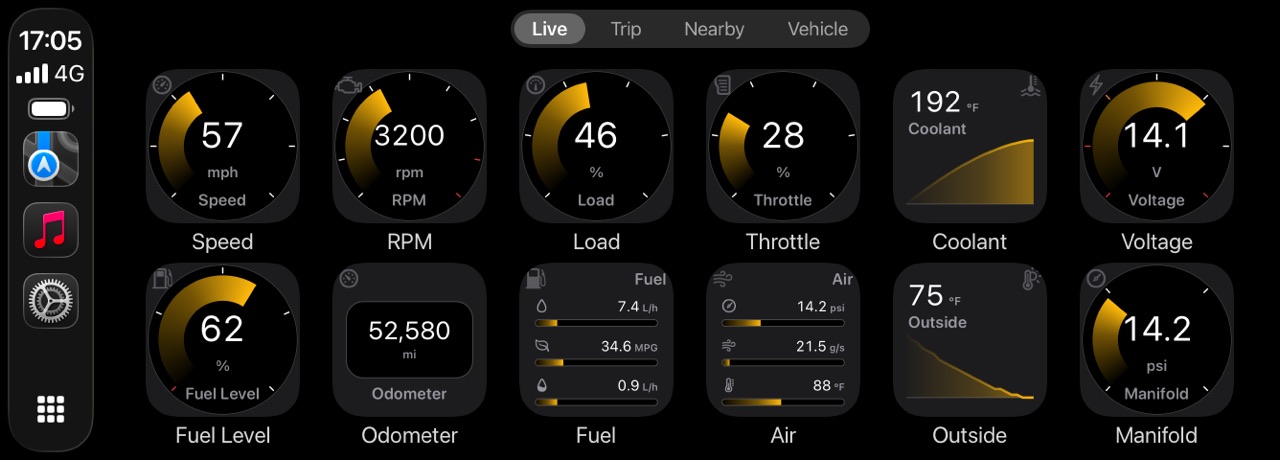
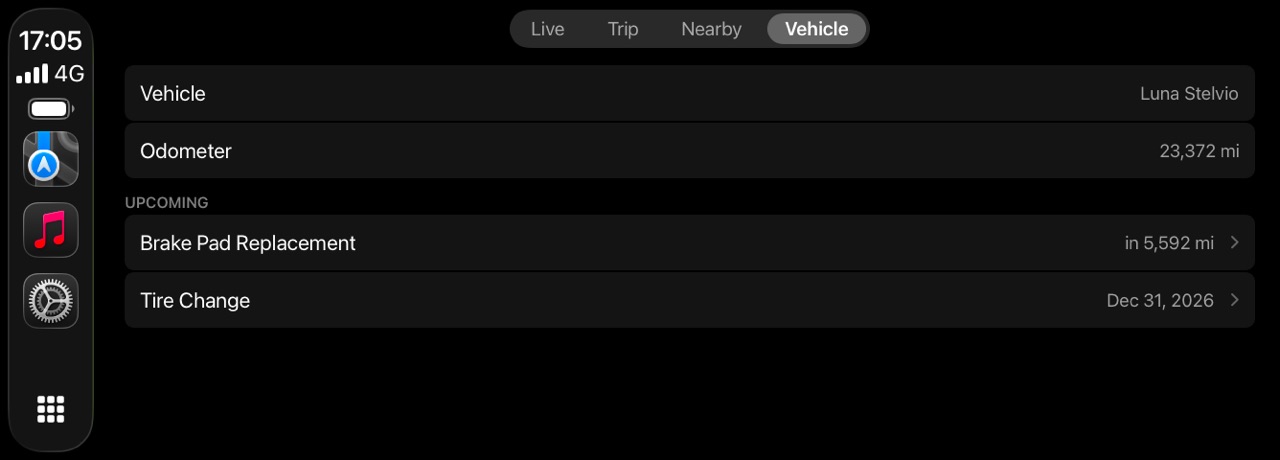
| WrenchTime | A grid of gauge tiles with caution and critical bands, plus Trip, Nearby and Vehicle tabs | Bluetooth Low Energy ELM327 or OBDLink MX+ | Free; CarPlay is part of WrenchTime Pro |
Sources: OBD Fusion, App Store and OCTech; OpenOBD, App Store; OBDeleven's launch notice reposted on SeatCupra.net, August 2025; WrenchTime's own feature list. Checked November 6, 2026.
WrenchTime, the app I develop, is a driving task app with four tabs you can reorder, built on a log that already keeps the car's fill-ups, charging sessions, 59 maintenance procedures and trips. The full tour is in the OBD-II app for CarPlay guide.
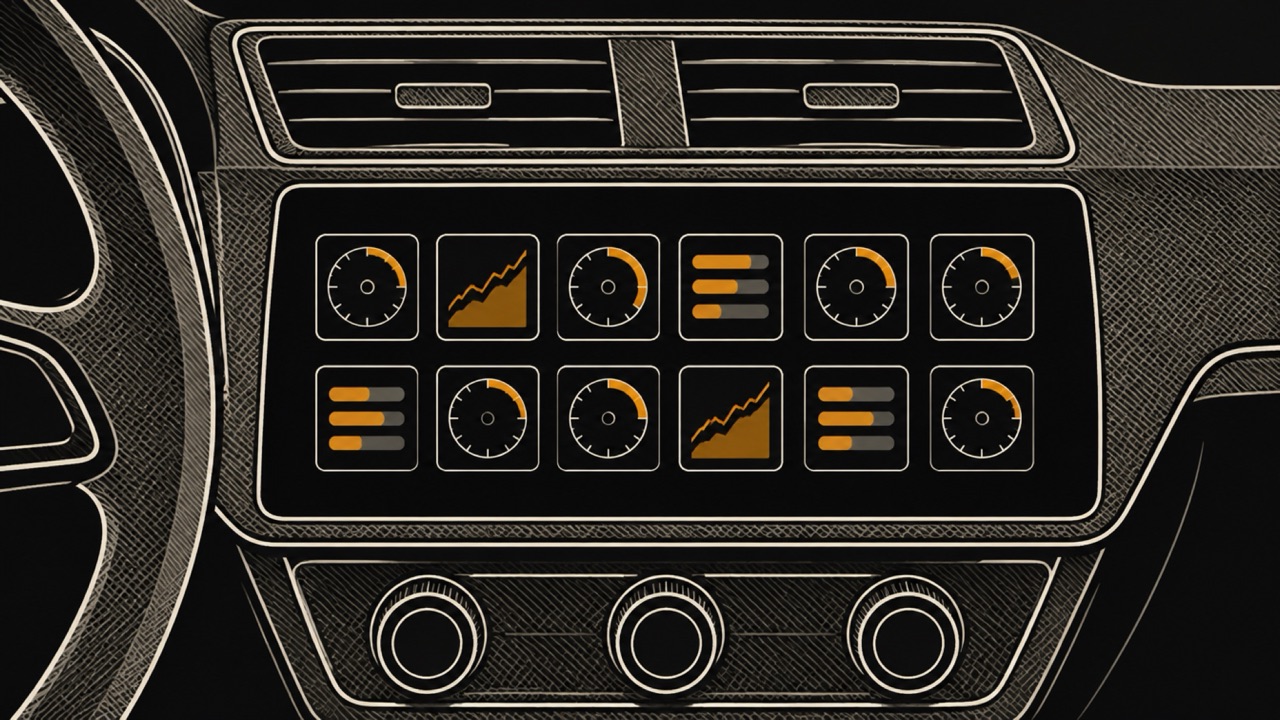
Live is a grid of square gauge tiles fed by a Bluetooth Low Energy ELM327 adapter or the OBDLink MX+: three to eight tiles per row, each one a reading or a small stack of readings that belong together, such as fuel rate with instant and idle consumption.
A tile is drawn as a ring with its caution and critical bands on the same track, as a plain readout where there is no scale (the odometer), as a sparkline of the last three minutes for the temperatures, or as a stack of lines.
Tapping a tile shows the reading's current, minimum, maximum and average over the session, and a reading entering its critical band, coolant temperature for instance, raises one alert for that transition and is then quiet, even if its tile is not on the grid.
Trip shows the vehicle, distance, duration, average speed and current speed while a trip records, with Start and Stop buttons and a Tag row, and History lists the last ten finished drives.
Nearby puts up to twelve fuel stations on the car's map, cheapest first where a public price registry exists (Italy, France and Spain out of the box, Germany with your own free key) and nearest first everywhere else, or charging points for an electric vehicle. Vehicle is read-only: the name, the current odometer, the upcoming maintenance with overdue first, and dues such as insurance or road tax. Only Live needs the adapter; CarPlay is part of WrenchTime Pro.
The car's screen is laid out from the phone, in Settings, CarPlay, per vehicle: which tiles are shown, in what order, how many per row, and the vehicle's own color, so two cars in the same garage are told apart at a glance. A custom OBD-II reading you define yourself, a transmission or oil temperature for instance, joins the grid as a tile of its own. Details: the OBD-II guide, custom PIDs and automatic trip tracking.
| Tab | What it shows | What it needs |
|---|---|---|
| Live | A grid of gauge tiles, three to eight per row: rings with caution and critical bands, readouts, three-minute sparklines for the temperatures, stacks of related readings, custom PID tiles; current, minimum, maximum and average per tile; one alert per reading entering its critical band | A paired OBD-II adapter: Bluetooth Low Energy ELM327 or OBDLink MX+ |
| Trip | Vehicle, distance, duration, average and current speed while it runs; Start and Stop; a Tag row; the last ten finished drives with addresses, speeds, moving time and their start and end on the car's map | Nothing beyond the phone |
| Nearby | Up to twelve fuel stations on the car's map, cheapest first where prices are public and nearest first elsewhere, or charging points for an electric vehicle; each pin opens the system's place card | Nothing beyond the phone |
| Vehicle | Name, current odometer, upcoming maintenance with overdue first, and dues such as insurance or road tax in their own section; read-only | Nothing beyond the phone |
Source: WrenchTime's own feature list, checked against the shipping build on November 6, 2026. CarPlay is part of WrenchTime Pro.
Yes, through an iPhone app that reads an OBD-II adapter, and the apps differ in what they draw. OBD Fusion shows "vital driving information in a list" on CarPlay and says in its listing that its dashboards stay on the phone; OpenOBD lists "a live 8-tile dashboard"; WrenchTime draws a grid of gauge tiles, each with its scale, its bands and its number inside the tile.
CarPlay itself has no access to the car's diagnostic port; the iPhone app reads the adapter over Bluetooth and the CarPlay screen is only its display, so the adapter has to be one the phone can talk to.
For WrenchTime that means a Bluetooth Low Energy ELM327 adapter or the OBDLink MX+, a classic Bluetooth adapter that Apple's MFi program lets the app use; any other classic Bluetooth adapter is on a radio an iPhone app cannot open, and WrenchTime does not support Wi-Fi adapters. The Vgate iCar Pro, the iCar Pro 2S and the OBDLink MX+ are confirmed working on a real vehicle.
What reaches the gauges is engine RPM, vehicle speed, engine load, throttle position, intake manifold pressure, coolant, intake air and ambient temperature, fuel level, module voltage and fuel rate, plus whatever further parameters the vehicle declares, each polled at its own cadence.
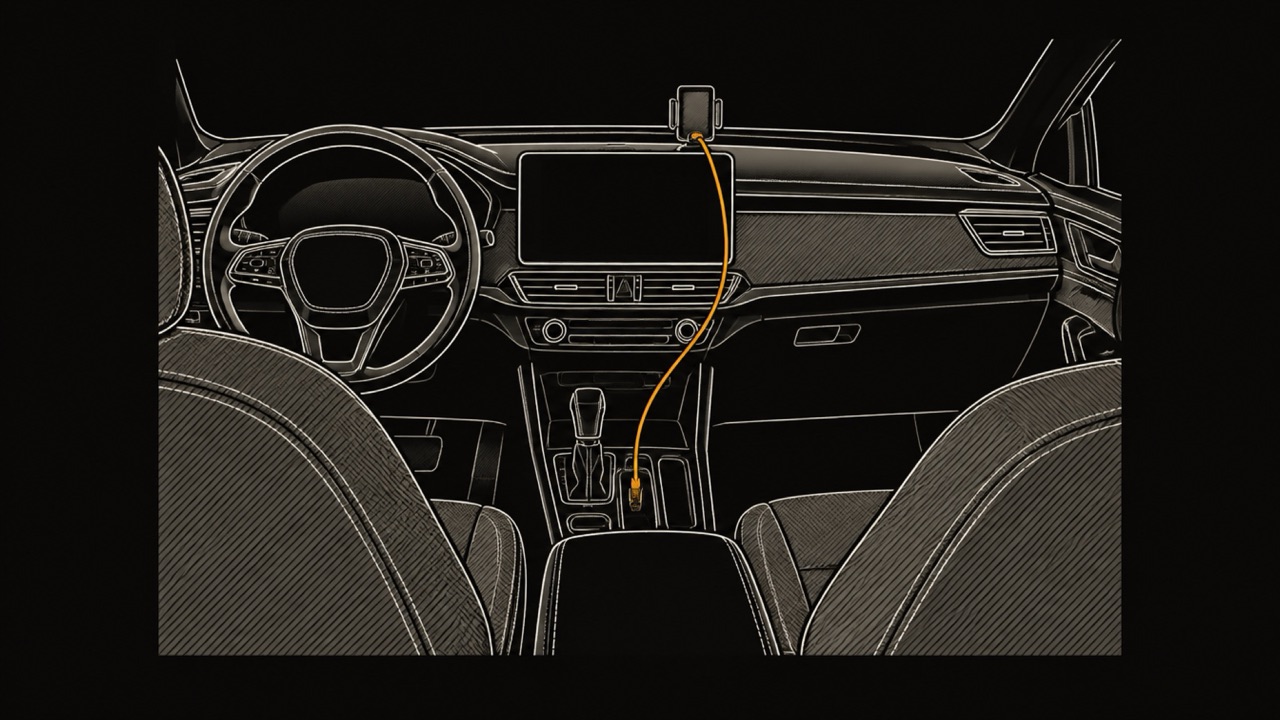
The readings in the car and on the phone come from one shared adapter session: a trip opens it when it starts, CarPlay opens it on its own when no trip is running, and a trip that starts later takes it over and records the drive, so connecting to CarPlay is enough to have the tiles up.
A reading the car does not answer is dropped from polling rather than drawn as a dash, and a custom PID, services 01, 21 or 22 decoded by a formula, joins the Live tab as a tile of its own.
The tiles are images the app draws for the head unit, in the car's light or dark style and in the vehicle's color, which is how a caution band can sit on the same track as the needle; how large a tile ends up is the car's decision, so the layout is best judged on the car's screen. What the CarPlay gauges show and how to use an OBD2 scanner cover the adapter side.
The best free CarPlay apps are Waze for navigation, Libby for audiobooks, ChargePoint for charging and SpotHero for parking: each is free to download with no in-app purchase listed on its US App Store page as of November 6, 2026. Apple Maps, Apple Music, Apple Podcasts, Messages and Phone are built in and cost nothing.
Most other CarPlay apps are free to download and sell a subscription inside, and a few put CarPlay itself behind it: CARROT Weather lists its CarPlay app under its Premium Ultra tier. Apple's own footnote is that a subscription may be required for some apps (Apple, CarPlay). OBD Fusion is the only paid download on this page, at $9.99.
CarPlay itself needs no app and no download on the iPhone. What can cost money is the car, where Apple says CarPlay "is either standard or available as an option" (Apple, CarPlay available models), and some apps. BMW tried charging for it, then dropped the fee on its OS7 cars in December 2019 (Auto Express).
| App | Category | Price to download | In-app purchases |
|---|---|---|---|
| Waze | Navigation | Free | None listed |
| Google Maps | Navigation | Free | Yes |
| Spotify | Music | Free | None listed (Premium is sold outside the App Store) |
| Overcast | Podcasts | Free | Yes |
| Pocket Casts | Podcasts | Free | Yes |
| Libby | Audiobooks | Free | None listed (needs a library card) |
| Messaging | Free | Yes | |
| PlugShare | EV charging | Free | Yes |
| ChargePoint | EV charging | Free | None listed (charging itself is paid) |
| SpotHero | Parking | Free | None listed (parking itself is paid) |
| Chevron | Fuel | Free | None listed |
| CARROT Weather | Weather | Free | Yes (the CarPlay app is in Premium Ultra) |
| OBD Fusion | Car and vehicle data | $9.99 | Yes |
| OpenOBD | Car and vehicle data | Free | Yes |
| WrenchTime | Car and vehicle data | Free | Yes (CarPlay is part of WrenchTime Pro) |
Source: each app's US App Store page, checked November 6, 2026. "None listed" means the page shows no in-app purchases; a service the app sells or charges for outside the App Store can still cost money.
Any iPhone app with a small widget can have a CarPlay widget since iOS 26, so there is no fixed list of CarPlay widget apps. Your own Home Screen is the list: if an app offers a small widget, look for it in the steps below.
Live Activities need no setup. Apple Sports, for one, shows its scores on CarPlay Dashboard as a Live Activity (BGR, October 2025).
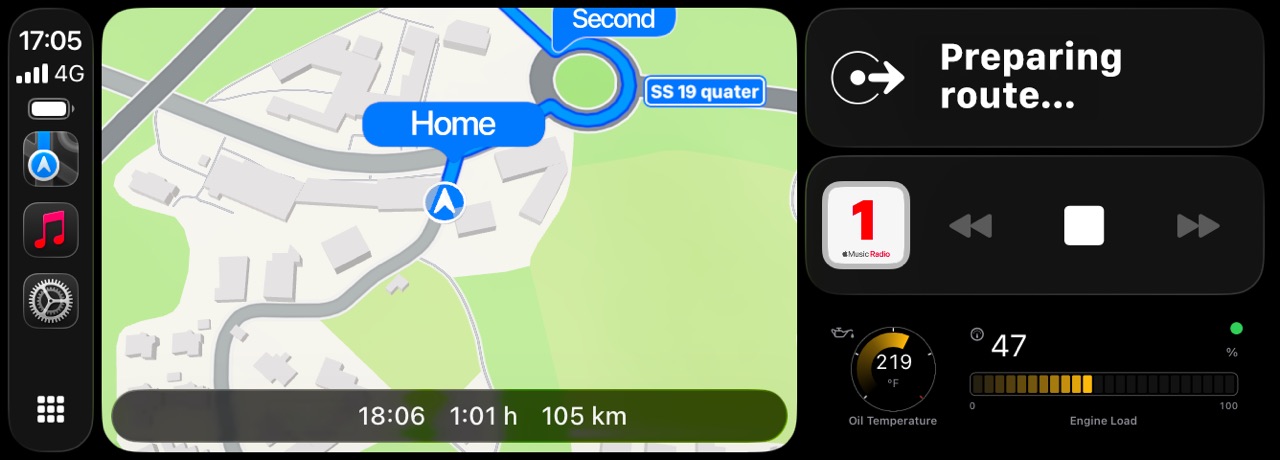
By Apple's iOS 26 rule, WrenchTime's small widgets and its trip Live Activity also qualify for the stacks beside Dashboard, so the next service, the month's spending or the distance of the drive in progress can sit next to the map without the app being open. The same holds for any maintenance or fuel app you already use: if it ships a small widget, check the stacks beside Dashboard before concluding it has no CarPlay presence.
The steps below are Apple's own (iPhone User Guide, Customize widgets in CarPlay). The number of widget stacks you see depends on the car's screen.
Only while parked, and only in cars that support it. Apple's own wording: "Video apps can play video content in supported cars when parked" (Apple Developer, CarPlay). Third-party video apps are an iOS 27 addition: Apple's WWDC26 session describes browsing a video app on the CarPlay display and warns that "at any given time, the car may indicate that video playback is not available. If this happens your video will be played as audio-only" (Apple, WWDC26). Older cars and older head units do not get video at all.
The catch is the car, not the phone. A third-party video app appears on CarPlay only in a car that supports what Apple calls the video in car feature, and the app has to support AirPlay video streaming (Apple, WWDC26). Apple has not named a car that supports it as of November 2026. MacRumors calls the Apple TV app "the first confirmed app that works with the feature" and notes that "no automakers have announced plans to add support as of now" (MacRumors, October 2026), so whether Netflix or YouTube ships a CarPlay video app is up to each developer.
Apple also notes that people can already watch video from an app on the CarPlay display when they are not driving, by choosing the car's display when they play it on the iPhone (the steps are in how to watch videos on CarPlay). Nothing plays video on a moving car's screen, and no app or adapter that promises otherwise is worth the risk.
On the iPhone, not on the car's screen, and only when you are not driving. The steps below are Apple's own (iPhone User Guide, Rearrange the icons on CarPlay Home). An app is offered here only if it supports CarPlay; an app that reaches the car through a widget or a Live Activity never appears in this list, because it has no icon to place. Why an app is missing, and how widgets and Screen Time change what you see, is covered in how to add an app to CarPlay.
If the car tool you want on CarPlay is the log of the car itself, that is what WrenchTime's CarPlay app is: a grid of gauge tiles from the adapter while you drive, the trip recording with its distance, duration and speed and a tag set from the wheel, your last ten drives on the car's map, fuel stations or charging points nearby, the odometer with what is upcoming and due, each vehicle in its own color on the car's screen, and every reading of the drive kept with the trip. The same log holds your fill-ups, charging sessions, 59 maintenance procedures, trips and 9 Home Screen and Lock Screen widgets on the iPhone, some with WrenchTime Pro, in your own iCloud, with no account.
The free version covers 1 vehicle, 3 fuel and charging entries a month and 10 recorded trips a week. CarPlay, like the Apple Watch app, is part of WrenchTime Pro: a monthly or yearly subscription with a free trial, or a one-time lifetime purchase. What the CarPlay gauges show, and what each release added.
Install an iPhone app that supports CarPlay; it appears on CarPlay Home on its own, and you reorder, remove or add icons in Settings, General, CarPlay, your vehicle, Customize. There is no CarPlay store. An app without a CarPlay interface can still reach the car through its small widget or a Live Activity since iOS 26.
Only while parked, in supported cars. Third-party video apps need iOS 27, an app with AirPlay video streaming and a car with what Apple calls the video in car feature, and Apple has not named such a car as of November 2026. Whether Netflix ships a CarPlay video app is up to Netflix.
Yes, since iOS 26. Apple's rule: an app's small widget or Live Activity "will automatically appear in CarPlay with no changes required." Widgets sit in stacks to the left of Dashboard, Live Activities show in Dashboard or as a notification, and a developer can mark a widget as not suitable for the car.
Because Apple allows full CarPlay apps only in listed categories: audio, video, messaging and VoIP, navigation, EV charging, fueling, parking, public safety, quick food ordering, voice-based conversational apps and driving task apps. An app outside them can appear only through a small widget or a Live Activity, Check Settings, General, CarPlay, your vehicle, Customize, where a removed icon sits under More Apps.
Waze, Libby, ChargePoint and SpotHero are free with no in-app purchase on their US App Store pages as of November 6, 2026; Google Maps, Overcast, PlugShare and most others are free to download with optional in-app purchases. OBD Fusion is the only paid download here, at $9.99. Apple Maps, Music, Podcasts, Messages and Phone are built in.
Any iPhone app in one of Apple's CarPlay categories is compatible: audio, messaging and VoIP, navigation, EV charging, fueling, parking, public safety, quick food ordering, voice-based conversational and driving task apps, plus video in supported cars while parked. Since iOS 26, an app with a small widget or Live Activity also appears in CarPlay.
CarPlay needs no app or download on the iPhone. Apple says it is either standard or an option on the car, and some apps need a subscription. BMW charged a CarPlay fee on some models before reversing that decision for its OS7 cars in December 2019.
More from the blog
CarPlay
How to see live OBD2 readings such as RPM, boost and coolant temperature on CarPlay, why most apps show a list, which apps draw gauges, and which adapters work with iPhone.
Diagnostics
Six OBD2 apps for iPhone compared on price, adapter, readiness, Mode 06, manufacturer modules, CarPlay and logs, from what each developer states.
Mileage
MileIQ, Everlance, TripLog, Driversnote, Stride and WrenchTime compared on free limits, prices, how a trip starts on its own, and what each one is for.
Free to download. One vehicle, real features, no ads. Your garage will thank you.
Download WrenchTime on the App Store