OBD-II adapters · iPhone · iOS 26+
OBD-II adapters that work with an iPhone, tested on a real car
An iPhone app can reach an OBD-II adapter in two ways: over Bluetooth Low Energy, which any app may use, or over classic Bluetooth, which iOS opens to an app only when the adapter is certified through Apple's MFi program for that app by name. WrenchTime uses both: any adapter that speaks the ELM327 command set over Bluetooth Low Energy, plus the Apple-certified OBDLink MX+. The Vgate iCar Pro, iCar Pro 2S, iCar Pro Mini and vLinker BM+ and the OBDLink MX+ are confirmed working on a real vehicle. The non-Pro Vgate iCar has to be switched on with its button, and the vLinker MS has to be moved out of MFi mode with Vgate's own updater app before the scan can find it. WrenchTime does not read adapters over Wi-Fi, so a listing that says Wi-Fi or Android only is not the one to buy. The table below is copied from the app's own adapter log, which records what each device actually did rather than what its box promises.
Which OBD-II adapters work with an iPhone?
Bluetooth Low Energy ones, plus the one classic Bluetooth adapter Apple's MFi program lets WrenchTime use, the OBDLink MX+. An iPhone app can reach a classic Bluetooth adapter only when the adapter's maker has certified it for that app by name, so any other adapter that pairs from iPhone Settings is on a radio this app cannot use, and a Wi-Fi adapter joins its own network rather than answering an app: a listing that says Android or Wi-Fi is not the one to buy. WrenchTime speaks the ELM327 command set and keeps a running log of what specific adapters actually did, rather than claiming a compatibility list it has not tested.
- Vgate iCar Pro and iCar Pro 2S confirmed working on a real vehicle. Found by the scan, connect and poll, and wake on their own when the app connects, so a trip that starts with the adapter asleep still gets a session.
- OBDLink MX+ Apple-certified (MFi) and confirmed working, supported since WrenchTime 6.7. Pair it once in iPhone Settings > Bluetooth, then link it to a vehicle in Settings > Connections like any other adapter.
- Vgate iCar, the non-Pro works, but does not wake by itself: press its button before the drive or the scan comes up empty.
- Vgate vLinker MS ships in Apple MFi mode, and its certification does not name this app, so it must be switched to BLE with Vgate's own updater app and then forgotten in iOS Bluetooth settings.
- Anything else if it is BLE and speaks ELM327 it should work, and the app measures your particular adapter rather than assuming. Tell us what you saw and it goes in the log.
The status says what the app did with each adapter, not whether the adapter suits your car: protocol coverage, sleep and wake behavior and a given make's quirks are on the maker's compatibility list, and worth a look before buying. On the app side, any adapter that speaks ELM327 over Bluetooth Low Energy 4.0 or later is expected to work, as is the Apple-certified OBDLink MX+; the ones below are the ones on record.
| Adapter | Status | Notes |
|---|---|---|
| Vgate iCar Pro 2S | Works | Found by the scan, connects and polls, wakes on its own when the app connects. Not on a BMW, where the iCar Pro line does not wake by itself: see the vLinker BM+. |
| Vgate iCar Pro (BLE 4.0) | Works | Same firmware family as the 2S and behaves the same: found, connects, wakes by itself, except on a BMW, where it does not. |
| Vgate iCar Pro Mini | Works | The smaller iCar Pro, sold under Vgate's vLinker brand. Found by the scan, connects and polls, confirmed by a user on a real vehicle. Its listing says it does not wake by itself on an electric or hybrid vehicle. |
| Vgate iCar (non-Pro) | Works with setup | Connects and polls like the Pro, but does not wake by itself: press its button before the drive or the scan comes up empty. |
| Vgate vLinker MS | Works with setup | Not recommended. It ships in Apple MFi mode, whose certification does not name this app, and works only after being switched to BLE with Vgate's own updater app and then forgotten in iOS Bluetooth settings. One user report so far, not yet confirmed after the switch. Pick an iCar Pro instead. |
| Vgate vLinker MC+ | Unverified | Bluetooth Low Energy out of the box, with no MFi mode, so it should need none of the vLinker MS's setup. Nobody has reported it yet, so it is listed without a verdict. |
| Vgate vLinker BM+ | Works | Vgate's BMW-specific adapter, confirmed working with the app. It exists because the iCar Pro line does not wake automatically on a BMW, so a drive that starts with the adapter asleep records nothing there; the BM+ is the one to pair with a BMW. |
| OBDLink MX+ (MFi) | Works | Apple-certified (MFi) classic Bluetooth adapter, supported since WrenchTime 6.7. Pair it once in iPhone Settings > Bluetooth, then link it to a vehicle in the app's Settings > Connections like any other adapter. |
| OBDLink CX | Unverified | Bluetooth Low Energy adapter from the maker of the MX+, so nothing to pair in iPhone Settings: it is linked from the app's Settings > Connections. Not yet tested on a real vehicle, so it is listed without a verdict. |
Statuses are copied from WrenchTime's own adapter log as read on : what each device did on a real vehicle, not a maker's claim. A listed adapter is not a recommendation, and no adapter maker sponsors this page.
Why does a Wi-Fi or classic Bluetooth adapter not show up?
Because WrenchTime cannot reach it. iOS lets any app talk to a Bluetooth Low Energy device directly, which is why a BLE adapter is found by the scan inside the app and never paired in iPhone Settings. A classic Bluetooth adapter is different: iOS hands it to an app only when the adapter is MFi-certified for that app by name, which today is true of the OBDLink MX+ alone. A Wi-Fi adapter makes a network of its own for the phone to join, and WrenchTime does not read adapters over Wi-Fi. So it is the radio that decides, not the car: look for Bluetooth Low Energy, BLE or Bluetooth 4.0 on the listing, and be wary of one sold for Android only, which usually means classic Bluetooth.
How is the OBDLink MX+ set up differently?
It is paired once in iPhone Settings > Bluetooth, like a pair of headphones, because it is a classic Bluetooth accessory certified by Apple. After that you link it to a vehicle inside WrenchTime exactly like a BLE adapter, and the app talks to it through Apple's accessory framework rather than through its own Bluetooth scan. A BLE adapter is the opposite: it is never paired in iPhone Settings, only found by the scan inside the app. A BLE adapter paired in iPhone Settings anyway, or a vLinker MS still in MFi mode, is the usual reason the scan comes up empty.
Does the adapter wake up on its own?
Most do, and it matters: a trip that starts while the adapter is asleep records no engine data. The Vgate iCar Pro and iCar Pro 2S come out of sleep by themselves when the app connects, so a drive that begins with the adapter asleep still gets its readings. Two exceptions are on record. The non-Pro Vgate iCar never wakes by itself and has to be switched on with its button before each drive. And the iCar Pro line does not wake on a BMW, which is what Vgate sells the vLinker BM+ for; that one is confirmed working too.
How do I link an adapter to a vehicle?
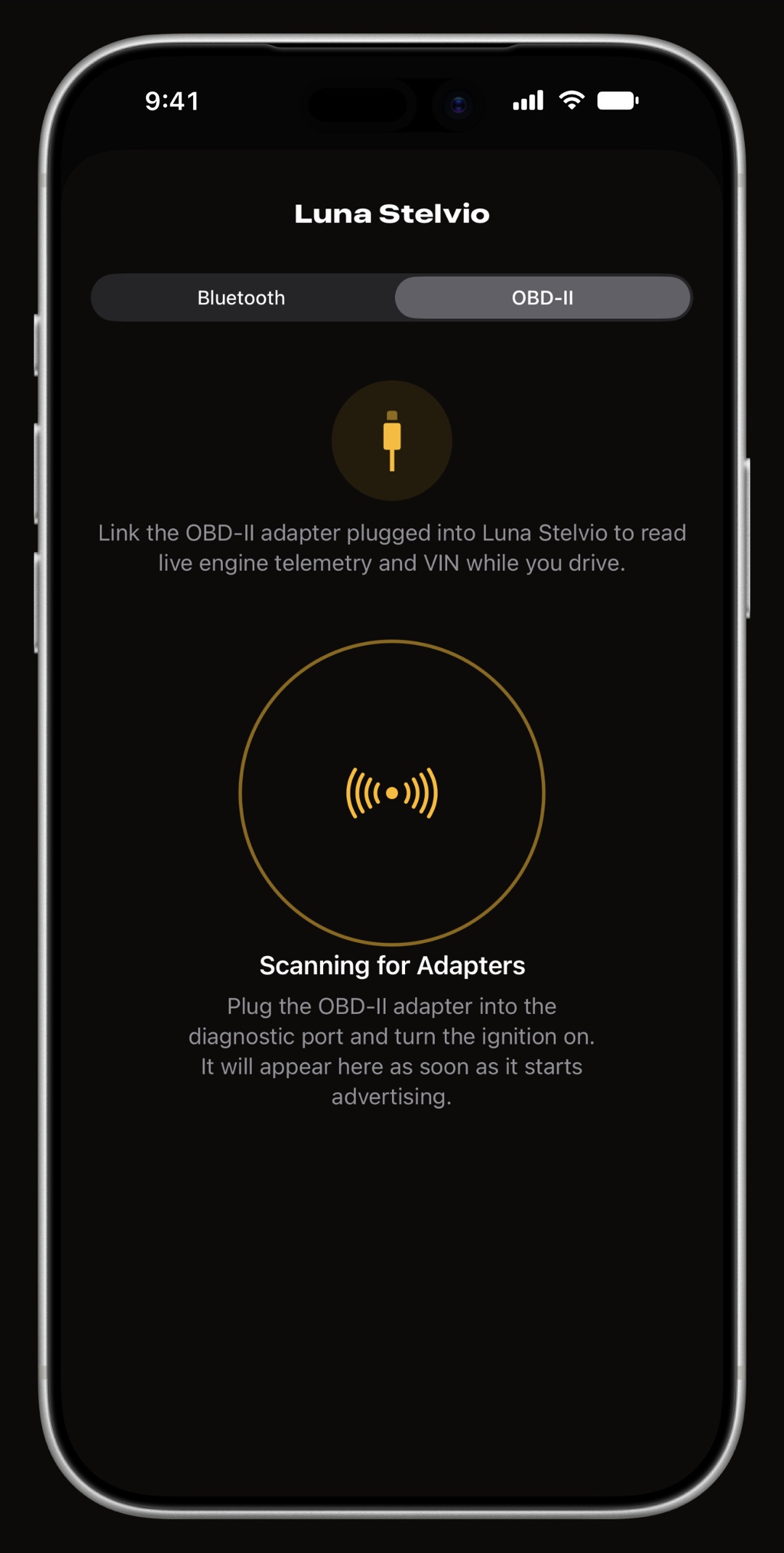
Plug the adapter into the car's OBD-II port, usually under the dashboard on the driver's side, turn the ignition on, and open Settings > Connections in WrenchTime. Pick the vehicle, switch to its OBD-II tab and let the scan run: the adapters it recognizes are listed first, and a tap links one to that vehicle. The first connection runs a Connection Check that watches speed and revs for a few seconds and shows how fast your link answered. From then on, with Connect During Trips switched on, every trip recorded in that vehicle opens a session by itself and closes it when the trip ends, and the readings are kept with the trip.
Why does my car alarm go off with the adapter plugged in?
Some modern cars read traffic on the diagnostic port of a locked car as a break-in, and most adapters stay powered and connected long after the engine is off. Each vehicle has a switch for this in its adapter pairing screen, off by default, that only applies when no one is at the screen: a trip, CarPlay or the Live dashboard.
- Disconnect When the Vehicle Sleeps the app stops talking to the car the moment the engine reads zero revs, the car's own Bluetooth drops or the bus goes quiet, and picks up on the same link once the car moves again, without reconnecting. Start-stop pauses the readings too, until you drive off.
- Also Drop the Bluetooth Link for a car whose alarm objects to the idle link itself: the session ends on the same signals and reconnects when the drive resumes, which costs a few seconds of readings at every drive-off.
What if the pairing scan does not recognize my adapter?
The scan lists the adapters it recognizes first, and below them the other named Bluetooth devices nearby with a usable signal. Pick one of those and WrenchTime tries it on the spot: it is kept only if it answers like an OBD-II adapter, and otherwise the screen says so and your previous link is left as it was. Other people's devices are never named in the diagnostic log. If an unlisted adapter works for you, tell us and it goes in the adapter log above.
Frequently asked questions
Which OBD-II adapter should I buy for an iPhone?
A Bluetooth Low Energy adapter that speaks ELM327, or the Apple-certified OBDLink MX+. The Vgate iCar Pro and iCar Pro 2S are confirmed working on a real vehicle and wake by themselves, and the OBDLink MX+ is confirmed working too. The non-Pro Vgate iCar works but has to be switched on with its button. A vLinker MS needs to be moved from Apple MFi mode to BLE with Vgate's updater app first. Wi-Fi adapters cannot work with an iPhone app, and the OBDLink MX+ is the only classic Bluetooth adapter WrenchTime can use.
My car alarm goes off after I lock the car with the adapter plugged in. What can I do?
Turn on Disconnect When the Vehicle Sleeps in that vehicle's adapter pairing screen. The app stops talking to the car as soon as the engine is off and resumes when you drive away. If the alarm still objects, Also Drop the Bluetooth Link ends the connection too.
Does WrenchTime work with a Wi-Fi OBD-II adapter?
No. WrenchTime reads adapters over Bluetooth Low Energy, plus the Apple-certified OBDLink MX+ over classic Bluetooth. A Wi-Fi adapter is not one it can use.
Should I pair a Bluetooth Low Energy adapter in iPhone Settings?
No. A BLE adapter is found and linked from Settings > Connections inside WrenchTime, and should not be paired in iPhone Settings > Bluetooth. Only the OBDLink MX+ is paired there first, because it is a classic Bluetooth accessory certified by Apple.
Can I move one adapter between two cars?
Yes. An adapter is linked to one vehicle at a time: when you move it, link it to the other vehicle from that vehicle's OBD-II tab in Settings > Connections.

Made for people who would rather know than guess.
Free to download. One vehicle, real features, no ads. Your garage will thank you.
Download WrenchTime on the App Store