Car expense tracker · iPhone · iOS 26+
A car expense tracker for iPhone that keeps every cost with the vehicle it belongs to
WrenchTime is a car expense tracker for iPhone that adds up what each car or motorcycle costs you in four parts: fuel, charging, care (servicing and repairs) and dues (road tax, insurance, car payments, traffic fines, tolls and parking fees). Each vehicle's card shows the total with its split, and the Charts tab plots spending month by month. Insurance, road tax and loan installments can run as recurring series on any interval of days, weeks, months or years, with a reminder before the due date and, for a direct debit, the payment marked as paid on its own. Receipts and invoices are scanned with the camera, or added as a photo or a PDF, and stay attached to their fill-up, charging session or care entry. Tags sort entries your own way, and a CSV or PDF export covers any period for one vehicle. It runs on iPhone and iPad with no account, and syncs through your own iCloud when you turn it on. The free tier covers one vehicle; more vehicles, unlimited entries and all 31 charts are part of WrenchTime Pro.
Which car expenses does WrenchTime track?
Every cost of owning the vehicle, sorted into four buckets that are added up per vehicle. The vehicle's card in the Vehicles tab shows the running total with its split, and tapping it opens the full breakdown. A cost is counted once it is logged: a fill-up or a charging session when you save it, a care or dues entry once it is completed, so a service you only scheduled does not inflate the total.
- Fuel every fill-up with its volume, cost, odometer and fuel type, which also drives tank-to-tank fuel economy.
- Charging every charging session with its energy, cost, charger type and location, for an electric car or a plug-in hybrid; see the EV charging log.
- Care servicing, repairs, tires, detailing and inspections, from WrenchTime's 56 maintenance procedures or a name of your own.
- Dues road tax, insurance, car payments, traffic fines, tolls, parking fees and any other expense that is not workshop work.
How are insurance, road tax and tolls kept apart from servicing?
They belong to a procedure category of their own, Dues, and everything filed there is summed separately from Care. Road Tax, Insurance, Car Payment, Traffic Fine, Toll and Parking Fee each have their own procedure, and Other Expense takes a label of your choosing for anything else. The effect is two honest numbers: what the car costs to keep on the road and what it costs to keep running. A large insurance renewal never looks like an expensive service, and the vehicle card, the Total Operating Cost chart and the Monthly Spending widget all show Dues as their own color. Inspections are the one borderline case, and they stay in Care, because a mandatory inspection is billed workshop time. A Dues kit bundles road tax and insurance into one entry when you pay them together.
- Tolls and parking added in version 6.3 for cars and bikes alike, so a motorway toll or a monthly garage pass is counted under Dues instead of hiding under Other Expense.
- Car payments a loan or financing installment, usually set up once as a monthly recurring series.
Can WrenchTime handle recurring payments like insurance and car loans?
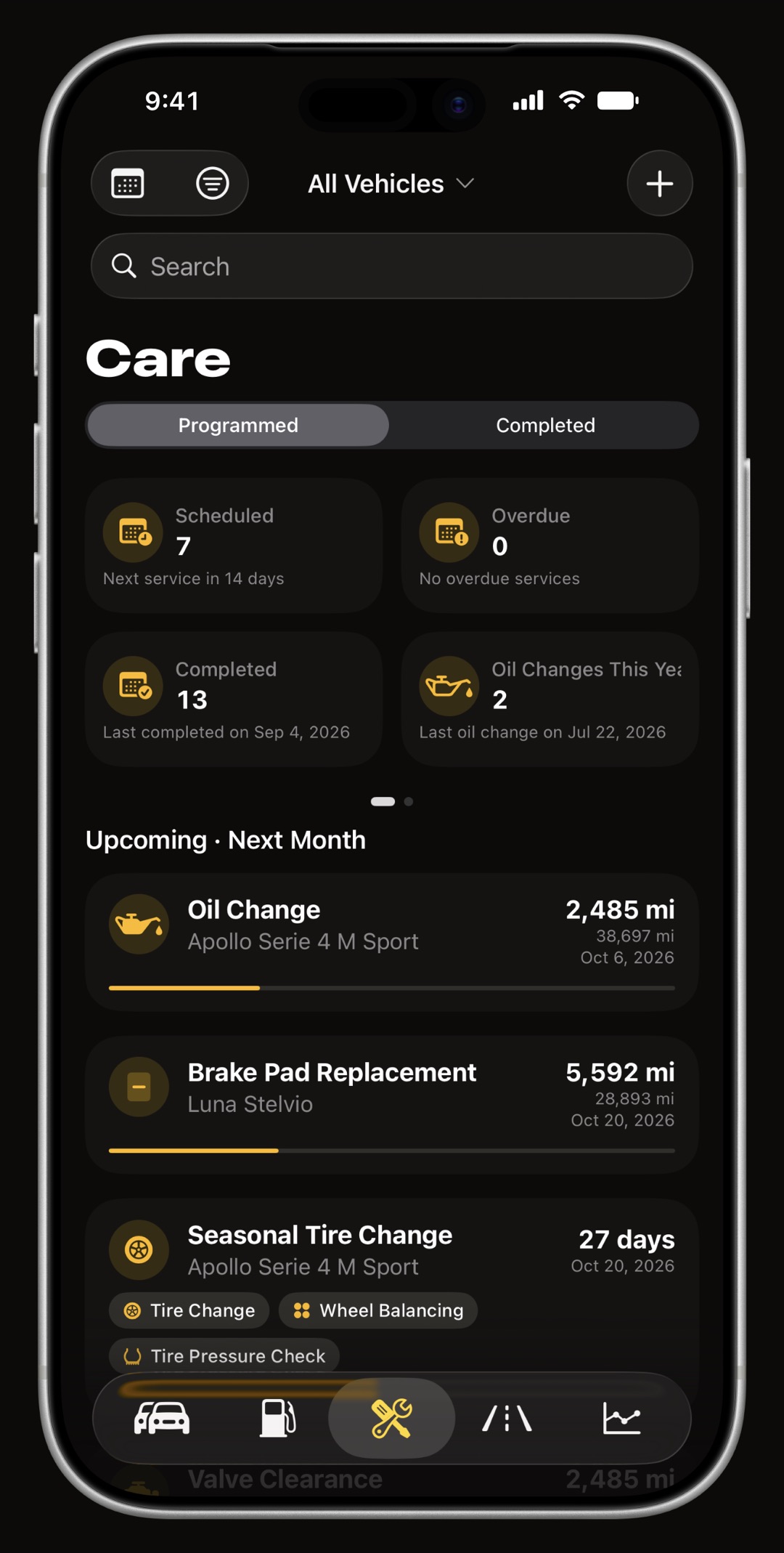
Yes. Any procedure can become a recurring series, and the series is set up once: what it is, how much, how often, when it starts and, if you like, when it ends. Each occurrence appears in the Care tab on its due date, or from the reminder day when you set one, rather than filling the list months in advance, and the reminder notification is scheduled ahead so it arrives with the app closed. Every active series is listed under Active recurrences in the Care tab, where you can pause one or edit it; pausing removes the upcoming entries and reminders and keeps the completed history.
- Any interval every so many days, weeks, months or years, such as weekly parking, a monthly loan installment, a quarterly insurance payment or yearly road tax.
- A fixed payment day a monthly series can fall on a set day of the month, or on the last day of the month whatever its length.
- Weekends a due date that lands on a Saturday or Sunday can move to the following Monday. Public holidays are not taken into account.
- Direct debit with auto-complete on, each installment is marked as paid on its due date, so a payment that leaves your account by itself needs no tap.
- Reminders on the due date, or a day, three days, a week, two weeks or a month before it.
- Services too a recurring series can also run on the odometer, such as an oil change every so many miles, where the next one is scheduled when the previous one is completed.
Can I keep receipts and invoices with each expense?
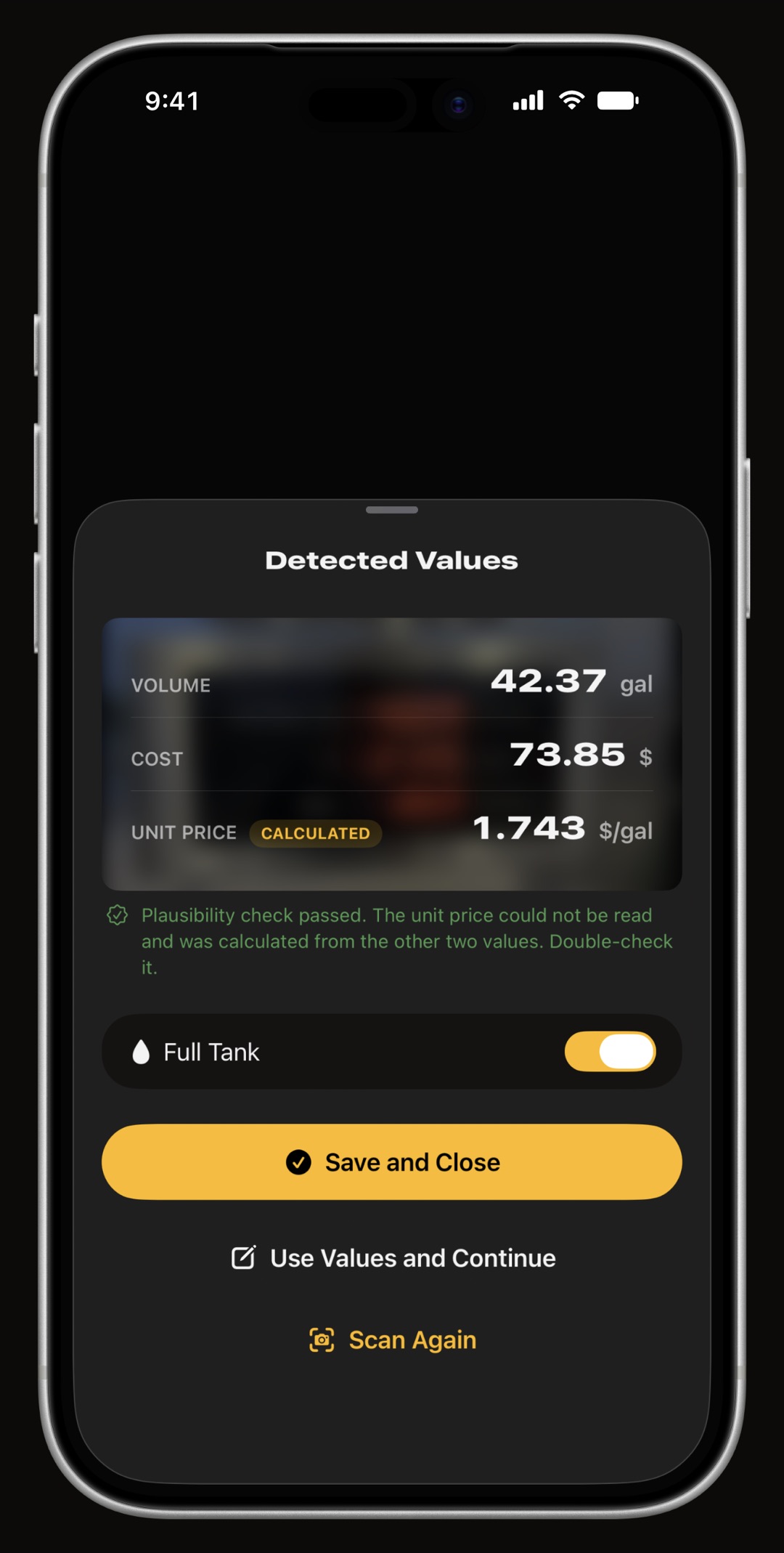
Yes. A fill-up, a charging session or a care entry can carry as many documents as you want: scan a paper receipt or a workshop invoice with the camera, choose a photo, or import a PDF or an image from Files. Each one is stored as a PDF, kept in the order you set, and opened from the entry itself, and it travels with the entry through iCloud Sync and vehicle sharing. Documents attach to entries, not to trips or to the vehicle as a whole. Separately, with WrenchTime Pro, pointing the camera at a pump display, a charger screen or a fuel receipt fills in the fill-up for you, read on the device and never uploaded.
Can I tag expenses, for example business and personal?
Yes. Tags are labels you create, in eight colors, and the same set is shared by fill-ups, charging sessions, care entries, trips and odometer readings. Tag a garage visit Warranty, a fill-up Holiday or a batch of trips Business, then filter the Fuel, Charging, Care or Trips tab by one or more tags. The export uses the same tags, so a report can hold only the entries that carry them. Settings, Data & iCloud, Tags lists and renames them. A tag is only a label: WrenchTime does not decide on its own which costs are business ones.
Where can I see what my car costs per month and per mile?
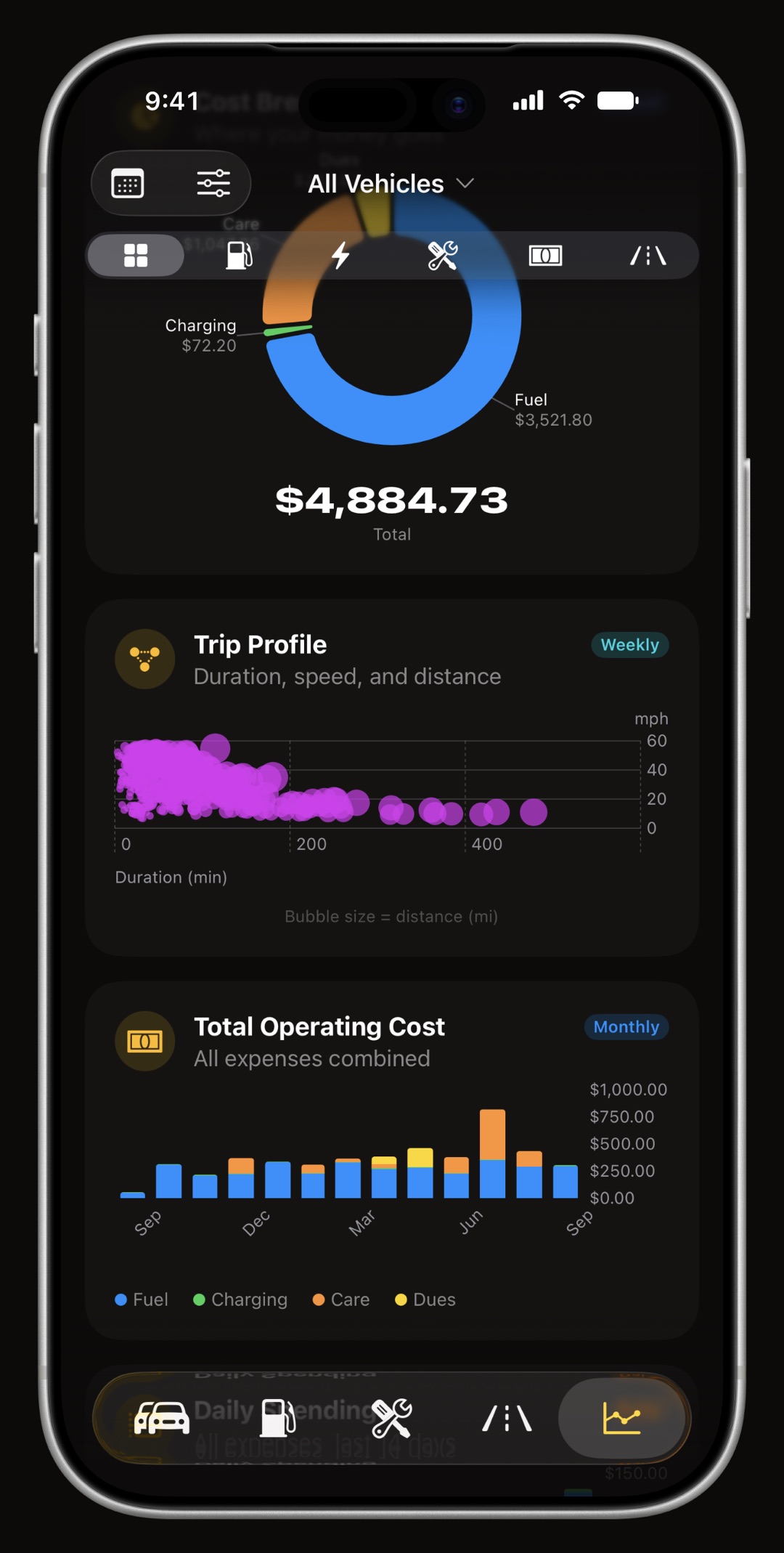
In the Charts tab and on the vehicle's card. The cost charts add fuel, charging, care and dues together per day, per month or per year, split the total into its four parts, and follow each part on its own. Cost per mile, or per kilometer, is charted for fuel and for charging, dividing what you spent by the distance driven in each period; there is no single all-in cost per mile that folds care and dues into the same figure. On the Home Screen, the Monthly Spending widget shows the last thirty days, or the current calendar month, with the same breakdown and a gauge that compares it with earlier periods.
- Total Operating Cost, Daily Spending and Annual Spending every cost combined, over months, the last two weeks or the whole history.
- Cost Breakdown where the money goes, as one ring.
- Fuel Costs, Charging Costs and Care Costs each kind of spending over time, next to the fuel and electricity price trends.
How do I export my car expenses to CSV or PDF?
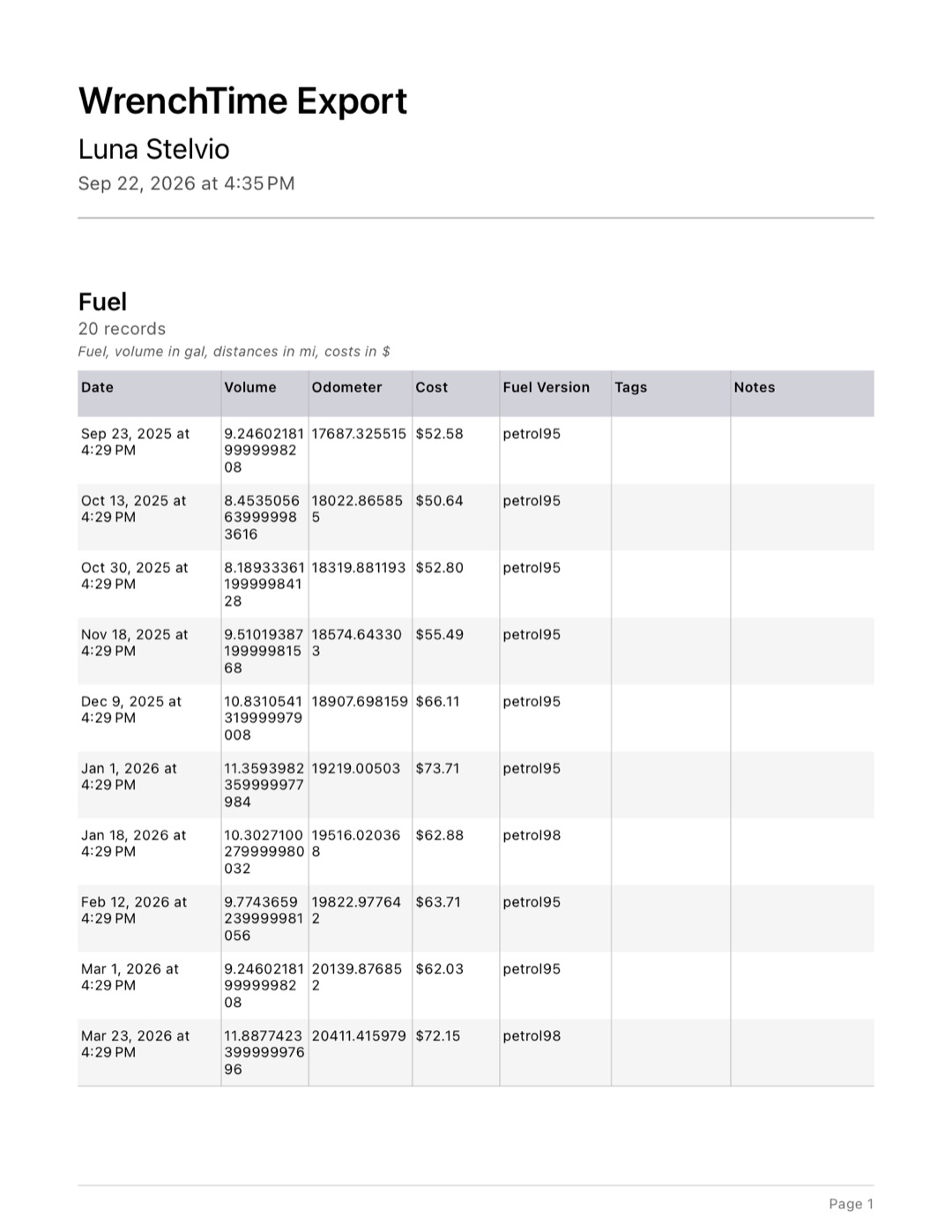
In Settings, Export Data: pick the vehicle, the period (a preset such as this year or last month, or a custom date range) and, if you use them, the tags to include, then choose PDF or CSV. A PDF holds as many kinds of data as you tick, fuel, charging, care, trips and odometer history, as tables with a total row, ready to hand to an accountant or a buyer; a CSV holds one kind at a time, for a spreadsheet. With WrenchTime Pro, the same page also exports every receipt and invoice attached in that period, as one merged PDF that opens on an index of the documents, or as a ZIP of the original files with an index in CSV, and care documents can be narrowed to chosen procedures. Tags filter both the data and the documents, though odometer history is never filtered by tag.
Which currency does WrenchTime use?
One currency for the whole app: your region's by default, or one you choose in Settings, Units & Currency, which is useful when the phone is set to one country and the car is paid for in another. With iCloud Sync on, the choice follows you to your other devices. Amounts are shown in that currency exactly as you entered them. WrenchTime does not convert between currencies, so it is not the tool for a vehicle paid for in several currencies at once; changing the currency relabels the amounts rather than converting them. When you import a history kept in another currency, you can enter a conversion rate there and every imported amount is multiplied by it.
Can I share car expenses with a partner or family?
Yes, by sharing the vehicle. The owner, with WrenchTime Pro, invites people over iCloud and chooses who can edit and who can only view; fill-ups, charging, care and dues entries, recurring series and attached documents stay in sync for everyone, and each entry says who logged it. The person invited needs no Pro, and a vehicle shared with them never counts toward their own free limits. WrenchTime shows what the car cost and who logged each cost; it does not split bills or settle who owes whom. The details are in the guide to sharing a car log with family.
Can I use WrenchTime for tax deductions or mileage reimbursement?
As a record, yes; as a tax calculator, no. WrenchTime keeps the dated costs with receipts attached, and records trips on its own with their date, route and distance, which you can tag Business and export for a period. It does not apply a mileage rate, classify trips as business or personal, or work out a deduction, and whether its records satisfy a tax authority depends on what you log with them. For what a US tax log needs, such as the business purpose of each trip, see what an IRS compliant mileage log needs.
Is the car expense tracker free?
The basics are. On the free tier you can track 1 vehicle and log 3 fill-ups and 3 charging sessions a month and 2 care or dues entries a month, see 1 chart and 2 statistic cards per tab, and export your data to CSV and PDF. Recurring series, tags and attached documents are part of the free app. WrenchTime Pro, a monthly or yearly subscription with a free trial or a one-time lifetime purchase, removes the limits and adds the rest.
- Part of WrenchTime Pro more vehicles, unlimited entries, every chart and statistic card, the Monthly Spending widget, receipt and pump scanning that fills in an entry, exporting attached documents, vehicle sharing and importing from another app.
Frequently asked questions
What is the best car expense tracker app for iPhone?
It depends on what you want to track. WrenchTime keeps fuel, charging, care and dues (road tax, insurance, car payments, fines, tolls and parking) apart and adds them up per vehicle, runs recurring payments with reminders, attaches receipts to each entry and exports any period to CSV or PDF, with no account. It is built for the owner of the vehicle, not for mileage reimbursement or splitting bills.
Can I track car insurance and road tax in WrenchTime?
Yes. Insurance and road tax each have their own procedure in the Dues category, counted separately from servicing. Set either one up as a recurring series, yearly, monthly or on any other interval, with a reminder before it is due.
Can WrenchTime track car loan or lease payments?
Yes, as Car Payment entries in Dues, usually as a monthly recurring series on a fixed day or the last day of the month. With auto-complete on, each installment is marked as paid on its due date, and a due date on a weekend can move to the following Monday.
Can I attach receipts to expenses?
Yes. Scan a receipt or invoice with the camera, or add a photo or a PDF, to any fill-up, charging session or care entry. The documents stay with the entry, sync through iCloud, and with WrenchTime Pro can be exported for a period as one PDF with an index or as a ZIP.
Does WrenchTime track tolls and parking?
Yes. Toll and Parking Fee are procedures of their own in the Dues category, for cars and motorcycles, and either can repeat, such as a monthly parking pass.
Can I export my car expenses to Excel?
Yes, as CSV, which Excel, Numbers and Google Sheets open. Settings, Export Data picks the vehicle, the period and the tags; a CSV holds one kind of data at a time, and a PDF can hold several with totals. Exporting to CSV and PDF is free.
Does WrenchTime convert between currencies?
No. It shows every amount in one currency, your region's or one you choose in Settings, Units & Currency, exactly as entered. Only an import from another app can apply a conversion rate you enter.
Does WrenchTime work for motorcycles too?
Yes. A motorcycle has the same fuel, care and dues tracking as a car, with its own procedures such as chain and fork service; see the motorcycle maintenance app guide.

Made for people who would rather know than guess.
Free to download. One vehicle, real features, no ads. Your garage will thank you.
Download WrenchTime on the App Store