EV charging log · iPhone · iOS 26+
An EV charging log that is not a fuel form with the labels changed
WrenchTime logs electric vehicle charging on iPhone with the fields a charge actually has: energy in kWh, cost, charger type (Level 1, Level 2 or DC fast), location, battery percentage before and after, odometer and notes. It computes charging efficiency in km/kWh, mi/kWh, kWh/100 km or kWh/100 mi, tells you how much of your energy came from home charging, schedules EV-specific maintenance such as battery health checks and reduction gear oil, finds charging points anywhere in the world filtered to the connector your car actually carries, and lets a plug-in hybrid log the electric-only share of each trip so fuel and electricity figures never contaminate each other. Everything stays on your device and in your own iCloud.
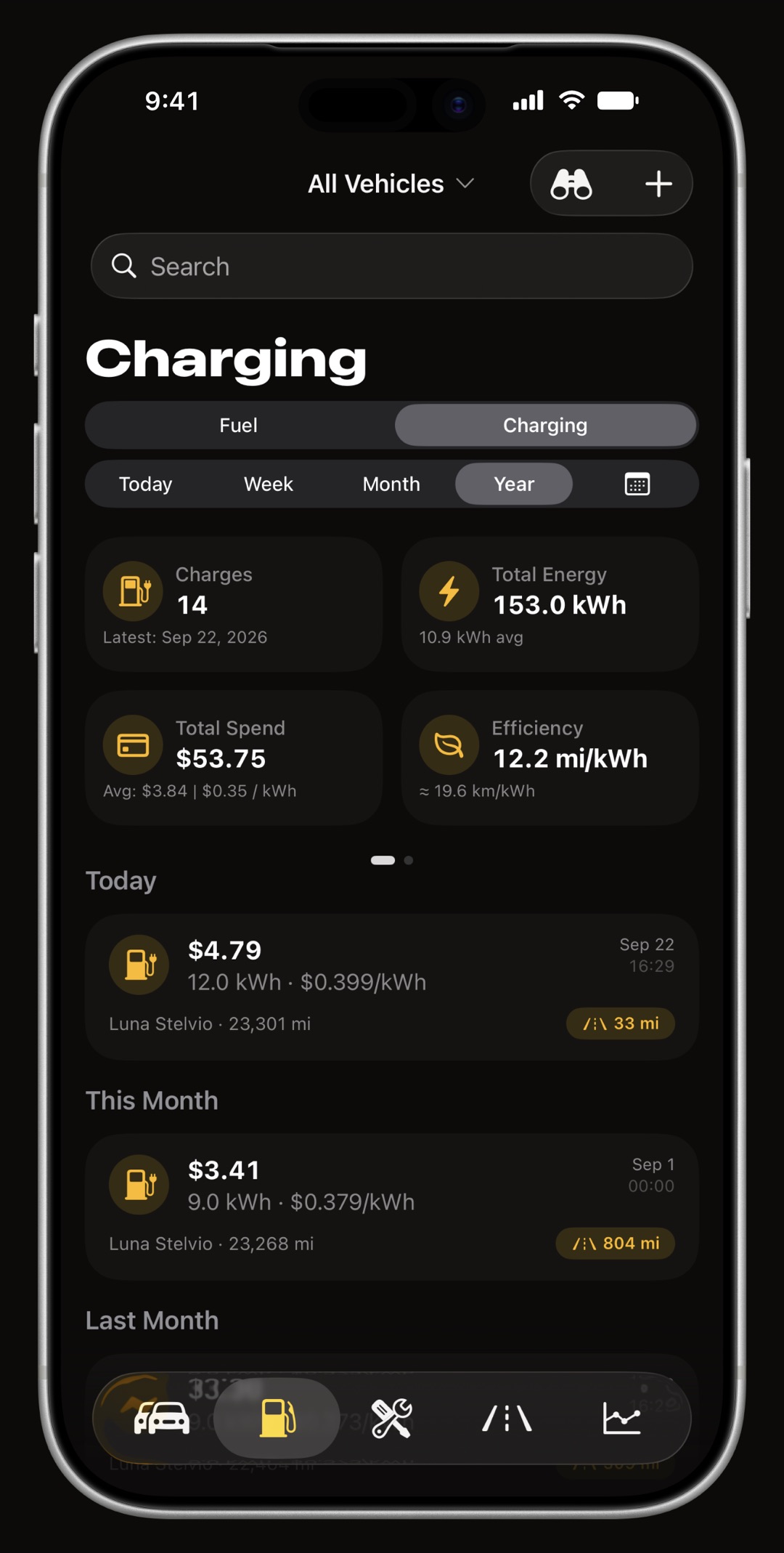
What does a charging entry record?
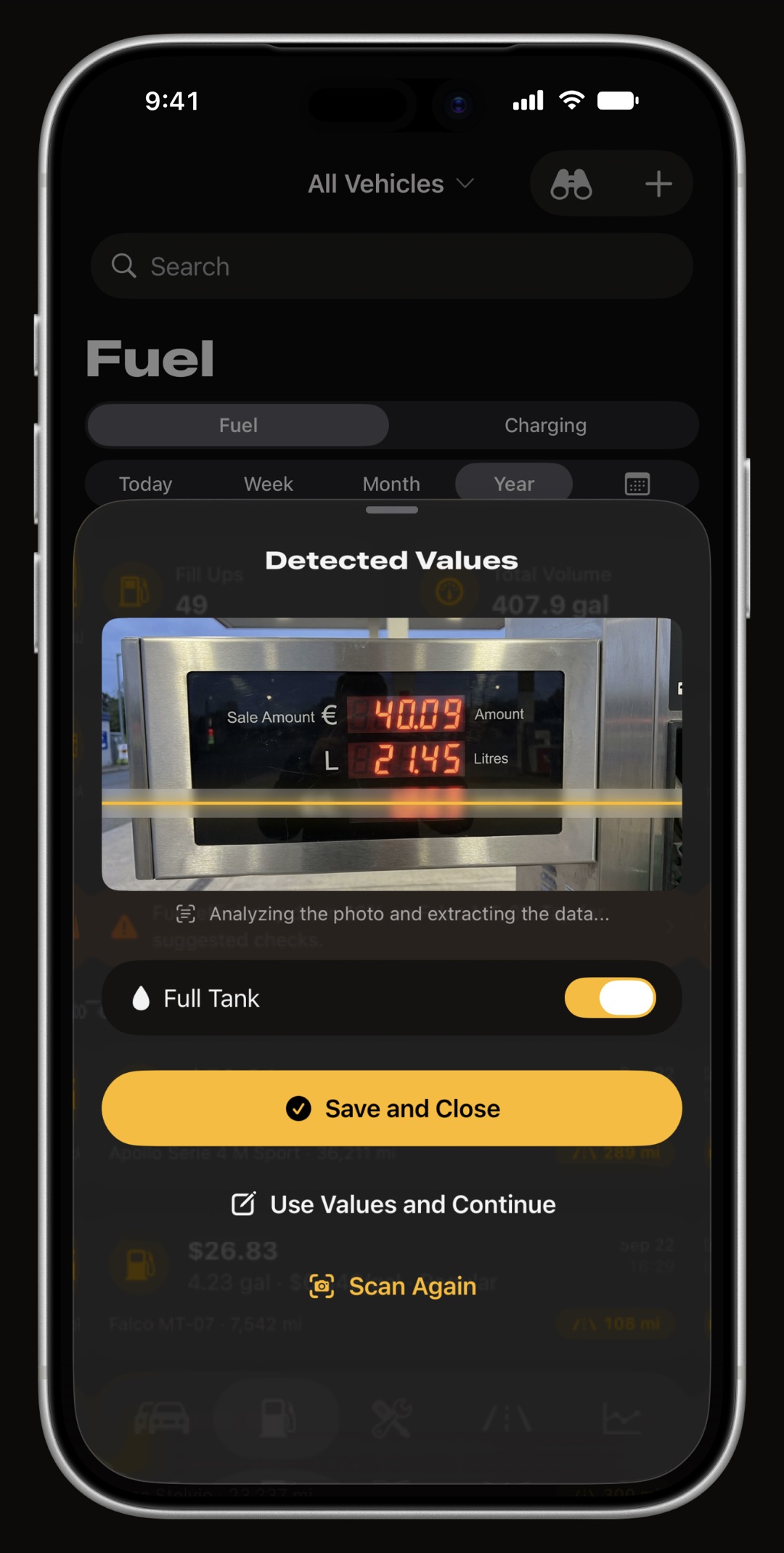
A charging session is its own record type with its own tab, not a fuel entry with kWh written over the liters. Each one holds the energy delivered in kWh, what it cost, the charger type, where it happened, the battery percentage before and after, the odometer and a note. Point the camera at a charger screen and on-device text recognition reads the energy, the unit price and the total for you, with a plausibility check that catches a misread digit before it is saved. A receipt or an invoice can stay attached to the session too: scan it with the camera, or add a photo or a PDF, and open it from the entry later.
- Charger type Level 1, Level 2 or DC fast, so a slow overnight charge and a highway rapid charge are never averaged into one number.
- Battery before and after the percentage you plugged in at and the percentage you left with, which is what makes session efficiency computable.
- Missed charge flag forgot to log one? Mark the next entry and the interval is excluded instead of producing an impossible figure.
How is charging efficiency computed, and in which units?
Efficiency is computed from the energy logged and the distance the odometer covered between charges, the same charge-to-charge discipline the fuel log applies tank to tank. You read it in whichever unit you think in: km/kWh or mi/kWh if you like a bigger number to mean better, kWh/100 km or kWh/100 mi if you prefer consumption. Every value is stored in kWh and kilometers and converted for display, so changing the unit never changes the data.
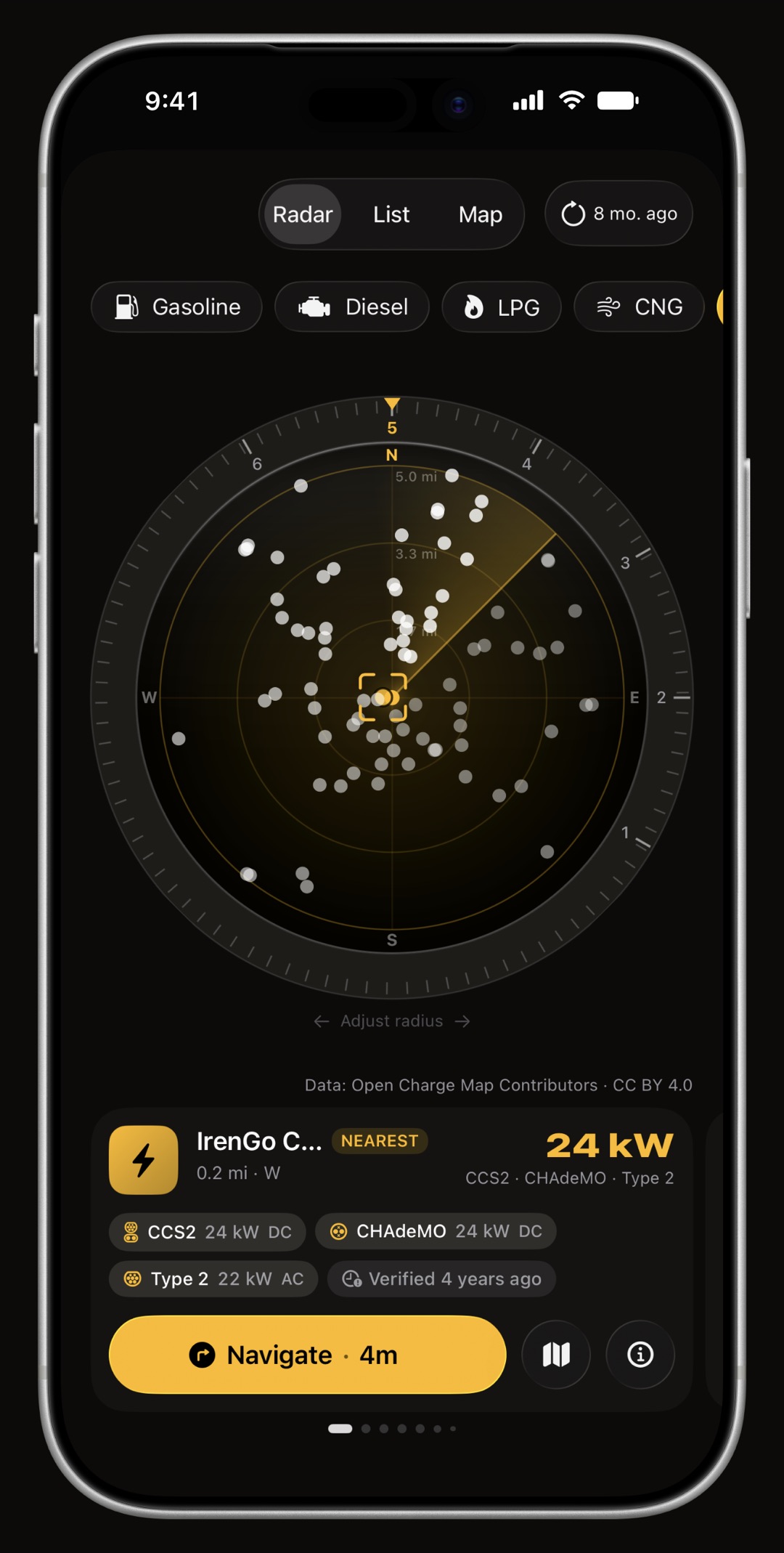
Can it find a charging point near me?
Yes, anywhere in the world. Switch the Price Radar to EV and it plots the charging points around you by real direction and distance, or on a map you can pan. Each one carries the plugs it has and whether they are AC or DC, how fast they are in kW, who operates it, whether it is reported working, the access notes, the date it was last verified and the latest community check-in, which is the one honest proxy for availability that exists. Filter by the connector your own vehicle carries, which the app preselects from the vehicle's profile, and by minimum power. The data comes from Open Charge Map, the global public registry, with Apple Maps as the floor underneath so the answer is never an error screen, and each location credits its data provider and licence as the terms require.
- Filters cost nothing the connector and minimum-power filters are applied to the zone already in hand, so changing one never asks the network again.
- No charger carries a price per kWh, per minute, session fees and roaming markups coexist at the same plug, so nothing publishes a comparable price. The operator's own cost note is shown verbatim and nothing is invented.
- Apple's place card is one tap away for live opening hours and whatever Apple knows about the location, which is more than any free registry does.
What does the home-charging ratio tell you?
The share of your energy that came from your own socket versus public chargers. Home electricity and rapid-charging electricity can differ in price by a factor of several, so an average cost per kWh hides what actually drives your bill. The ratio, together with the electricity price trend, the charger type breakdown and the cost-per-distance charts, shows whether the expensive sessions are the exception or the habit.
How does it handle a plug-in hybrid?
Honestly. A PHEV burns fuel and electricity in proportions that change with every trip, and an app that divides fuel by distance produces a fuel economy figure that is fiction. WrenchTime lets a plug-in hybrid log the electric-only share of each trip, with a suggested value drawn from your own history, so the fuel figures and the electricity figures are each computed over the distance they actually powered. Both the Fuel tab and the Charging tab are shown for a PHEV; an all-electric garage sees only Charging.
Which maintenance does an electric vehicle get?
The 56 procedures are filtered by powertrain, so an EV is never offered an oil change or spark plugs. What it is offered is what it needs: battery health check, reduction gear oil, charging port inspection, brake fluid (an EV still has hydraulic brakes, and regenerative braking lets the pads and discs sit unused long enough to matter), cabin filter, coolant for the battery loop, tires and wheel alignment, plus the dues every vehicle has. An EV Service kit bundles them into one entry. WrenchTime knows 11 engine types, from petrol and diesel through mild, full and plug-in hybrids to battery electric, and hides what does not apply to each.
What do the charging charts show?
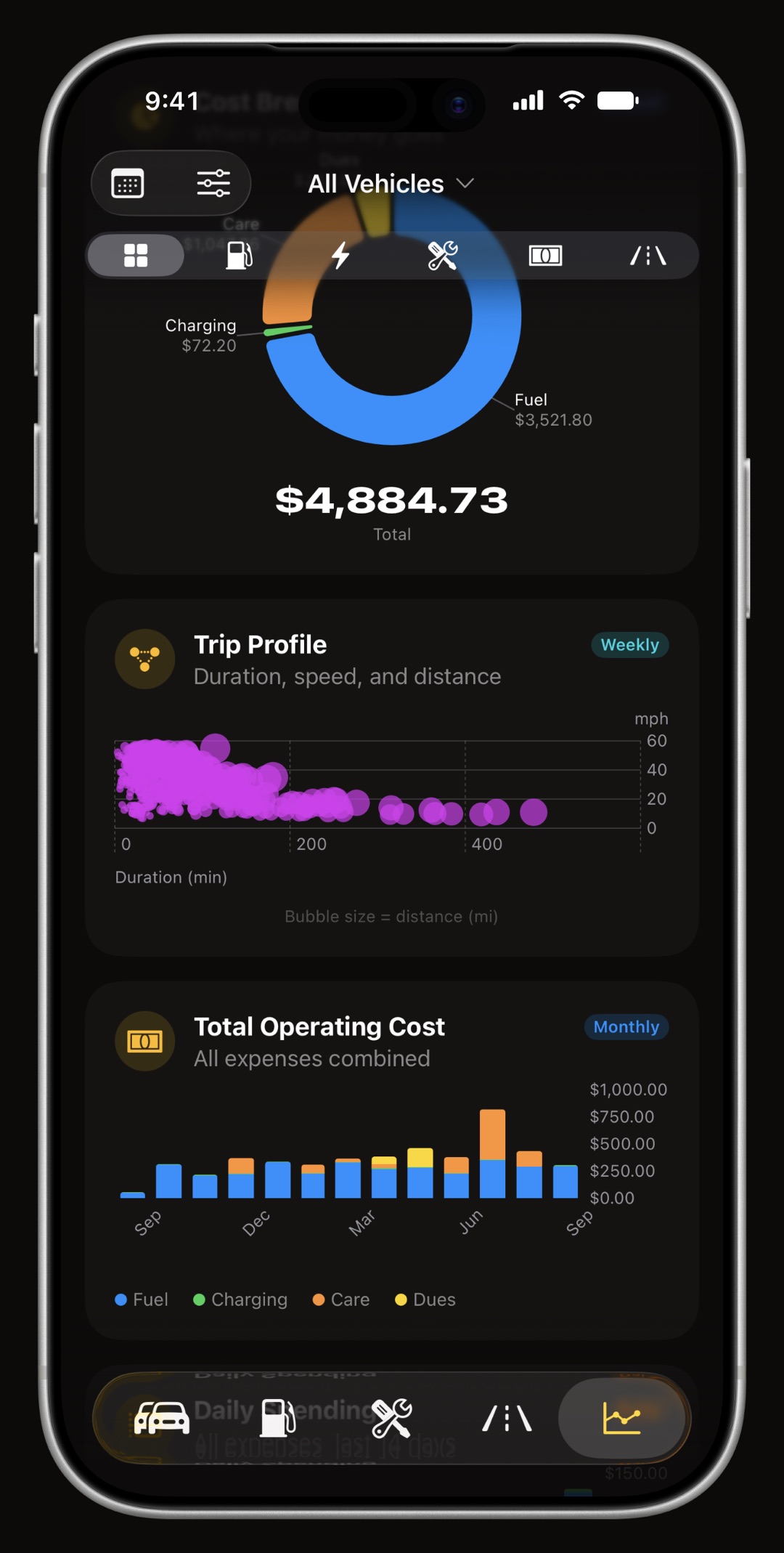
Of the 31 charts in the app, the charging set covers cost over time, the electricity price trend, efficiency, session efficiency, energy cost, cost per distance, distance covered, energy delivered, the charger type breakdown and the distribution of session sizes. Each carries a caption explaining exactly how the figure is computed, respects one global time range, and hides itself when there is not enough data to be honest.
How does WrenchTime compare with Magica, Fuelly and Drivvo for an EV?
Magica offers a charging panel and a map of charging stations. Fuelly and Drivvo log kWh alongside fuel with basic charging support. WrenchTime is the one with a dedicated charging tab, battery percentage before and after, session efficiency in four units, a home-charging ratio, EV-specific maintenance procedures, a worldwide charging point finder matched to your own connector and an honest electric share for plug-in hybrids, with no account and no vendor server behind it. If your charging history is in Drivvo, Fuelio or Spritmonitor, the CSV import brings it across as charging sessions rather than as fill-ups.
Frequently asked questions
Does WrenchTime work for electric vehicles?
Yes. Charging sessions have their own tab with energy, charger type, battery percentage and cost, EV-specific maintenance procedures, charging efficiency in four different units, and a home charging ratio. Plug-in hybrids can log the electric-only share of each trip.
Can it find charging points near me?
Yes, worldwide. The Price Radar in EV mode lists the charging points around you with their connectors, power in kW, operator, reported status, last verification and latest check-in, filtered to the connector your vehicle carries. It never shows a charging price, because no market publishes one that can be compared.
Which charger types can I log?
Level 1, Level 2 and DC fast. The charger type breakdown chart shows how your energy splits between them.
Can I keep an EV and a petrol car in the same app?
Yes. Each vehicle gets the tabs its powertrain needs: an EV sees Charging, a petrol car sees Fuel, a plug-in hybrid sees both. Every chart and statistic can be filtered to one vehicle or the whole fleet.
Does it need an account?
No. There is no WrenchTime account and no WrenchTime server. Your data lives on your iPhone and syncs to your iPad and Apple Watch through your own private iCloud.
Is the charging log free?
Yes, for 1 vehicle with 3 fuel and charging entries and 2 maintenance entries per month. WrenchTime Pro removes the limits, as a subscription or a one-time lifetime purchase.

Made for people who would rather know than guess.
Free to download. One vehicle, real features, no ads. Your garage will thank you.
Download WrenchTime on the App Store