OBD-II app · iPhone · CarPlay · iOS 26+
An OBD-II app for iPhone that keeps the readings with the drive
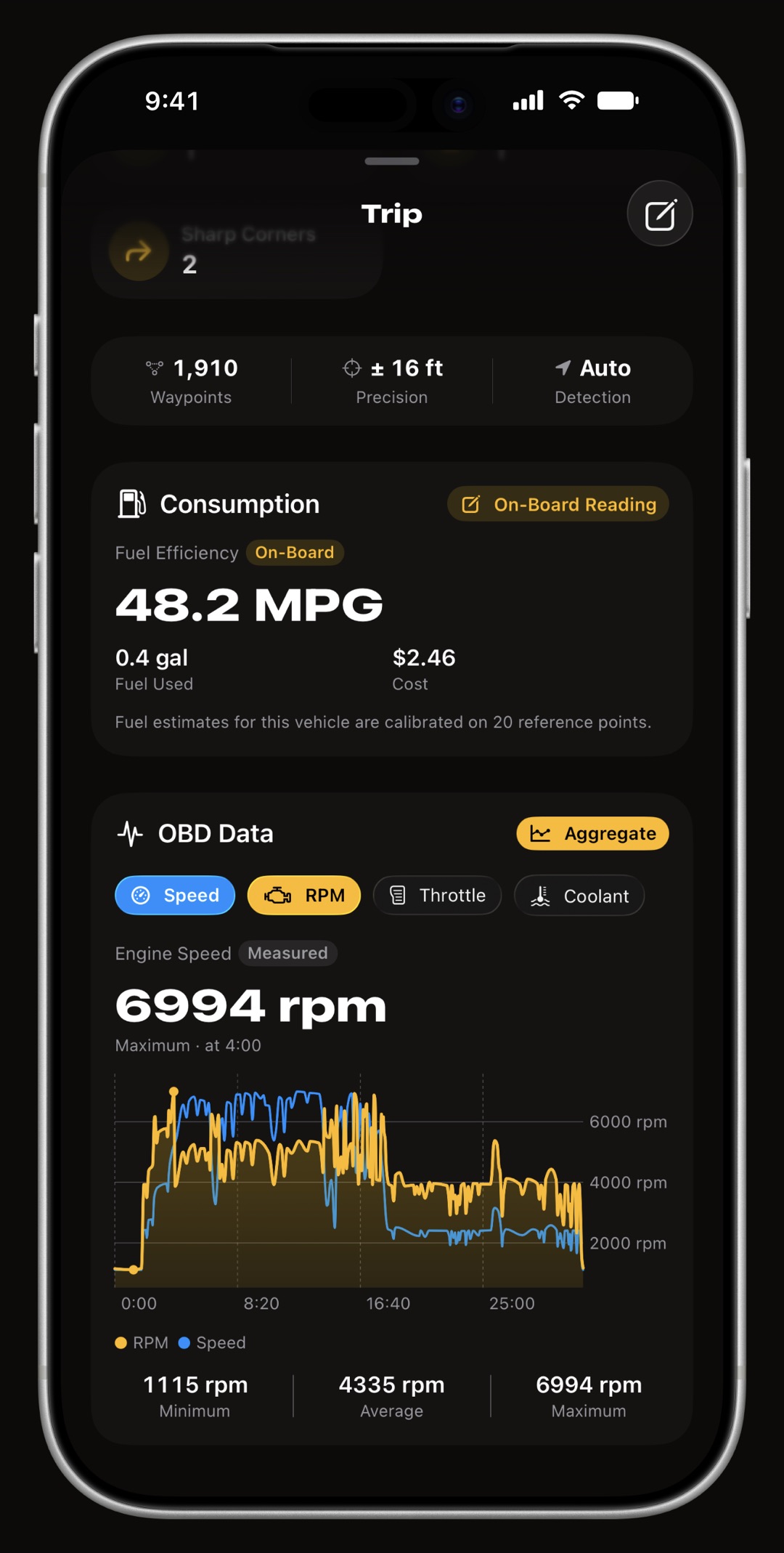
WrenchTime connects to a Bluetooth Low Energy ELM327-compatible OBD-II adapter, or to the Apple-certified OBDLink MX+, and reads your car while you drive: engine RPM, vehicle speed, engine load, throttle position, coolant temperature, intake air and ambient temperature, fuel level, module voltage, intake pressure and fuel rate, plus dozens of further readings wherever the vehicle reports them, from boost, torque and power to fuel trims, lambda, oil and exhaust temperatures and, on a diesel, the particulate filter and the AdBlue level. The readings are drawn as ring gauges on the phone, as gauge grids on a CarPlay head unit and as instruments on the full-screen WrenchTime Live dashboard, and every channel is recorded at one sample per second for the whole drive and kept with the trip, so a drive can be scrubbed back through afterwards on a chart. The Vgate iCar Pro, the iCar Pro 2S and the OBDLink MX+ are confirmed working on a real vehicle. Nothing is uploaded: the adapter link and the readings live on your device and in your own iCloud.
Which OBD-II adapters work with an iPhone?
Bluetooth Low Energy ones, plus the one classic Bluetooth adapter Apple's MFi program lets WrenchTime use, the OBDLink MX+. An iPhone app can reach a classic Bluetooth adapter only when the adapter's maker has certified it for that app by name, so any other adapter that pairs from iPhone Settings is on a radio this app cannot use, and a Wi-Fi adapter joins its own network rather than answering an app: a listing that says Android or Wi-Fi is not the one to buy. WrenchTime speaks the ELM327 command set and keeps a running log of what specific adapters actually did, rather than claiming a compatibility list it has not tested.
- Vgate iCar Pro and iCar Pro 2S confirmed working on a real vehicle. Found by the scan, connect and poll, and wake on their own when the app connects, so a trip that starts with the adapter asleep still gets a session.
- OBDLink MX+ Apple-certified (MFi) and confirmed working, supported since WrenchTime 6.7. Pair it once in iPhone Settings > Bluetooth, then link it to a vehicle in Settings > Connections like any other adapter.
- Vgate iCar, the non-Pro works, but does not wake by itself: press its button before the drive or the scan comes up empty.
- Vgate vLinker MS ships in Apple MFi mode, and its certification does not name this app, so it must be switched to BLE with Vgate's own updater app and then forgotten in iOS Bluetooth settings.
- Anything else if it is BLE and speaks ELM327 it should work, and the app measures your particular adapter rather than assuming. Tell us what you saw and it goes in the log.
The status says what the app did with each adapter, not whether the adapter suits your car: protocol coverage, sleep and wake behavior and a given make's quirks are on the maker's compatibility list, and worth a look before buying. On the app side, any adapter that speaks ELM327 over Bluetooth Low Energy 4.0 or later is expected to work, as is the Apple-certified OBDLink MX+; the ones below are the ones on record.
| Adapter | Status | Notes |
|---|---|---|
| Vgate iCar Pro 2S | Works | Found by the scan, connects and polls, wakes on its own when the app connects. Not on a BMW, where the iCar Pro line does not wake by itself: see the vLinker BM+. |
| Vgate iCar Pro (BLE 4.0) | Works | Same firmware family as the 2S and behaves the same: found, connects, wakes by itself, except on a BMW, where it does not. |
| Vgate iCar Pro Mini | Works | The smaller iCar Pro, sold under Vgate's vLinker brand. Found by the scan, connects and polls, confirmed by a user on a real vehicle. Its listing says it does not wake by itself on an electric or hybrid vehicle. |
| Vgate iCar (non-Pro) | Works with setup | Connects and polls like the Pro, but does not wake by itself: press its button before the drive or the scan comes up empty. |
| Vgate vLinker MS | Works with setup | Not recommended. It ships in Apple MFi mode, whose certification does not name this app, and works only after being switched to BLE with Vgate's own updater app and then forgotten in iOS Bluetooth settings. One user report so far, not yet confirmed after the switch. Pick an iCar Pro instead. |
| Vgate vLinker MC+ | Unverified | Bluetooth Low Energy out of the box, with no MFi mode, so it should need none of the vLinker MS's setup. Nobody has reported it yet, so it is listed without a verdict. |
| Vgate vLinker BM+ | Works | Vgate's BMW-specific adapter, confirmed working with the app. It exists because the iCar Pro line does not wake automatically on a BMW, so a drive that starts with the adapter asleep records nothing there; the BM+ is the one to pair with a BMW. |
| OBDLink MX+ (MFi) | Works | Apple-certified (MFi) classic Bluetooth adapter, supported since WrenchTime 6.7. Pair it once in iPhone Settings > Bluetooth, then link it to a vehicle in the app's Settings > Connections like any other adapter. |
| OBDLink CX | Unverified | Bluetooth Low Energy adapter from the maker of the MX+, so nothing to pair in iPhone Settings: it is linked from the app's Settings > Connections. Not yet tested on a real vehicle, so it is listed without a verdict. |
Statuses are copied from WrenchTime's own adapter log as read on : what each device did on a real vehicle, not a maker's claim. A listed adapter is not a recommendation, and no adapter maker sponsors this page.
What does WrenchTime read from the car?
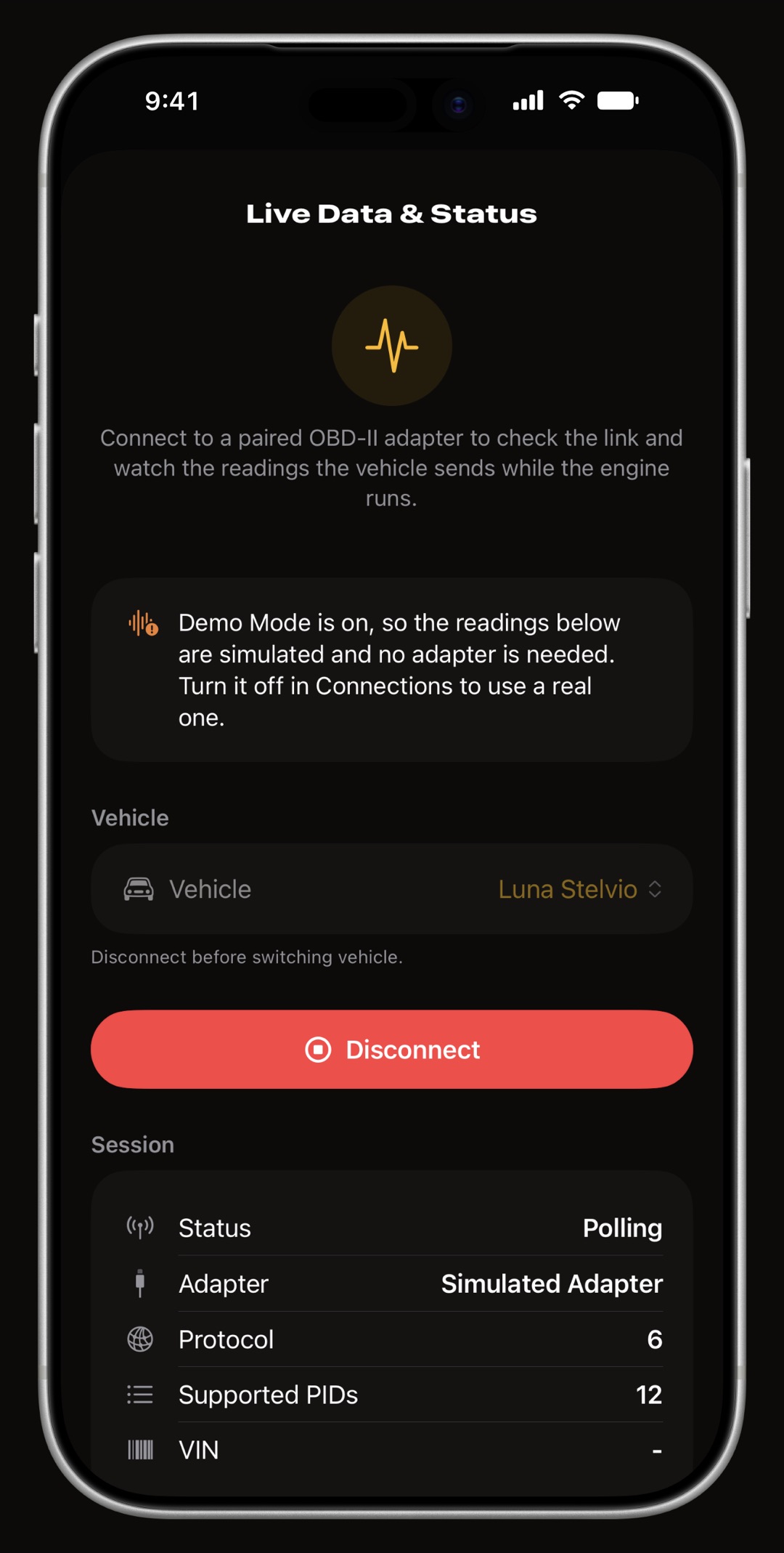
Standard Mode 01 parameters, polled in tiers so fast-changing values are read often and slow ones rarely: engine RPM and vehicle speed several times a second, engine load, throttle and intake manifold pressure about once a second, and coolant temperature, intake air temperature, ambient temperature, fuel level and module voltage every few seconds. Beyond that core set it reads dozens more whenever the car declares them: boost and turbo pressure, engine torque and power, accelerator pedal position, oil, charge air, catalyst and exhaust gas temperatures, short and long term fuel trims, commanded and measured lambda, ignition timing, fuel rail pressure, EGR, barometric pressure, ethanol content, hybrid battery charge and, on a diesel, the particulate filter's pressure and temperature and the AdBlue level. All of them show up in Live Data & Status, can join the CarPlay layout and are recorded with the trip. Fuel rate is read directly where the car reports it and derived from the mass air flow sensor where it does not. Only parameters your vehicle declares are ever requested, and one that stops answering is quietly demoted instead of being asked forever. On a CAN link several parameters ride one request to keep the cadence up.
Does it read fault codes?
Yes, with WrenchTime Pro. The Trouble Codes tool reads the stored, pending and permanent codes from every control unit that answers the standard OBD-II request, shows whether the check engine light is on, checks the readiness monitors and shows the freeze frame the car saved with the fault. Each scan is kept with its date and odometer reading, and codes can be cleared with the engine off after two confirmations. The OBD-II code reader guide covers what each part of a scan means and what it does not do.
How does it adapt to a slow adapter?
It measures yours. When you first link an adapter, a calibration run works out how many parameters your link can carry in one request, how many answers come back, how long a round trip takes and which readings the vehicle actually answers, and the polling plan is built from that. A link fast enough for the shipped defaults gets no change at all, because every derived cadence is taken as the slower of the measurement and the default. On the road a degradation ladder absorbs what a parked measurement could not see: if round trips start running over budget the cadence steps down, and it steps back up when they recover. You can re-run the calibration any time from the adapter's own screen.
What do the CarPlay gauges show?
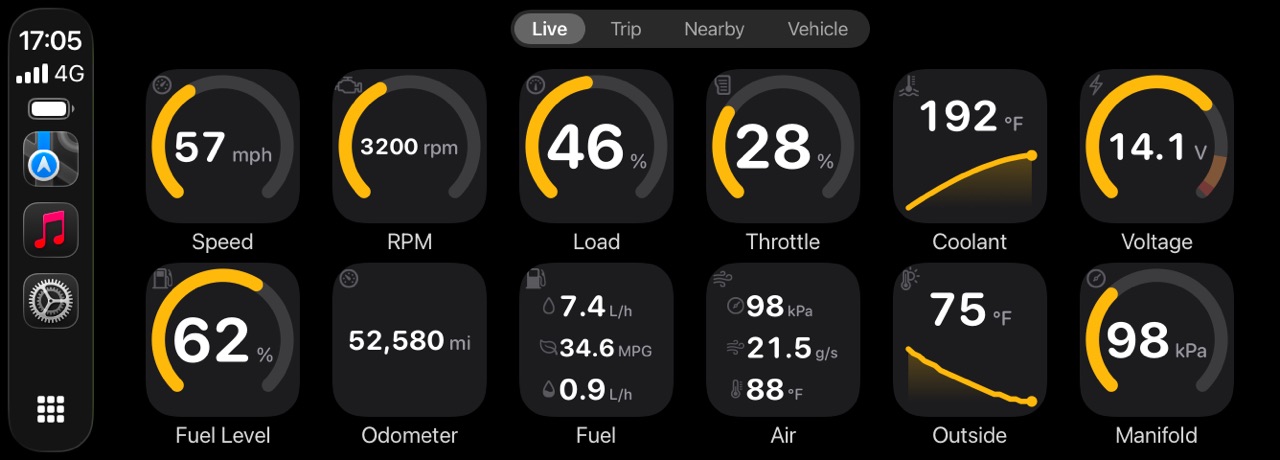
On a CarPlay head unit WrenchTime is a driving-task app with four tabs. Live is a grid of ring gauges, one card per reading, grouped the way a driver reads them: motion, engine, fuel, air. Tapping a card shows the current, minimum, maximum and average of that channel over the session, and a reading that enters its critical band, coolant temperature for instance, raises one alert for that transition and then stays quiet for a while. Trip starts and stops a recording and lists your last ten drives. Nearby finds fuel stations, or chargers for an electric vehicle. Vehicle shows the odometer and what is due. You choose each row's title and how many gauges it shows, each vehicle can carry a color of its own so two cars in the same garage are told apart at a glance, and a night mode either follows the car or overrides it. CarPlay is part of WrenchTime Pro.
Can I build my own dashboard from the readings?
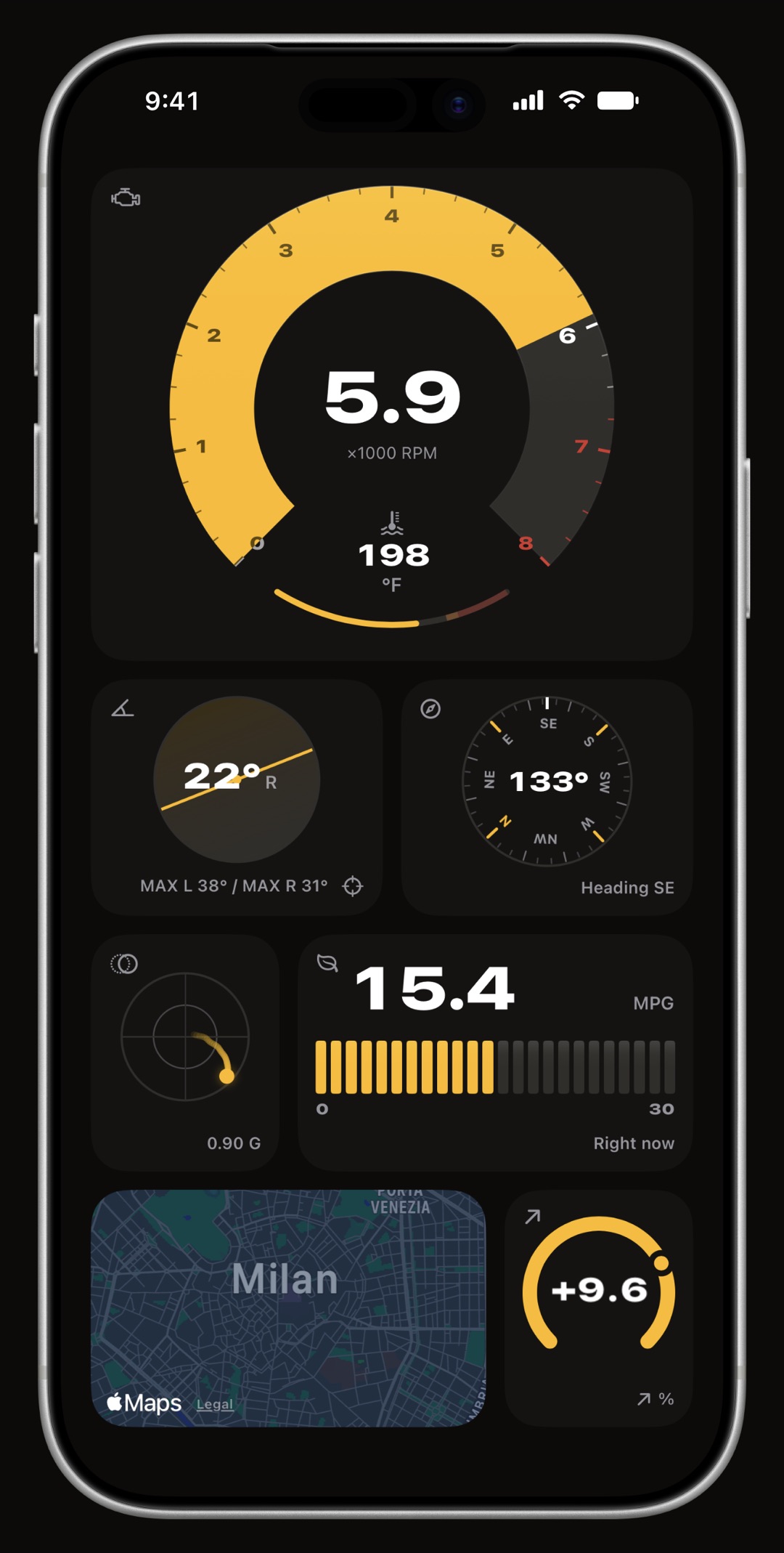
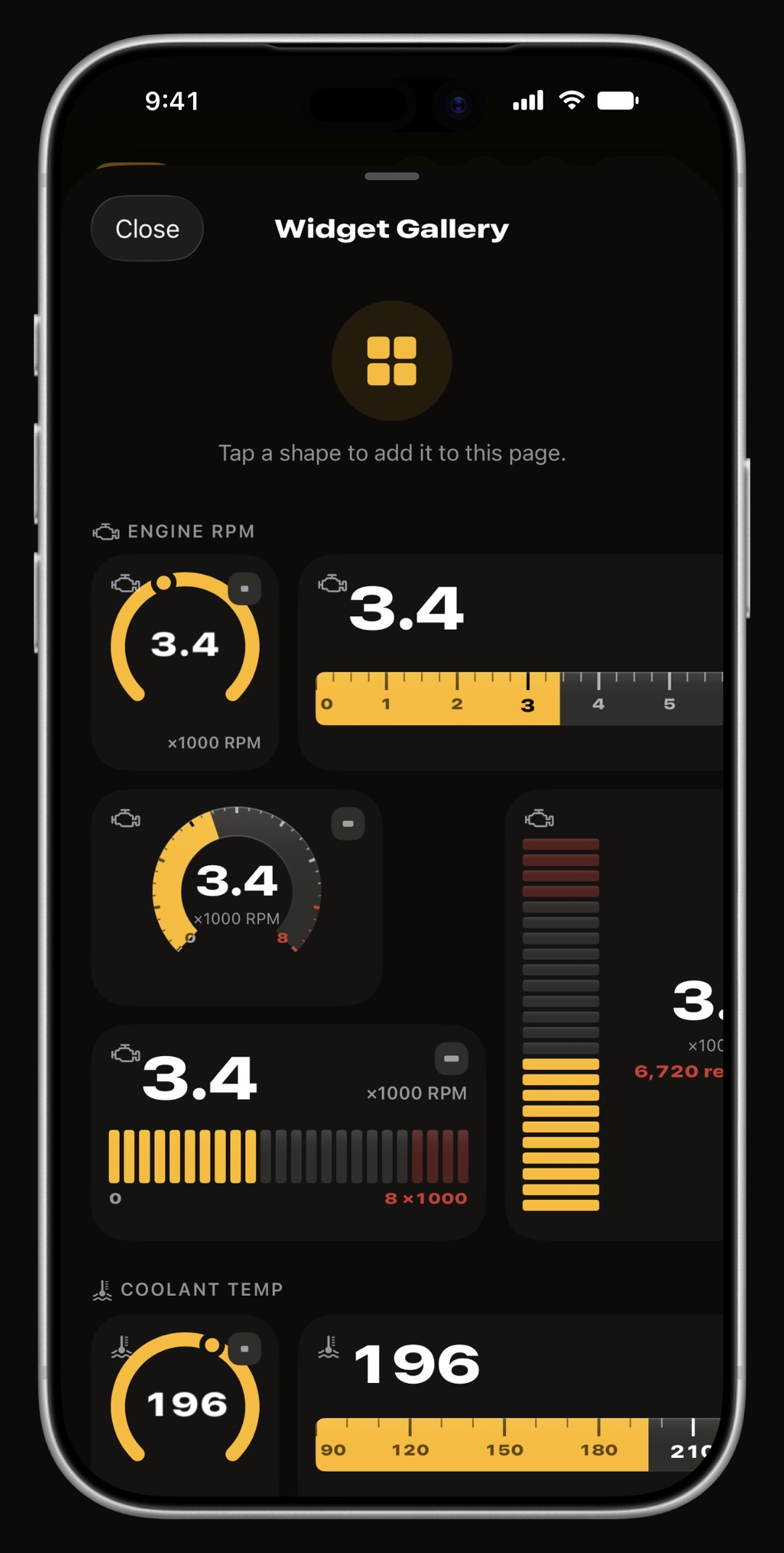
Yes. WrenchTime Live is a full-screen instrument board built from 17 instrument types, and the adapter feeds them: a signal card draws revs, coolant temperature, fuel level, throttle, voltage, consumption or any other OBD-II reading as its own gauge, as many times as you like, beside gear, speed, lean angle, G-force, road grade, compass, altitude, range, a live map, nearby fuel prices, trip stats and weather. You lay them out on pages that fill the screen and are swiped like Home Screen pages, in portrait or landscape depending on how the phone is mounted, and a card can be a third, a half, two thirds or a whole row wide and one to three rows tall, with a different instrument drawn at each shape rather than one drawing scaled up. The free tier gets 3 instruments on the first page; more, and any page after the first, is Pro.
What happens to the data the adapter produced?
It stays yours and it stays on the phone. While a session runs the stream is binned at one sample per second per channel, and when the trip ends the series is packed and stored with it, so the drive can be replayed on a chart with one chip per recorded channel, several overlaid together with Pro. The telemetry has its own retention period, so it can be pruned while the trip and its route survive, and a switch turns recording off entirely. The adapter link, the learned profile and a VIN read but not yet confirmed live in the device's own settings, never in iCloud, because that is session state about this phone rather than data you own about the vehicle. A VIN only lands on your vehicle record when you accept it.
Do I need an adapter to use WrenchTime?
No. Maintenance, fuel, charging, trips, parking, the charts, the Price Radar, the widgets, the Apple Watch app, iCloud sync, backups and export all work with no adapter at all, and the CarPlay Trip, Nearby and Vehicle tabs do too. The adapter adds live engine data and per-trip telemetry on top of a log that is complete without it. There is also a demo mode in Settings that drives every one of these screens from a simulated adapter, so you can see exactly what you would get before buying anything.
Can I add a reading WrenchTime does not show?
Yes, with WrenchTime Pro. A custom PID is a request you define for one vehicle: the service (01, 21 or 22), the parameter, optionally the control unit it lives on, and how the answer's bytes become a number, either a simple scale and offset or a formula. It can be drawn as a gauge, a plain readout, a status lamp or a lookup table, shown in Live Data & Status, on the Live dashboard and on CarPlay, and recorded with every trip if you switch that on. You can also import one from the OBDb community catalog, filtered by your vehicle's model year, or open a PID someone shared as a link. Nothing outside those three read-only services can be sent from a custom PID. The custom PID guide walks through a definition.
Can I set my own gauge ranges and red line?
Yes, free, and per vehicle. The Gauge Scales tool lets you set the minimum, maximum, caution band and critical band of any OBD-II reading, and a red line for the tachometer, so a diesel that revs lower or an engine that runs warmer is drawn on its own terms. The phone, the Live dashboard and CarPlay all draw from the same scale, and the critical band is the one that raises the CarPlay alert. Leaving one side of a band blank keeps it open, and a single channel or the whole vehicle can be reset to the defaults.
Why does my car alarm go off with the adapter plugged in?
Some modern cars read traffic on the diagnostic port of a locked car as a break-in, and most adapters stay powered and connected long after the engine is off. Each vehicle has a switch for this in its adapter pairing screen, off by default, that only applies when no one is at the screen: a trip, CarPlay or the Live dashboard.
- Disconnect When the Vehicle Sleeps the app stops talking to the car the moment the engine reads zero revs, the car's own Bluetooth drops or the bus goes quiet, and picks up on the same link once the car moves again, without reconnecting. Start-stop pauses the readings too, until you drive off.
- Also Drop the Bluetooth Link for a car whose alarm objects to the idle link itself: the session ends on the same signals and reconnects when the drive resumes, which costs a few seconds of readings at every drive-off.
What if the pairing scan does not recognize my adapter?
The scan lists the adapters it recognizes first, and below them the other named Bluetooth devices nearby with a usable signal. Pick one of those and WrenchTime tries it on the spot: it is kept only if it answers like an OBD-II adapter, and otherwise the screen says so and your previous link is left as it was. Other people's devices are never named in the diagnostic log. If an unlisted adapter works for you, tell us and it goes in the adapter log above.
Frequently asked questions
Which OBD-II adapter should I buy for an iPhone?
A Bluetooth Low Energy adapter that speaks ELM327, or the Apple-certified OBDLink MX+. The Vgate iCar Pro and iCar Pro 2S are confirmed working on a real vehicle and wake by themselves, and the OBDLink MX+ is confirmed working too. The non-Pro Vgate iCar works but has to be switched on with its button. A vLinker MS needs to be moved from Apple MFi mode to BLE with Vgate's updater app first. Wi-Fi adapters cannot work with an iPhone app, and the OBDLink MX+ is the only classic Bluetooth adapter WrenchTime can use.
Does WrenchTime read fault codes?
Yes, with WrenchTime Pro. It reads stored, pending and permanent trouble codes from the modules that answer the standard OBD-II request, shows whether the check engine light is on, describes generic codes in plain language and clears them only with the engine off. Each scan also shows the readiness monitors and the freeze frame saved with the fault.
Which readings does it show?
Engine RPM, vehicle speed, engine load, throttle position, coolant temperature, intake air temperature, ambient temperature, fuel level, module voltage, intake manifold pressure and fuel rate, plus dozens more wherever your vehicle reports them: boost, torque and power, accelerator pedal, oil and exhaust temperatures, fuel trims, lambda, ignition timing and, on a diesel, the particulate filter and the AdBlue level. Odometer too, where the car reports it. With Pro you can define custom PIDs for anything else your car answers.
Are the readings saved with the trip?
Yes. Every channel is binned at one sample per second for the whole drive and stored with the trip, so you can scrub back through it on a chart afterwards. A trip recovered after iOS killed the app has no telemetry, because that buffer lived in memory.
Does the OBD-II data go to a server?
No. There is no WrenchTime server. The readings live on your device and sync only through your own private iCloud. The adapter link itself never leaves the phone.
Is CarPlay included?
CarPlay is part of WrenchTime Pro. The Live tab needs a paired adapter; the Trip, Nearby and Vehicle tabs work without one.
Can I add my own OBD-II PIDs?
Yes, with WrenchTime Pro. A custom PID uses service 01, 21 or 22, turns the answer's bytes into a number with a scale or a formula, and can be shown as a gauge, readout, status lamp or lookup on the phone, the Live dashboard and CarPlay, and recorded with every trip. Definitions can also be imported from the OBDb community catalog or opened from a link someone shares.
Can I change the gauge scale or the red line?
Yes, for free and per vehicle: minimum, maximum, caution and critical bands for any reading, and a red line for the tachometer. The phone, the Live dashboard and CarPlay all use the same scale.
My car alarm goes off after I lock the car with the adapter plugged in. What can I do?
Turn on Disconnect When the Vehicle Sleeps in that vehicle's adapter pairing screen. The app stops talking to the car as soon as the engine is off and resumes when you drive away. If the alarm still objects, Also Drop the Bluetooth Link ends the connection too.

Made for people who would rather know than guess.
Free to download. One vehicle, real features, no ads. Your garage will thank you.
Download WrenchTime on the App Store