Custom PIDs · OBD-II · iPhone · CarPlay · WrenchTime Pro
Custom OBD-II PIDs on iPhone, for the readings your car keeps to itself
A custom PID in WrenchTime is a raw OBD-II request you define yourself, for a reading the app does not show out of the box: a transmission or oil temperature, a boost pressure, a manufacturer sensor, a switch. You choose the service (01, 21 or 22), the identifier, the module to ask and how it is addressed, then turn the answer's bytes into a number with a byte width, sign, scale and offset or with a formula over bytes A to H, and pick how it is drawn: a ring gauge, a plain number, a status lamp or a lookup table. The reading appears in Live Data & Status, as a card on the WrenchTime Live dashboard and as a tile on CarPlay, and can be recorded with every trip. You do not have to start from scratch: Import from Catalog lists the readings the OBDb community has already mapped for the model closest to yours, and a PID someone shares as a link arrives with every setting filled in. It needs a Bluetooth Low Energy ELM327 adapter or the OBDLink MX+, and WrenchTime Pro. It can only read: nothing typed into a custom PID can clear, write, reprogram or actuate anything in the car.
What is a custom PID, and when do I need one?
WrenchTime reads the standard Mode 01 parameters on its own: revs, speed, load, throttle, coolant and intake temperatures, fuel level, voltage, manifold pressure and fuel rate (see the OBD-II app for iPhone guide). Many values a car knows are not among them, because the standard does not require them or the manufacturer keeps them in a module other than the engine. Transmission fluid temperature, engine oil temperature, turbo boost, a DPF soot load or a gearbox position usually fall in that group. A custom PID is how you ask for one of those yourself. You can import one from the community catalog, open one someone shared as a link, or bring the request and the formula yourself, from your vehicle's documentation, an owners' forum or a list you already use with another app. The tool lives in Vehicles, behind the heartbeat button that opens Vehicle Tools, and each PID belongs to one vehicle.
Where do I find the PIDs for my car?
In the community catalog, before anywhere else. Import from Catalog, next to New PID, opens the catalog of OBDb, an open community project that maps the signals each model answers. It starts from your vehicle's make; choose the model closest to yours and its signals are listed, ready to import in one tap as ordinary custom PIDs you can still edit. Set the model year in the vehicle's details and the list is filtered to that year, with each signal marked verified or unverified, and the ones the catalog files under other years of the model kept apart, since its year data is incomplete. Signals the app cannot read yet are listed as not supported rather than hidden. The catalog is fetched when you open it, never bundled with the app, and a copy is kept for when you are offline. Its definitions are licensed CC BY-SA 4.0 and credited on the catalog screen.
Can I share a custom PID with someone?
Yes, as a link. Open a saved PID and share it: the link carries the whole definition, request, decoding and display, with no server in between. Whoever opens it, or pastes it with Paste Link in their PID list, sees the request and the decoding before anything is imported, and chooses which of their vehicles it goes to; a vehicle shared with them as view only cannot take one. A link from someone else sends a read-only request like any other custom PID, so import only from people you trust. It is the easy way to pass a working PID around a car club or a model forum.
Which requests can a custom PID send?
Three read services and nothing else, sent to the module you choose, over the kind of CAN addressing that module uses.
- Services 01, 21 and 22 01 is the standard current-data service, 21 the older manufacturer-specific read with a one-byte identifier, and 22 the UDS read-by-identifier with a two-byte identifier, which is where most modern manufacturer values live.
- ECU header Auto (7DF, the functional request every OBD-II module listens to), Engine (7E0), Transmission (7E1) or a custom three-digit header for any other module. The header is set for that one request and restored to 7DF right after it. A PID with a custom header is polled on the slow tier, about every eight seconds, because each read costs several extra round trips to the adapter.
- Standard, extended or 29-bit addressing Standard uses 11-bit CAN identifiers, as most vehicles do. Extended is for modules behind a gateway that expects a leading target byte, and needs a response ID and an adapter that supports it. 29-bit is for vehicles whose diagnostics use 29-bit identifiers; the response ID can stay empty when the request starts with 18DA, because it is derived from the request.
- The other width, borrowed for one round A 29-bit PID works on a car whose OBD port answers on 11-bit, and the other way round: WrenchTime switches the adapter to the partner protocol for that reading and straight back, and several such PIDs due at the same time share one switch so live data stays smooth. The switch never uses the command that would save a protocol into the adapter's memory. An adapter that refuses the switch has those PIDs skipped for the session instead of being forced.
How do I turn the answer into a number?
After the service echo and identifier are stripped, the answer's data bytes are named A, B, C and so on up to H, and you pick one of two ways to read them. A Test section in the editor sends the request once with Read Now and shows the raw answer next to the decoded value, so a wrong byte or scale shows up before you save.
- Simple read one, two or four bytes (A, AB or ABCD), unsigned or signed as 8-bit or 16-bit, then multiply by a scale and add an offset. Most published PID definitions fit this form.
- Formula a Torque-style expression over A to H with + - * / ^ and brackets, plus SIGNED(A) for one signed byte, INT16(A:B) for a signed 16-bit value and BIT(A:n) for a single bit. A formula such as A * 0.75 - 40 is typed as it is usually published.
- Unit conversion optional, applied after decoding: Celsius and Fahrenheit either way, kPa or bar to psi and back, km/h and mph either way. The unit label itself is free text, because the app cannot know what unit the manufacturer documents a value in.
- Polling tier Fast (about three times a second), Normal (about once a second) or Slow (about every eight seconds), on the same schedule as the built-in readings. Adapters have limited throughput, so if live data stutters, slow a PID down or remove one.
How can a custom reading be displayed?
Each PID has a display type, and every surface that shows it uses the same one, so a reading looks alike on the phone and in the car. The short name is what fits on a gauge card and on a CarPlay tile.
- Gauge a ring with your own minimum and maximum, and optional caution and critical bands on the low and high side, so a transmission temperature turns amber and then red where you decide.
- Number a plain value with its unit label beside it, for a reading with no meaningful range.
- Status a lamp that reads on or off. Any nonzero value counts as active unless you pick one specific bit, and Alert When Active tints it as critical when it lights.
- Lookup table rows that map a value to a label, so a gear selector or a mode byte reads as P, R, N, D or Eco instead of a number.
Where does a custom PID show up?
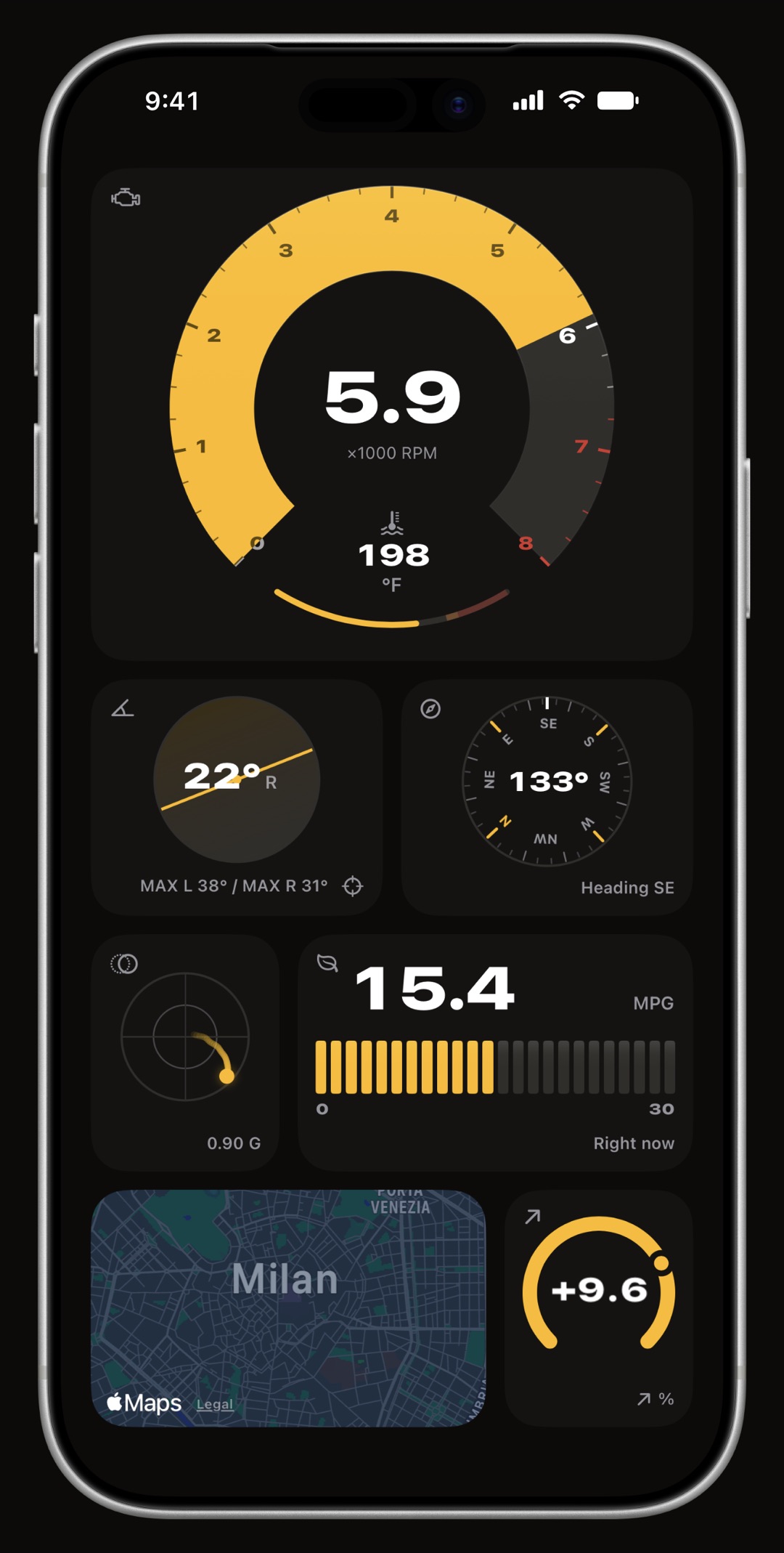
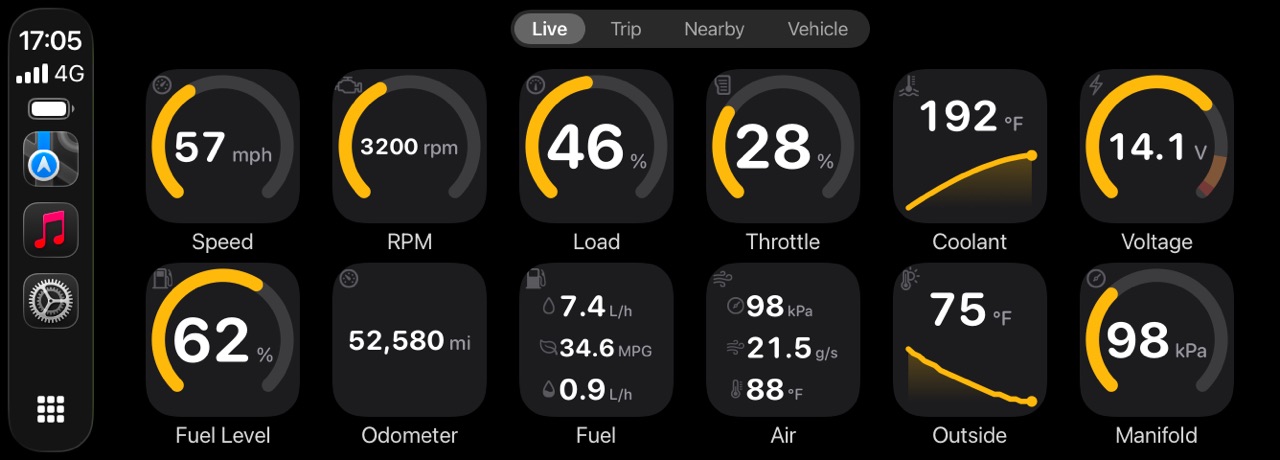
In three places, all fed by the same adapter session. In Live Data & Status, under Settings, Connections, the vehicle's enabled custom PIDs follow the built-in gauges in a section of their own. On the WrenchTime Live dashboard a Custom PID card can be added like any other instrument, and it is the one card that can appear more than once, so two custom readings can sit on the same page. With more than one vehicle, the widget gallery lets you choose whose custom PIDs to list: a card for another vehicle says which one it reads on and comes alive when the dashboard opens on that vehicle, because each PID is read through its own vehicle's adapter. On CarPlay, a custom PID is a tile you can place in the Live tab's layout from Settings, CarPlay, drawn from the same bounds and bands as on the phone. A status PID stays a tinted tile on CarPlay and never raises an alert while driving. CarPlay is part of WrenchTime Pro.
Can a custom reading be recorded with every trip?
Yes, per PID. Turn on Record During Trips and the reading is kept with each drive that adapter records, stored with the trip alongside the built-in telemetry and simplified to keep the trip's stored data small. A recorded custom PID can be picked from the trip's chart as a channel of its own and from the timeline menu of the full-screen route, where it is drawn along the drive and its gauge moves during the replay. The switch is off by default, because each recorded reading grows the trip and the adapter's throughput is shared with everything else it reads. Up to sixteen custom readings can be recorded on one trip. Like the rest of the OBD-II telemetry, nothing leaves your device except through your own iCloud.
How do I read transmission temperature on an iPhone?
With a supported OBD-II adapter and a custom PID. Transmission temperature is not a standard OBD-II parameter, so its request depends on the make and often the gearbox. Look in Import from Catalog first: if the community has mapped it for your model, it is there to import. Otherwise find the service, identifier and formula for your vehicle, which enthusiast forums and PID lists for other apps usually publish, then, in WrenchTime, add a custom PID, choose service 22 or 21 as the list says, set the ECU header to Transmission (7E1) or to the header the list gives, pick 29-bit addressing if the gearbox sits on a 29-bit module, and enter the formula. Use Read Now to check that a sensible temperature comes back, choose Gauge with a caution and a critical band, and turn on Record During Trips if you want the temperature along each drive. If the module does not answer, the vehicle may not expose that value over the OBD port at all, which no app can work around.
Can I change the scale of the built-in gauges?
Yes, and that tool is free. Gauge Scales, in the same Vehicle Tools list, overrides any built-in OBD-II reading's gauge for one vehicle: its minimum and maximum, a caution band and a critical band with each side optional, and for the tachometer a red line. A diesel that red-lines lower, or a coolant temperature that normally runs warmer, then draws where it should. The override is per vehicle, every other vehicle keeps the shipped numbers, and each channel or the whole vehicle can be reset. Everywhere that reading appears, in Live Data & Status, on the Live dashboard and on CarPlay, draws from the same scale. A custom PID does not need it: its gauge bounds are set in the PID itself.
Can a custom PID change anything in my car?
No. The request builder accepts services 01, 21 and 22 and nothing else, so clearing codes, actuator tests, session control, security access, writes, coding and routines cannot be sent from a custom PID, whatever is typed. Every address field is checked for exact length and hexadecimal characters only and refused rather than trimmed, so text cannot smuggle a second command onto the line. Headers are restored after every read, and the adapter's saved protocol is never rewritten. The Trouble Codes tool clears codes through its own guarded path, with the engine off and after two confirmations, never through a custom PID. A PID imported from the catalog or opened from a link goes through the same checks, so a definition written by someone else cannot send anything a hand-typed one could not. If you are looking for a Torque Pro style tool for iPhone, our Torque Pro on iPhone article compares what carries over and what does not.
Frequently asked questions
Is there a Torque Pro custom PID alternative for iPhone?
WrenchTime's custom PIDs cover the same ground on iPhone: services 01, 21 and 22, a custom ECU header, and a Torque-style formula over bytes A to H with SIGNED, INT16 and BIT functions, so most published Torque PID definitions can be typed in as they are. It needs a Bluetooth Low Energy ELM327 adapter or the OBDLink MX+, and WrenchTime Pro. It does not read Torque's PID files, but PIDs can be imported from the OBDb community catalog or opened from a link someone shares, and anything else is typed in by hand.
Does WrenchTime come with a list of manufacturer PIDs?
Not bundled, but it can import them. Import from Catalog lists the PIDs the OBDb community has mapped for the model closest to yours, filtered by model year and marked verified or unverified. Anything the catalog lacks you define from your vehicle's documentation or a published list, and the Read Now test shows the raw answer so you can check a definition before saving it.
Can I share a custom PID?
Yes, as a link that carries the whole definition. The person who opens or pastes it sees the request and the decoding first, then picks the vehicle it goes to.
Can I read transmission temperature with an iPhone?
On many vehicles, yes, through a custom PID pointed at the transmission module, if you know the request and formula for your make. Not every car exposes that value over the OBD port.
Are custom PIDs free?
Custom PIDs are part of WrenchTime Pro. The Gauge Scales tool, which changes the range, bands and red line of the built-in gauges per vehicle, is free.
Can a custom PID damage or reprogram my car?
No. Only the read services 01, 21 and 22 can be sent. Writes, clears, actuator tests, security access, session control and routines are refused by construction.
Do custom PIDs work on CarPlay?
Yes. A custom PID can be placed as a tile in the CarPlay Live tab, drawn with the same gauge bounds and bands as on the phone. CarPlay is part of WrenchTime Pro.
Do custom PIDs sync to my other devices?
Yes. A custom PID is stored with its vehicle and syncs through your own iCloud like the rest of the vehicle's data. The adapter pairing itself stays on the phone that made it.

Made for people who would rather know than guess.
Free to download. One vehicle, real features, no ads. Your garage will thank you.
Download WrenchTime on the App Store