Release notes · v6.9.0
What's new in WrenchTime 6, and what is next
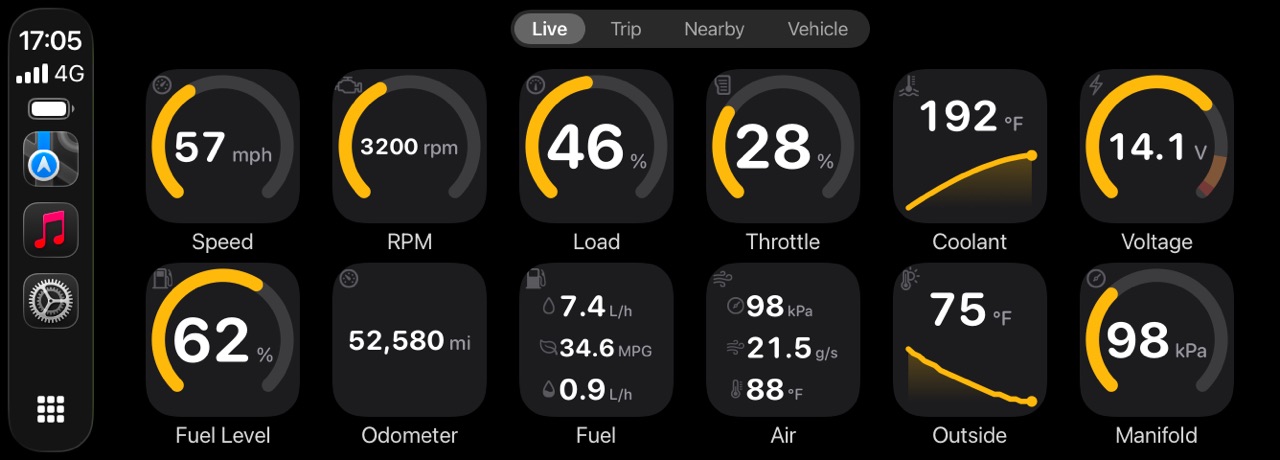
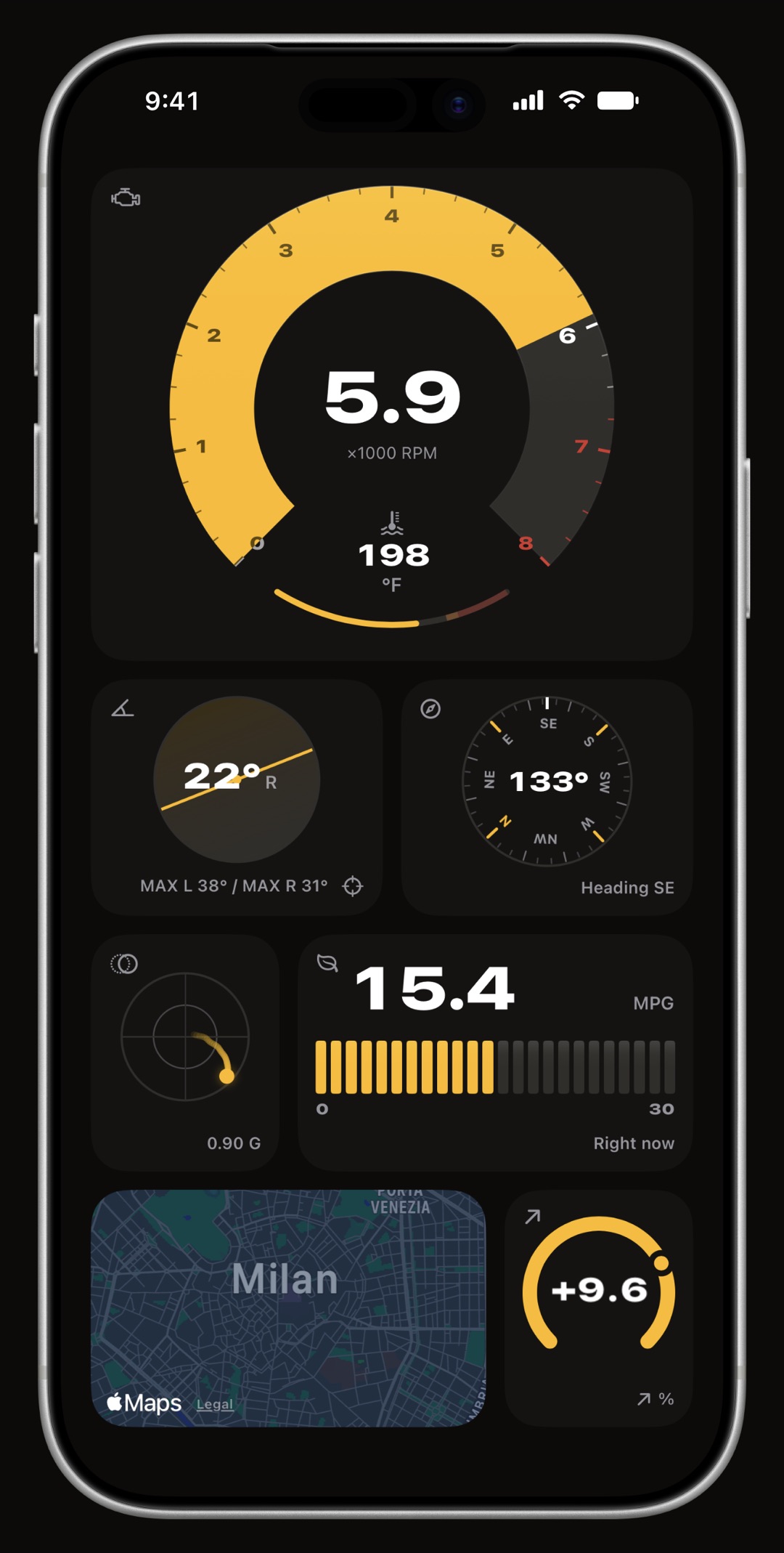
WrenchTime 6.9.0 is the current release, for iPhone and iPad with CarPlay and an Apple Watch app. It adds archived vehicles, quick actions on every vehicle card, your own vehicle order and the engine oil each vehicle takes. Version 6.7 added custom OBD-II PIDs imported from the OBDb community catalog or shared as a link, support for the Apple-certified OBDLink MX+ adapter and a Dutch translation, after 6.6 made the whole app faster. Version 6.5 added CSV import from Fuelly, Drivvo, Fuelio and Spritmonitor, and custom readings from several vehicles on one WrenchTime Live board. Version 6.4 added vehicle sharing over iCloud. Version 6.3 added a per-vehicle toolbox with an OBD-II trouble code reader, custom PIDs, gauge scales and a GPS acceleration timer, plus receipts attached to entries, recurring costs on any interval, and tolls and parking fees. Version 6.1 brought 25 accent colors and dozens more engine readings. Version 6.0 added the Price Radar, the WrenchTime Live dashboard, live OBD-II data, CarPlay and the Apple Watch app. What is next is macOS, through Mac Catalyst.
What is new in WrenchTime 6.9.0?
Room for the vehicles you have sold and the ones you reach for most, and a record of the oil that goes in. Everything below is in the App Store version today.
- Archive a vehicle you sold it leaves your lists, statistics and widgets, so nothing gets logged on it by mistake, and its history stays safe: export or restore it any time from Settings > Data & iCloud > Archived Vehicles.
- Quick actions on every vehicle touch and hold a vehicle card to add a fill-up, a charge or care for it, start a trip, update the odometer, check its oil life or tire pressure, or export its data, without opening it first.
- Your vehicles, in your order drag them into the order you want, and every vehicle list and picker in the app follows it.
- The oil each vehicle takes save the oil type, brand and capacity in a vehicle's details and log the oil and the quantity used on every oil change; Oil life shows the oil that went in last.
What did WrenchTime 6.6 and 6.7 add?
Custom readings you no longer have to work out yourself, a second kind of adapter, and a faster app. Version 6.6 was a performance release: vehicle cards stay fluid after a long session, and the Trips list scrolls without waiting on route lookups.
- Custom PIDs from the community Import from Catalog, next to New PID, lists the readings the OBDb community has mapped for the model closest to yours, filtered by its model year and marked verified or unverified. Part of WrenchTime Pro. Custom PIDs explained.
- Share a custom PID as a link whoever opens or pastes it gets the same reading with every setting filled in, sees the request before importing it, and picks the vehicle it goes to.
- OBDLink MX+ the Apple-certified OBD-II adapter, paired once in iPhone Settings > Bluetooth and then linked to a vehicle like any other. Which adapters work.
- Shared vehicles skip the free limits on the free plan, a vehicle someone shares with you never counts toward your limits, even once your own are used up, and a trip recorded on it is kept after your weekly trips run out. How sharing works.
- Dutch the app is now fully available in Dutch, alongside English (US and UK), Italian, German, Spanish, French, Japanese, Korean, Brazilian Portuguese and Simplified Chinese.
What did WrenchTime 6.5 add?
It brought your history over from another app and made WrenchTime Live more your own.
- Import from other apps a CSV export from Fuelly, Drivvo, Fuelio or Spritmonitor, or any spreadsheet through a column mapper, into the vehicle you pick, with a preview, duplicates skipped and a one-step undo. Part of WrenchTime Pro. How the import works.
- Custom readings from every vehicle one WrenchTime Live board can carry custom PIDs from several vehicles; a card for another vehicle says which one it reads and comes alive when the dashboard opens on it.
- Both CAN widths a custom PID on 29-bit addressing now works on a car whose OBD port answers on 11-bit, and the other way round, so values like a gearbox oil temperature come through. Custom PIDs explained.
- WrenchTime Live settings the board's look, its color and whether it opens during a trip sit together on one page in Settings.
What did WrenchTime 6.4 add?
Sharing a vehicle with the people who drive it, and custom readings on the trip route.
- Vehicle sharing invite family or a co-driver over iCloud and choose who can edit and who can only view. Fill-ups, charging, care, odometer history, documents, parking and trips stay in sync, each entry says who logged it, and a vehicle shared with you never counts toward your own free limits. Part of WrenchTime Pro. How sharing works.
- Custom PIDs along the route a custom reading recorded during a trip can be picked from the route timeline and followed through the replay. Custom PIDs explained.
What did WrenchTime 6.3 add?
A toolbox for every vehicle, opened from the heartbeat button in Vehicles, and better records of what a car costs. Trouble codes and custom PIDs need an OBD-II adapter and WrenchTime Pro; the acceleration timer and gauge scales are free.
- Trouble codes stored, pending and permanent codes with plain-language descriptions, the check engine light, readiness monitors before an emissions test, the freeze frame, and clearing once the engine is off. Reading trouble codes on iPhone.
- Custom PIDs define a reading your car reports but the app does not show yet, with a formula and a gauge, readout, status lamp or lookup table, and record it with every trip. Custom PIDs explained.
- Acceleration timer 0 to 100 km/h, the quarter mile and other runs timed by GPS, best and latest saved per vehicle, read within roughly two tenths of a second. How the timer works.
- Gauge scales your own range, caution and critical bands for any OBD-II reading, and a red line for the tachometer, per vehicle, on the phone and on CarPlay alike. The OBD-II guide.
- Receipts, recurring costs, tolls and parking scan a receipt or attach a PDF to its entry, repeat any procedure on any interval, log tolls and parking fees under Dues, tag care entries, and export a period with every document. Tracking what a car costs.
- Heart rate from Apple Watch an opt-in Pro switch that carries your pulse with the trip; nothing is written to Health.
- A higher free tier without Pro you can log 3 fill-ups and 3 charging sessions a month, up from two.
What did WrenchTime 6.1 add?
Color, more from the engine, and a quieter adapter. This covers 6.1.0 and the two updates that followed it, 6.1.1 and 6.1.2.
- Accent colors 25 colors the whole app follows, and WrenchTime Live can keep one of its own. Part of WrenchTime Pro.
- A color per vehicle on CarPlay two cars in the same garage are told apart at a glance on the car's screen.
- Dozens more engine readings boost, torque, power, the accelerator pedal, oil and exhaust temperatures, fuel trims, lambda, ignition timing, and on a diesel the particulate filter and AdBlue level, whenever the car reports them. What the OBD-II guide covers.
- Quiet once the engine is off a per-vehicle switch stops talking to the car at key-off, for cars whose alarm reads traffic on the diagnostic port as a break-in. Adapters and alarms.
What did WrenchTime 6.0 add?
The release that made WrenchTime a live window onto the car as well as a logbook.
- Price Radar nearby stations by real direction and distance with the cheapest highlighted, real pump prices where an official registry publishes them, and charging points worldwide matched to your connector. Where prices are available.
- WrenchTime Live a full-screen dashboard built from 17 instrument types on pages you build, with 3 cards free on the first page. Live and OBD-II.
- OBD-II and CarPlay live engine data over a Bluetooth adapter, recorded with every trip, and a CarPlay app with gauge grids and trip control. CarPlay is part of WrenchTime Pro. The OBD-II guide.
- Apple Watch the garage on your wrist with 5 complications: log a fill-up, a charge or an odometer reading, save where you parked, and start or stop a trip.
- Trips, rebuilt routes matched to the road, a 3D replay that exports a vertical video, and merge and split for drives recorded wrong. How trips are recorded.
What is next for WrenchTime?
macOS, through Mac Catalyst rather than a separate Mac app, reusing the iPad layout. There is no date: a release that has not shipped has no release notes. To push something up the list, use the feedback form in Settings, Support.
Frequently asked questions
What is the current version of WrenchTime?
Version 6.9.0, for iOS 26 and later on iPhone and iPad, with CarPlay and an Apple Watch app.
What is new in WrenchTime 6.9.0?
Archived vehicles, quick actions on every vehicle card, your own vehicle order, and the engine oil each vehicle takes, recorded with every oil change.
What was new in WrenchTime 6.7?
Custom PIDs imported from the OBDb community catalog or shared as a link (Pro), support for the Apple-certified OBDLink MX+ adapter, vehicles shared with you kept outside the free limits, and a Dutch translation. Version 6.6 before it was a performance release.
What was new in WrenchTime 6.5?
CSV import from Fuelly, Drivvo, Fuelio, Spritmonitor or any spreadsheet (Pro), custom PIDs from several vehicles on one WrenchTime Live board, custom PIDs across both CAN widths, and a settings page of its own for WrenchTime Live.
What was new in WrenchTime 6.4?
Vehicle sharing over iCloud with view-only or edit access (Pro), and custom PID readings along the trip route and replay.
What was new in WrenchTime 6.3?
A per-vehicle toolbox with a trouble code reader and custom PIDs (both Pro), gauge scales and a GPS acceleration timer (both free), plus receipts attached to entries, recurring costs on any interval, tolls and parking fees, and heart rate from Apple Watch.
Is OBD-II support still in beta?
No. It left beta once adapters were confirmed working on real vehicles.
Is there a Mac version?
Not yet. macOS through Mac Catalyst is the one planned platform, reusing the iPad layout. There is no date.
How do I ask for a feature?
From Settings, Support, Help & Feedback inside the app, which sends the version and device model with your message. Shaking the phone opens the same form, and r/WrenchTime on Reddit is there for the questions that are really conversations.

Made for people who would rather know than guess.
Free to download. One vehicle, real features, no ads. Your garage will thank you.
Download WrenchTime on the App Store