Fuel economy
How to calculate gas mileage
Divide the miles between two full tanks by the gallons it took to refill, then average over at least three tanks by totals, never by per-tank figures.
Fuel economy
It depends on what you need. Choose Fuelio for a free log on iPhone and Android with no account, Drivvo for the same log on the web, WrenchTime if you want the camera to read the pump's own display or the receipt (with Pro) and fuel kept next to maintenance and trips that record themselves, Road Trip MPG for a one-time purchase, Fuelly for a log that syncs with its website and Simply Auto for tax and rideshare logs. Whichever you pick, MPG is only right between two full fill-ups, as fueleconomy.gov explains.
I build WrenchTime, one of the apps below, so read this knowing that. Fuelly, Fuelio, Drivvo, Road Trip MPG and Simply Auto are trademarks of their respective owners. WrenchTime is not affiliated with, sponsored by or endorsed by any of them. Every claim below links its source and was checked on October 26, 2026.
A gas mileage app is a fuel log: you enter each fill-up with the odometer reading and the gallons, and the app works out MPG and what the car costs to run. The table compares six of them on what decides the choice: the free version, the platforms, whether you need an account, and how each one handles a partial or a missed fill-up.
Each app below, WrenchTime included, is named for the need it suits, so you can match it to yours. Apps that track business mileage for taxes are a different list, our best mileage tracker apps.
| App | Best for | Free version | Platforms | Account | Partial or missed fill-ups | Sync and iPhone integration |
|---|---|---|---|---|---|---|
| Fuelio | A free log with no account | Yes, Pro adds more | iPhone, Android | Not required | Full-tank method, needs two full fill-ups | iCloud Drive backup; gas prices also in CarPlay |
| Drivvo | One log on Android, iPhone and web | Yes, with ads, up to 2 vehicles | iPhone, Android, web | Required | Between two full fill-ups; partial fills counted; missed fill-up option | Account sync, also on the web |
| WrenchTime | Fuel, maintenance and automatic trips, with on-device pump and receipt scanning (Pro) and OBD-II | Yes, 1 vehicle, no ads | iPhone, iPad, Apple Watch | None, your own iCloud | Full-tank method; missed fill-up flag | Private iCloud; native iOS 26 design, Live Activities, widgets (some with Pro); CarPlay and Apple Watch (Pro) |
| Road Trip MPG | A one-time purchase for iPhone | No, paid up front | iPhone | None described; syncs via iCloud or Dropbox | Partial, same-day and missed fill-ups | iCloud or Dropbox sync, Family Sharing |
| Fuelly | A log that syncs with a website | Yes, Premium removes ads | iPhone, Fuelly.com | Syncs online | Not detailed on the listing | Syncs with the Fuelly.com website |
| Simply Auto | Fuel, trips and tax logs together | Yes, GOLD and PLATINUM add more | iPhone | Sign-in for sync (GOLD) | Partial fill-ups | Cloud backup and web access (GOLD) |
Sources: the US App Store listings of Fuelio, Drivvo, Road Trip MPG, Fuelly and Simply Auto, the Fuelio FAQ and the Drivvo FAQ, checked October 26, 2026.
A gas mileage app calculates MPG the way fueleconomy.gov describes it: divide the miles traveled since the last fill-up by the gallons needed to refill the tank. The method needs two consecutive fill-ups where the tank is filled completely. Outside the US the same method gives L/100 km, the liters used for every 100 km driven.
Two common mistakes break that number. fueleconomy.gov warns that "if you do not fill up your tank completely, your MPG estimate will not be accurate", and that a fill-up you forgot to log needs a gap record, or "the number of miles traveled will be too high". This is the column that matters most in the table above: an app has to know which fill-ups were full and which interval is missing an entry.
Our guide on how to calculate gas mileage by hand works through the formula with examples, including partial fill-ups and the cost of a trip.

Fuelio, by Sygic, is a free fuel log for iPhone and Android. Its App Store listing says no account is required and the app shows no ads, with data kept on the device and an optional iCloud Drive backup. It covers several vehicles and fuel types, shows gas prices from users and third-party sources, also in CarPlay, and imports and exports CSV. On October 26, 2026 it averaged 4.5 from 170 ratings.
Fuelio's FAQ states that it uses a full-tank algorithm and needs at least two full fill-ups before consumption appears in its stats. Fuelio Pro, a monthly or yearly purchase, adds more expense categories, maintenance reminders, offline receipt scanning and extra reports. Our Fuelio and WrenchTime comparison goes into more detail. It may suit you better than WrenchTime if your household also uses Android.
Drivvo, by Cristian Cardoso, is a car expense tracker with a fuel log, and its FAQ says it is available on Android, iOS and the web. An account is required: it identifies your profile, stores the data and lets you log in from another device or a browser. On October 26, 2026 its App Store listing averaged 4.7 from 979 ratings.
Drivvo calculates consumption between two full fill-ups, counts partial fills in between toward the fuel total, and offers a "Missed previous refueling?" option so a forgotten entry does not distort the figure. The free plan has unlimited fill-ups, up to 2 active vehicles, reminders and reports, with ads. The Individual and PRO plans remove ads and add vehicles, attachments and data export. It may suit you better if you want the same log on Android or in a browser.
WrenchTime, a car maintenance app for iPhone, is built to get the number right. It computes tank-to-tank economy from fill-ups marked as full, lets you flag a missed fill-up so that interval is left out instead of producing an impossible figure, and warns when your economy drops against your own history. It keeps the two gallons apart, so US MPG and imperial MPG never mix. The fuel economy tracker guide explains the method.
Of the apps on this page, WrenchTime is the one that reads the pump's own LED display, not just the paper receipt: among the others, the only scanning their cited App Store listings and FAQs describe is Fuelio's paid tier's on-device receipt scanning (checked October 26, 2026).
It is also the one of the six that goes past the fuel log in two ways their own App Store pages, checked October 27, 2026, do not mention. It reads the engine's live data over an OBD-II adapter, free, and with WrenchTime Pro it has an Apple Watch app, where a fill-up can be logged from the wrist.
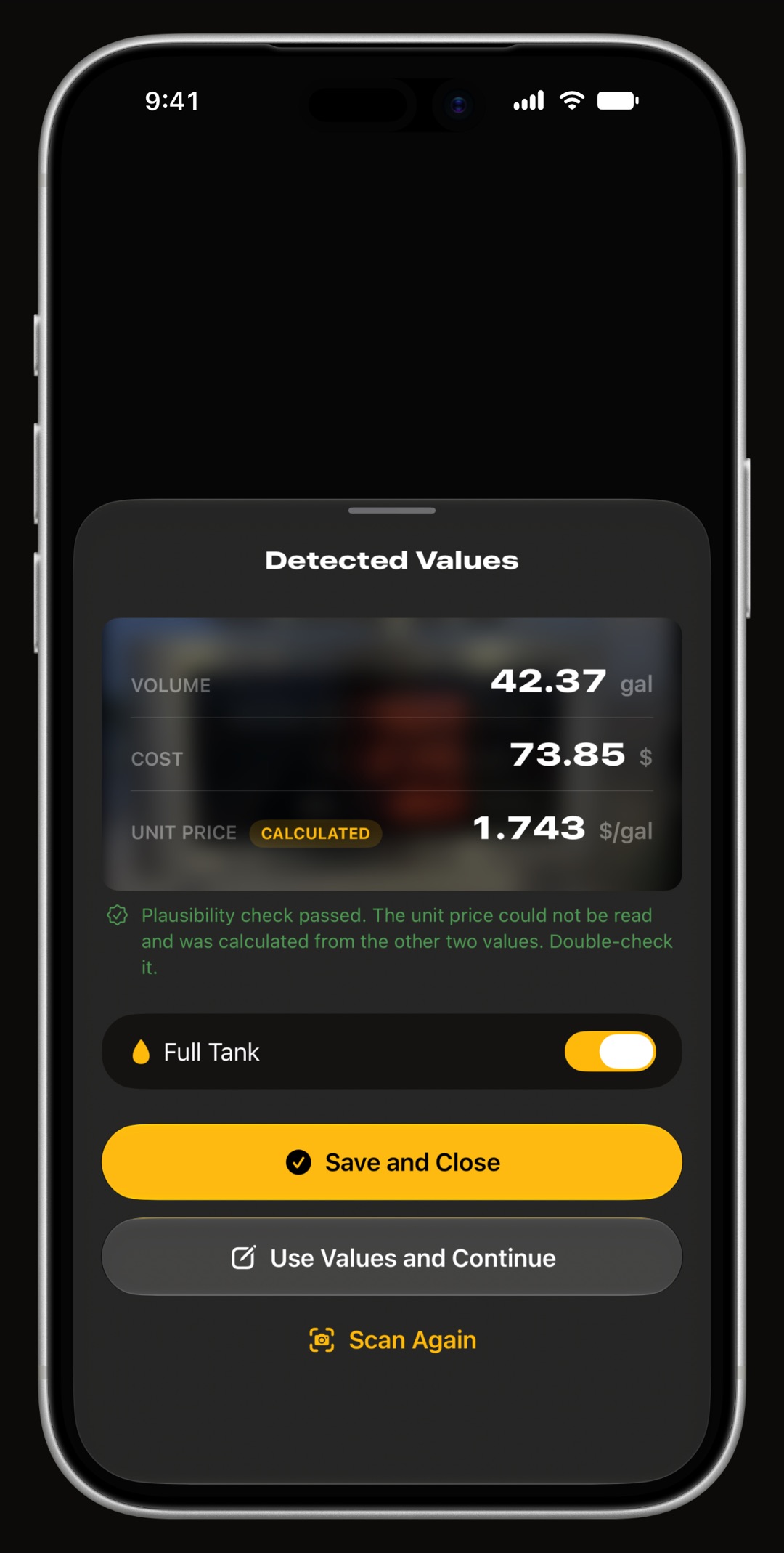
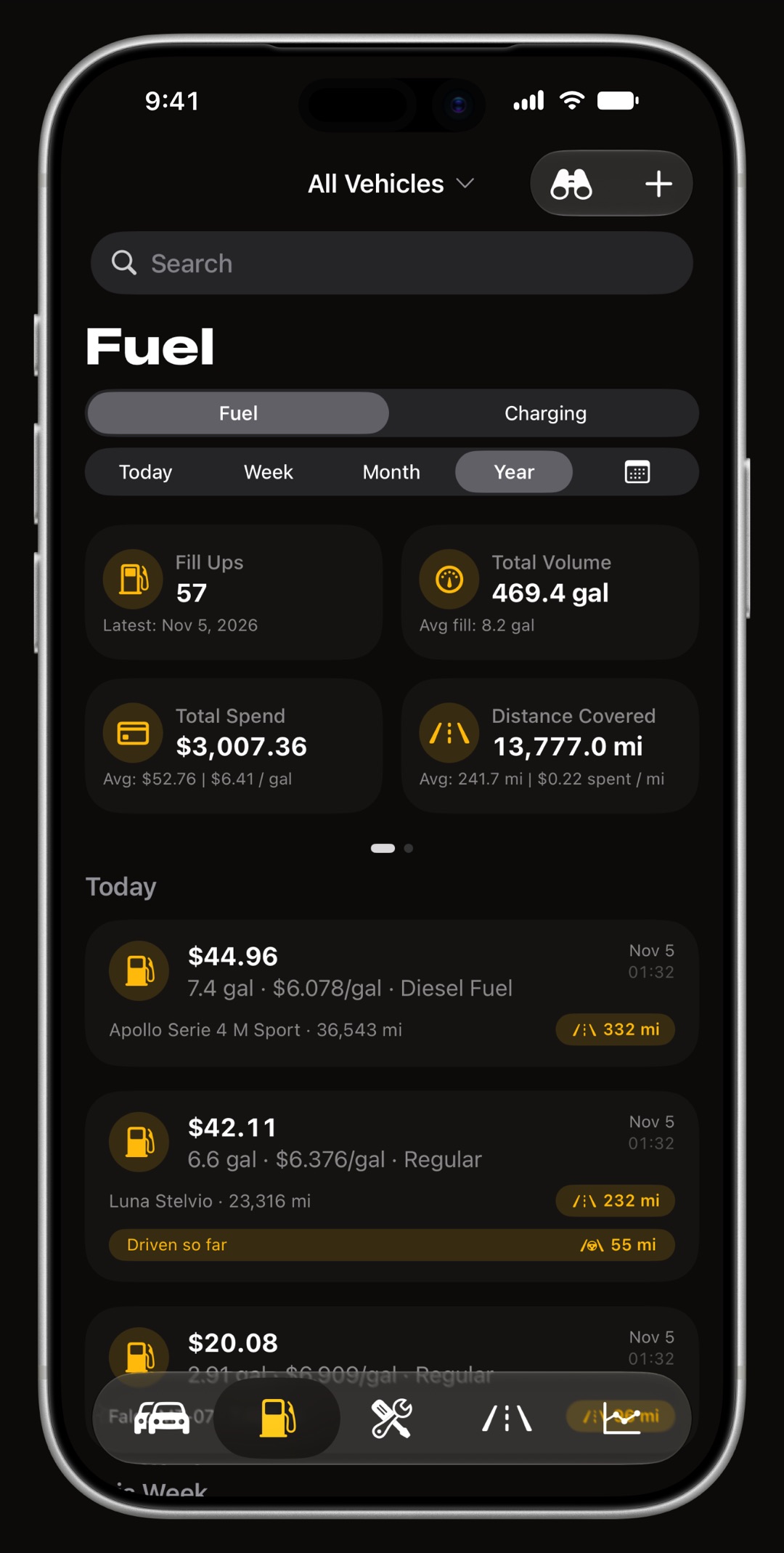
Logging a fill-up is mostly pointing the camera. With WrenchTime Pro, aim it at the pump display, a charger screen or the paper receipt and it reads the volume or energy, the total cost and the price per unit. It uses on-device Vision text recognition, with a seven-segment decoder for LED pump displays, and Apple Intelligence on supported devices.
A plausibility check cross-checks the three values against each other, so a misread digit is caught, and a confirmation sheet shows what was read before anything is saved. Everything runs on the iPhone: no photo or number leaves it, and there is no per-scan fee or extra service on top of Pro.
The same log holds maintenance with reminders by date or mileage and, with a paired car stereo, trips recorded on their own. There is no WrenchTime account and no ads on either tier: data stays on your iPhone and in your own iCloud. With WrenchTime Pro, a CSV export from Fuelly, Drivvo or Fuelio can be imported.
It is also built to feel like part of the iPhone. WrenchTime is written natively in SwiftUI for iOS 26, with Liquid Glass and the Dynamic Island: a trip being recorded shows its distance and time in a Live Activity on the Lock Screen and in the Dynamic Island, and 9 Home Screen and Lock Screen widgets, some with WrenchTime Pro, keep the odometer, recent fill-ups and the month's spending a glance away.
CarPlay and an Apple Watch app, where a fill-up can be logged from the wrist, come with WrenchTime Pro. The iPad gets a permanent sidebar, the dark theme is calibrated for OLED rather than inverted from the light one, and Pro adds 30 accent themes. There are no ads on either tier and no account: your log stays in your own iCloud.
Road Trip MPG, by Darren Stone, is an iPhone app sold as a one-time purchase. Its App Store listing lists no in-app purchases and says there are no ads, subscriptions or recurring fees, with Family Sharing for up to six members. Its privacy label reads Data Not Collected, and sync runs through iCloud or Dropbox. On October 26, 2026 it averaged 4.9 from 629 ratings.
The listing says its fuel economy tracking covers partial, same-day and missed fill-ups. Around the fuel log it keeps unlimited vehicles, a service log with reminders, a tire log, expenses, a trip cost calculator and distance to empty, with CSV import and export. Its listing describes an iPhone-only app. It may suit you better if you prefer a one-time purchase with nothing to buy afterwards.
Fuelly, by Fuelly, LLC, is an iPhone app that syncs with the Fuelly.com website, according to its App Store listing. Each fill-up records the miles, gallons and price per gallon, and the app charts MPG, gas price, gas spend and service spend across several vehicles, with service reminders and CSV reports by email. It reads in MPG, L/100km and km/L. On October 26, 2026 it averaged 4.7 from about 30,000 ratings.
Fuelly is free with in-app purchases. Fuelly Premium removes ads, adds photo and PDF attachments to records and auto-completes locations. The listing's description does not detail how partial or missed fill-ups are handled. It may suit you better if you want your log on the Fuelly.com website.
Simply Auto, by Mrigaen Kapadia, keeps fill-ups, maintenance, mileage, expenses and trips in one log. Its App Store listing says it supports partial fill-ups, compares fuel efficiency by octane, brand and station, logs EVs in kWh, and keeps tax-deduction and rideshare logs, with CSV import and export. On October 26, 2026 it averaged 4.1 from 870 ratings.
The app is free with two paid tiers. GOLD adds instant cloud backup, GPS trip tracking, receipt backup to Google Drive and web access; PLATINUM adds unlimited vehicles and drivers and automated weekly or monthly reports. The listing shows several purchase options for the paid tiers, so check the purchase screen for the current ones. It may suit you better if you need tax-deduction or rideshare logs next to the fuel log.
Five of the six apps are free to download, and what the free version leaves out is what separates them. Road Trip MPG is the exception: it is paid up front with nothing to buy afterwards. The table lists what each developer says about its free and paid tiers; prices are not listed because they vary by plan and storefront, so check the purchase screen.
| App | Free version | What the paid tier adds |
|---|---|---|
| Fuelio | Fuel log, no account, no ads | More expense types, maintenance reminders, receipt scanning, extra reports |
| Drivvo | Unlimited fill-ups, up to 2 vehicles, reminders and reports, with ads | No ads, more vehicles, attachments, data export |
| WrenchTime | 1 vehicle, 3 fill-ups a month, no ads | Unlimited vehicles and entries, pump and receipt scanning, CSV import |
| Fuelly | Fuel log with ads | No ads, photo and PDF attachments, location auto-complete |
| Simply Auto | Fill-ups, maintenance, trips, expenses | Cloud backup, GPS trips, web access, unlimited vehicles, automated reports |
| Road Trip MPG | Paid up front | Nothing extra to buy |
Sources: the App Store listings and FAQs linked above, checked October 26, 2026.
A gas mileage app shows what your car actually does, and that rarely matches the window sticker. fueleconomy.gov's page Your Mileage Will Vary says EPA ratings "may not accurately predict the average MPG you will get" and lists the reasons: how and where you drive, the condition and maintenance of the vehicle, fuel variations, differences between vehicles of the same model, and engine break-in.
The label is already adjusted for the real world. The fueleconomy.gov FAQ says EPA reduces fuel economy test values by about 10% to account for ethanol in gasoline, wind, hills and road conditions. A log of your own fill-ups over several tanks is the figure to compare against, and our guide to improving gas mileage covers what moves it.
The right app is the one you will keep using at every fill-up, so start from how you live with your car.
The best gas mileage app, in eight points.
If you already have years of fill-ups in another app, import your history from Fuelly, Drivvo or Fuelio with WrenchTime Pro, full-tank and missed fill-up flags included, and read how the fuel economy tracker keeps tank-to-tank MPG right. With Pro, every new fill-up can come straight from the pump display or the receipt. The free version covers 1 vehicle and 3 fill-ups a month, with no ads.
Yes. Fuelio, Drivvo, Fuelly, Simply Auto and WrenchTime are free to download with a paid tier; Road Trip MPG is paid up front. Drivvo's free plan has unlimited fill-ups for up to 2 vehicles with ads, and Fuelio's listing says it shows no ads and needs no account.
It depends on the need. For Android too, Fuelio or Drivvo; for a one-time purchase, Road Trip MPG; for a log on a website, Fuelly. For a camera that reads the pump display or the receipt (WrenchTime Pro), with maintenance and automatic trips in the same app and no ads or account, WrenchTime.
Yes. WrenchTime Pro reads the volume, total cost and price per unit off a pump display or a paper receipt with on-device Vision text recognition, including LED seven-segment displays. It cross-checks the three values and shows them for confirmation before saving, and nothing leaves the iPhone.
It divides the miles driven since the last fill-up by the gallons it took to refill the tank, and it needs two complete fill-ups in a row, as fueleconomy.gov explains. A partial fill or a skipped entry makes that interval wrong unless the app is told about it.
The EPA label comes from a lab test that EPA lowers by about 10%, and fueleconomy.gov lists how and where you drive, vehicle condition and maintenance, fuel and engine break-in as reasons your real MPG differs. Several tanks of your own fill-ups give the reliable figure.
Yes. Fuelio's App Store listing says no account is required, Road Trip MPG syncs through your own iCloud or Dropbox, and WrenchTime has no account and syncs through your own iCloud. Drivvo requires an account, which is what lets it work on the web.
More from the blog
Fuel economy
Divide the miles between two full tanks by the gallons it took to refill, then average over at least three tanks by totals, never by per-tank figures.
Fuel economy
Driving habits beat every product: smooth driving and lower highway speeds save the most, tires, oil and roof racks come next, and gadgets do nothing.
App comparison
What the Fuelio fuel log does on iPhone and Android, what is free and what Pro adds, and how it differs from WrenchTime's whole-vehicle log.
Free to download. One vehicle, real features, no ads. Your garage will thank you.
Download WrenchTime on the App Store