App comparison
OBD Fusion vs WrenchTime: CarPlay Gauges, Adapters and Price Compared
OBD Fusion is an OBD-II scanner app by OCTech for iPhone, iPad and Android, $9.99 once on the US App Store: custom gauge dashboards, data logging, emissions readiness and, with paid add-ons for makes such as Ford and Toyota, ABS, airbag and transmission codes. On CarPlay it shows driving information, but its listing says real-time gauges and dashboards are not shown there. WrenchTime reads live OBD-II data for free from a Bluetooth LE ELM327 adapter or an OBDLink MX+, draws it as a grid of gauges on CarPlay with WrenchTime Pro, records it with every trip and keeps the car's maintenance and fuel log. It reads no manufacturer-specific diagnostics.
OBD Fusion and WrenchTime in three points
I build WrenchTime, so read this comparison knowing that. I did not test OBD Fusion: every claim about it on this page comes from OBD Fusion's App Store listing and from OCTech's website, obdsoftware.net, checked on October 16, 2026, with the sources linked in each section and under each table. Every claim about WrenchTime comes from its own feature documentation.
OBD Fusion is a trademark of OCTech, LLC, registered in the U.S. OBDLink, Torque Pro and Car Scanner ELM OBD2 are trademarks of their respective owners. This comparison is independent: WrenchTime is not affiliated with, sponsored by or endorsed by any of them.
- OBD Fusion is a scanner and dashboard app: bought once, it reads and clears emissions-related trouble codes, builds custom gauge dashboards on the phone, logs data to CSV files and reads emissions readiness and test results, and paid enhanced diagnostic add-ons reach other modules on the makes OCTech supports.
- On CarPlay, OBD Fusion shows driving information and trouble codes, not dashboards: its App Store listing says real-time gauges are not supported there, so its dashboard pages stay on the phone. It also supports Android Auto.
- WrenchTime is a live-data and log app: live data free from a Bluetooth LE ELM327 adapter or an OBDLink MX+, a gauge grid on CarPlay and trouble codes with WrenchTime Pro, every reading recorded with the trip, and the car's whole maintenance, fuel and trip log, with no account.
What is the OBD Fusion app, and how much does it cost?
OBD Fusion is an OBD-II diagnostics app published by OCTech, LLC, the maker of TouchScan and OBDwiz, and on the App Store since 2013. Its App Store listing describes an app that reads and clears emissions-related trouble codes and the check engine light, builds real-time dashboards from fully customizable gauges, graphs and logs live data, exports CSV files, estimates fuel economy and times quarter-mile and 0-60 mph runs. It runs on iPhone and iPad from iOS 15, and OCTech's product page adds an Android version and a desktop edition.
On the US App Store, on October 16, 2026, OBD Fusion is listed at $9.99 as a one-time purchase, with an average rating of 4.7 from about 19,500 ratings. Manufacturer-specific enhanced diagnostics are sold separately as in-app purchases, listed by make and model year, such as Toyota 2008 Enhanced Diagnostics; the ones shown on the listing cost $14.99 each. Prices differ by country, so check the purchase screen before you buy.
OCTech's product page lists enhanced diagnostics for Ford, Lincoln, Mercury, Mazda, Toyota, Lexus, Scion, Nissan, Infiniti, Mitsubishi, Dodge, RAM, Chrysler, Jeep and some FIAT and Alfa Romeo vehicles. An enhanced add-on opens modules that standard OBD-II does not reach, such as ABS, airbag, transmission, 4x4 and body control, to read and clear their fault codes and to see hundreds of extra parameters.
Does OBD Fusion work with Apple CarPlay?
Yes, as a readout rather than a dashboard. OBD Fusion's App Store listing says the app lets you "view vital driving information on your CarPlay screen", and adds: "Note that real-time gauges are not supported by CarPlay, so you can't view your OBD Fusion pages such as dashboards on CarPlay." The custom gauge dashboards that OBD Fusion builds on the phone therefore stay on the phone. Its version history on the same listing adds trouble codes on CarPlay and vehicle-specific CarPlay configurations, and OCTech's product page announces Android Auto support as well.
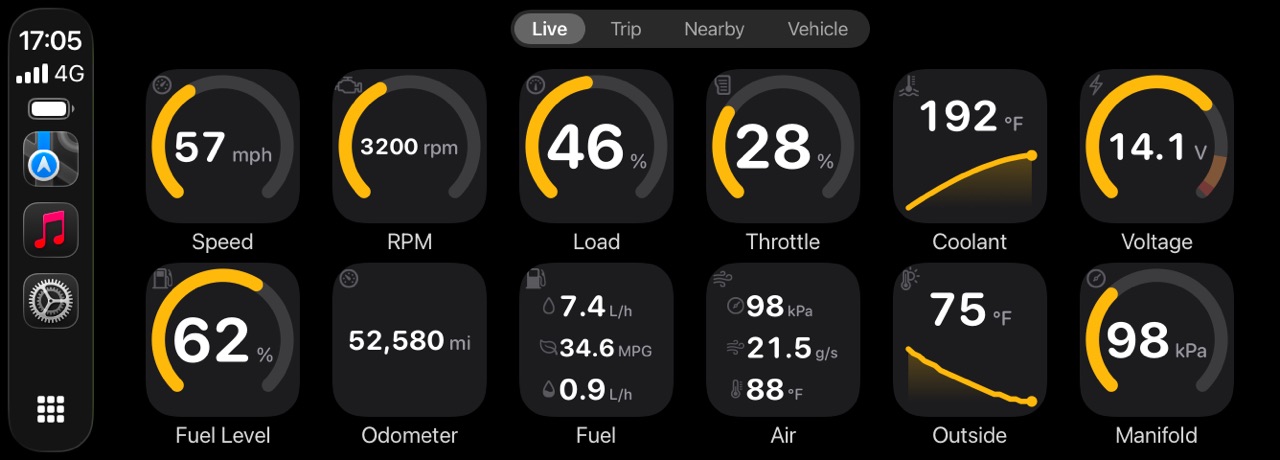
CarPlay gives apps a fixed set of templates, and WrenchTime draws each gauge as an image inside one of them, which is how its CarPlay screen shows rings, scales and bands. With WrenchTime Pro and any supported adapter, the Live tab is a grid of tiles you lay out per vehicle, with a tachometer and a speedometer fed by the car's own computer, boost, coolant temperature, voltage, fuel level, any standard reading the car reports, or a custom PID.
Each WrenchTime tile is a ring with caution and critical bands, a short graph or a plain number; a row holds three to eight tiles; a reading that turns critical raises one alert on the car's screen; and tapping a tile shows its minimum, maximum and average for the drive. Three more tabs record and tag trips, find fuel stations or chargers nearby, and show what is due on the car. The OBD2 app for CarPlay guide covers it, and the CarPlay gauges article compares what other apps draw.
Which OBD2 adapters work with OBD Fusion on iPhone?
On iPhone and iPad, OBD Fusion needs a Wi-Fi ELM327-compatible adapter or a compatible Bluetooth LE adapter. Its App Store listing names, as examples, the Veepeak BLE and BLE+, the Carista BLE, the OBDLink MX+ and OBDLink CX, the Tonwon, LELink, Viecar and BAST BLE adapters, the Lonauto, the Vgate iCar Bluetooth 4.0 and PLX's Kiwi adapters, and says the app is not compatible with generic ELM Bluetooth scan tools. OCTech's adapter guide explains that an iPhone or iPad is limited to Wi-Fi or Bluetooth LE adapters.
Most adapters on that list are Bluetooth LE ELM327 adapters, the kind WrenchTime is built for, but from that list only the OBDLink MX+ is confirmed working with WrenchTime. WrenchTime works with Bluetooth LE ELM327 adapters and with the Apple-certified MX+, and the Vgate iCar Pro and iCar Pro 2S are confirmed working on a real car too. It does not work with Wi-Fi adapters, which OBD Fusion supports, or with classic Bluetooth adapters other than the MX+. The OBD-II adapters for iPhone page lists which adapters work with WrenchTime and which are still unverified.
| Adapter type | OBD Fusion on iPhone | WrenchTime |
|---|---|---|
| Bluetooth LE, ELM327-compatible | Yes, compatible Bluetooth LE adapters; examples named | Yes; Vgate iCar Pro and iCar Pro 2S confirmed |
| OBDLink MX+ (Apple-certified, classic Bluetooth) | Yes | Yes, confirmed |
| OBDLink CX (Bluetooth LE) | Yes | Unverified |
| Wi-Fi, ELM327-compatible | Yes | No |
| Generic classic Bluetooth ELM327 | No | No |
Sources: OBD Fusion's App Store listing and OCTech's adapter guide; WrenchTime's adapter page. Checked October 16, 2026.
What does OBD Fusion do that WrenchTime does not?
OBD Fusion goes deeper into diagnostics and runs on more platforms. The points below come from its App Store listing and OCTech's product page, checked October 16, 2026; each point says how far WrenchTime goes, if at all.
- Manufacturer modules: with a paid enhanced add-on, fault codes and extra parameters from ABS, airbag, transmission, 4x4 and body control modules on the makes OCTech supports. WrenchTime reads trouble codes only from modules that answer the standard OBD-II request, and no manufacturer-specific diagnostics.
- Deeper emissions data: oxygen sensor results (Mode 05), on-board monitoring test results (Mode 06), in-performance tracking counters (Mode 09) and emissions readiness read against each US state's rules. WrenchTime shows readiness monitors and the freeze frame with WrenchTime Pro, without the Mode 06 test results.
- Wi-Fi adapters, Android and a desktop edition: OBD Fusion connects to Wi-Fi ELM327 adapters on iPhone and also runs on Android phones and tablets and on a computer. WrenchTime is an iPhone, iPad and Apple Watch app that speaks Bluetooth LE and the OBDLink MX+.
- Data files and Android Auto: logs saved as CSV files, with playback, iCloud and Dropbox, and Android Auto as well as CarPlay. WrenchTime keeps its readings with each trip, charted and replayed in the app, and runs on CarPlay only.
What does WrenchTime do that OBD Fusion does not list?
WrenchTime is built around the car's whole life rather than a diagnostic session. None of the following appears on OBD Fusion's App Store listing or OCTech's product page, checked October 16, 2026; that means OCTech does not list it, not that it is confirmed to be missing.
- Gauges on CarPlay: a grid of ring, graph and number tiles laid out per vehicle, with caution and critical bands you can set per vehicle and an alert on the car's screen when a reading turns critical, with WrenchTime Pro.
- Readings recorded with every trip, automatically: trips start and stop on their own from the car's Bluetooth or motion, without opening the app, and while an adapter is connected every reading is kept at one sample per second with the trip. OBD Fusion lists data logging with map playback and a trip statistics page, but not automatic trip detection.
- A maintenance, fuel and charging log: 56 maintenance procedures and 12 kits with reminders by date, odometer or both, a tank-to-tank fuel log, an EV charging log and 31 charts of costs, consumption and trips, with free CSV and PDF export. See how to keep car maintenance records.
- Live data on a free tier: standard live data costs nothing in WrenchTime; trouble codes, CarPlay and custom PIDs come with WrenchTime Pro, also sold as a lifetime purchase.
Can OBD Fusion and WrenchTime read custom PIDs?
Both can read values the car reports beyond the standard set. OBD Fusion's App Store listing says you can create custom enhanced PIDs and that it includes some built-in enhanced PIDs for GM vehicles, on top of over 250 supported PIDs; its paid add-ons add hundreds more parameters on the makes they cover.
WrenchTime Pro builds a custom PID from a request on service 01, 21 or 22, an optional control unit header with standard, extended or 29-bit CAN addressing, and a formula over the answer's bytes. It imports definitions from the community OBDb catalog for your make, model and model year, and shares one with another owner as a plain link. A custom PID becomes a gauge on the phone, on the WrenchTime Live dashboard and on CarPlay, and can be recorded with trips. See custom OBD-II PIDs on iPhone.
OBD Fusion vs WrenchTime at a glance
The table compares the two on what each maker states, checked October 16, 2026. "Not listed" means OBD Fusion's App Store listing and OCTech's product page do not mention the feature, not that it is confirmed to be missing. OBD Fusion is shown on iPhone, WrenchTime with its free tier and WrenchTime Pro.
| Feature | OBD Fusion | WrenchTime |
|---|---|---|
| Price model | One-time purchase; enhanced diagnostic add-ons sold separately | Free; WrenchTime Pro monthly, yearly or lifetime |
| Platforms | iPhone, iPad, Android, desktop edition | iPhone, iPad, Apple Watch |
| Adapters on iPhone | Wi-Fi ELM327 or compatible Bluetooth LE adapters, OBDLink MX+ | Bluetooth LE ELM327 adapters, OBDLink MX+ |
| Live data | Over 250 supported PIDs, custom dashboards on the phone | Over fifty standard parameters, free; WrenchTime Live dashboard |
| Read and clear trouble codes | Emissions-related codes, included | Codes from modules answering the standard request (Pro) |
| ABS, airbag and transmission modules | Paid enhanced add-ons on supported makes | No manufacturer-specific diagnostics; only codes a module reports to the standard OBD-II request (Pro) |
| Custom PIDs | Custom enhanced PIDs; built-in GM enhanced PIDs | Services 01, 21 and 22, OBDb catalog import (Pro) |
| Emissions data | Readiness per US state, Mode 05, Mode 06, Mode 09 | Readiness monitors (Pro) |
| Freeze frame | Yes | Yes (Pro) |
| CarPlay | Driving information and trouble codes; dashboards and real-time gauges not shown | Gauge grid laid out per vehicle, plus Trip, Nearby and Vehicle tabs (Pro) |
| Android Auto | Yes | No |
| Logging | Logging and playback, CSV files, live graphs, GPS map colored by a parameter | Every reading at one sample per second, saved with each trip automatically |
| Performance timing | Quarter mile and 0-60 mph | GPS acceleration timer, quarter mile, 0-60 mph and metric runs, free |
| Maintenance and fuel log | Not listed | 56 procedures, 12 kits, reminders, tank-to-tank fuel log |
| Automatic trip detection | Not listed | From the car's Bluetooth or motion |
| App Store privacy label, as declared by each developer | Data Not Linked to You: user content, identifiers, usage data, diagnostics | Data Not Collected |
Checked October 16, 2026 from OBD Fusion's App Store listing and OCTech's product page; WrenchTime's feature documentation and App Store listing.
What does WrenchTime cost compared with OBD Fusion?
OBD Fusion: $9.99 once on the US App Store on October 16, 2026, with manufacturer-specific enhanced diagnostics sold as separate in-app purchases by make and model year. The listing shows no subscription. Prices differ by country, so check the purchase screen for yours.
WrenchTime: free to download, with live OBD-II data on the free tier. Trouble codes, CarPlay, custom PIDs and the rest of WrenchTime Pro cost $2.99 a month, $14.99 a year with a free trial, or $34.99 once for a lifetime unlock, App Store prices read on 2026-10-05. In both cases the adapter is bought separately, and the OBDLink MX+ is one adapter both apps list.
Which one should you choose?
Pick by whether you need the car's other modules or the engine's readings in front of you. If neither fits, the best OBD2 apps for iPhone compares more apps side by side, and Torque Pro for iPhone covers owners moving from Android.
- Choose OBD Fusion if you want manufacturer-level diagnostics on a Ford, Mazda, Toyota, Nissan, Mitsubishi, Dodge, RAM, Chrysler or Jeep vehicle, Mode 06 test results, a Wi-Fi adapter, Android or a computer, or customizable gauge dashboards on the phone, for a one-time price.
- Choose WrenchTime if you use an iPhone and want the engine's readings as gauges on CarPlay, recorded with every drive without opening the app, next to the car's maintenance, fuel and trip log, with live data free, CarPlay with WrenchTime Pro, and no account.
- Use both if you need make-specific diagnostics now and then and live gauges every day. The OBDLink MX+ works in both apps, connected to one app at a time.
Key takeaways
What to remember about OBD Fusion and WrenchTime, checked on October 16, 2026.
- OBD Fusion costs $9.99 once on the US App Store and its manufacturer-specific enhanced diagnostics, which reach ABS, airbag, transmission and other modules on supported makes, are separate in-app purchases.
- On CarPlay, OBD Fusion shows driving information and trouble codes, and its listing says real-time gauges and its dashboards are not shown there; it also supports Android Auto.
- On iPhone, OBD Fusion needs a Wi-Fi or Bluetooth LE adapter, or the OBDLink MX+; generic classic Bluetooth ELM327 adapters do not work. WrenchTime does not support Wi-Fi adapters and works with Bluetooth LE ELM327 adapters and the OBDLink MX+.
- WrenchTime draws CarPlay gauges laid out per vehicle with WrenchTime Pro, records every reading with each trip, keeps the whole car log and reads live data free, but reads no manufacturer-specific diagnostics.
Put your engine's readings on CarPlay as gauges
If you want live gauges on the car's screen rather than a list, WrenchTime reads over fifty standard parameters for free over a Bluetooth LE ELM327 adapter or an OBDLink MX+, shows 3 instruments on the WrenchTime Live dashboard on the free tier, and puts the full gauge grid on CarPlay with WrenchTime Pro, which you can buy once for $34.99. The free tier also keeps 1 vehicle with 3 fuel entries and 2 maintenance entries a month and 10 recorded trips a week. Start with the OBD2 app for CarPlay guide. If you need ABS, airbag or transmission diagnostics on a supported make, OBD Fusion's add-ons cover what WrenchTime does not.
Frequently asked questions
Is OBD Fusion free?
No. OBD Fusion is listed at $9.99 as a one-time purchase on the US App Store, checked October 16, 2026, and its manufacturer-specific enhanced diagnostics are extra in-app purchases. WrenchTime is free to download and reads live OBD-II data on its free tier; trouble codes and CarPlay gauges come with WrenchTime Pro.
Does OBD Fusion show gauges on CarPlay?
Not according to its App Store listing, which says OBD Fusion shows vital driving information on CarPlay, trouble codes included, but that real-time gauges are not supported there, so its dashboards stay on the phone. WrenchTime draws its CarPlay readings as a grid of gauge tiles with WrenchTime Pro.
What adapter do I need for OBD Fusion on iPhone?
A Wi-Fi ELM327-compatible adapter or a compatible Bluetooth LE adapter, such as a Veepeak BLE or a Vgate iCar Bluetooth 4.0, or the OBDLink MX+. OBD Fusion says generic ELM327 Bluetooth adapters do not work on iOS. WrenchTime works with Bluetooth LE ELM327 adapters and the OBDLink MX+, not with Wi-Fi adapters.
Is OBD Fusion the Torque Pro of iPhone?
Torque Pro runs only on Android, so iPhone owners look for another app, and OBD Fusion is one of them, alongside Car Scanner ELM OBD2 and WrenchTime. All three read live data, trouble codes and custom PIDs. WrenchTime adds CarPlay gauges, readings recorded with every trip and a full car log.
Can WrenchTime read ABS and airbag codes like OBD Fusion's add-ons?
No. With WrenchTime Pro, WrenchTime reads trouble codes from every module that answers the standard OBD-II request, and it reads no manufacturer-specific diagnostics. OBD Fusion's paid enhanced add-ons reach modules such as ABS, airbag and transmission on the makes OCTech supports.
Does OBD Fusion work with Android Auto?
Yes. OCTech's product page says OBD Fusion supports both CarPlay and Android Auto, and the app is sold for Android as well as for iPhone and iPad. WrenchTime is an iPhone app, so it runs on CarPlay but not on Android Auto.
