App comparison
OBDeleven vs WrenchTime: Live Data, CarPlay and Coding Compared
OBDeleven is the tool to choose if you want to code your car: with its OBDeleven 3 device it scans every control unit and changes hidden settings on Volkswagen Group, BMW, Toyota, Ford (US models) and Mercedes-Benz cars, and its free plan reads fault codes and live data on most cars from about 2008, on CarPlay too. WrenchTime codes nothing. It is an iPhone app that reads live OBD-II data for free from any Bluetooth LE ELM327 adapter or an OBDLink MX+, draws it as gauges on CarPlay with WrenchTime Pro, records it with every trip, and keeps the car's maintenance and fuel log, with no account.
OBDeleven and WrenchTime in three points
I build WrenchTime, so read this comparison knowing that. I did not test OBDeleven: every claim about it on this page comes from OBDeleven's App Store listing, help center and website, checked on October 16, 2026, and each one links to where it was read. Every claim about WrenchTime comes from its own feature documentation.
OBDeleven is a trademark of its owner; the OBDeleven apps are published by OBDeleven UAB. VCDS, Carista and Carly are trademarks of their respective owners. This comparison is independent: WrenchTime is not affiliated with, sponsored by or endorsed by any of them.
- OBDeleven is a diagnostics and coding tool: its own device, OBDeleven 3, reads and clears fault codes and shows live data on its free plan, and on the brands OBDeleven is licensed for it scans every control unit and changes car features through One-Click Apps or, on Volkswagen Group cars with a PRO plan, manual coding.
- OBDeleven has also become a car companion: a free trip tracker, maintenance reminders, fuel cost estimates, car alerts and a CarPlay app with live data, scan history and reminders, which needs the OBDeleven 3 device.
- WrenchTime is a live-data and log app for an adapter you choose: any Bluetooth LE ELM327 adapter or the OBDLink MX+, live data free, trouble codes and CarPlay gauges with WrenchTime Pro, the car's whole maintenance, fuel and trip log, no account and no coding.
What is OBDeleven, and do you need a subscription?
OBDeleven is an OBD-II diagnostics and coding tool: a Bluetooth device that plugs into the car's diagnostic port, and apps for iPhone and Android published by OBDeleven UAB. According to its App Store listing, the main OBDeleven app works with the OBDeleven 3 device for full functionality and with ELM327 devices for basic diagnostics only, and setting it up includes creating an OBDeleven account. A second app, OBDeleven VAG, serves Volkswagen Group cars, and OBDeleven's help center says all new features are developed in the main app.
On every car brand that uses the CAN-bus protocol, typically from 2008 on, the OBDeleven app reads and clears engine and transmission fault codes and shows live data. On the brands OBDeleven is officially licensed by, Volkswagen Group, BMW Group, Toyota Group, Ford (US models) and Mercedes-Benz, it also scans every control unit and activates One-Click Apps, ready-made coding options that turn car features on, off or change them; manual coding, long coding and adaptations are for Volkswagen Group cars. Availability also depends on the country: OBDeleven's feature coverage article lists OBD2 diagnostics worldwide and the licensed features region by region.
You do not need a subscription to read codes or live data. OBDeleven's plan guide says the device and the app give basic fault reading and clearing, live data and basic diagnostics on the FREE plan. PRO adds manual coding, long coding, adaptations, Basic Settings and trouble code freeze frame on Volkswagen Group cars; ULTIMATE adds unlimited One-Click Apps under a fair usage threshold; and Credits, a micro-currency sold in the app and on obdeleven.com, buy One-Click Apps one at a time with no plan at all.
Since September 15, 2026, according to OBDeleven's renewal article, the PRO and ULTIMATE plans sold on obdeleven.com are one-year plans, and activating a plan code requires billing details and a payment card for automatic renewal, for one year at the regular plan price minus 10%, unless you cancel it. There is no monthly billing, purchases made inside the app are unchanged, and a plan included with a Pack device renews only if you turn renewal on in your profile.
| What you want to do | What OBDeleven requires |
|---|---|
| Read and clear fault codes, live data, basic diagnostics | The device and the FREE plan |
| Trip tracker | Free in the OBDeleven app |
| Car alerts for new or cleared fault codes | FREE plan, with OBDeleven 3 left plugged in |
| Occasional One-Click Apps | Credits, no plan |
| Manual coding and adaptations | PRO |
| Battery coding or SFD unlock | PRO or ULTIMATE |
| Unlimited One-Click Apps | ULTIMATE |
Sources: OBDeleven's plan guide, Trip tracker and Car alerts articles, checked October 16, 2026.
What does OBDeleven live data show?
OBDeleven live data is the car's sensor readings in real time, and it is part of the FREE plan. OBDeleven's help center says it is available on Volkswagen Group, BMW Group and Toyota Group cars and on all other vehicles from 2008 onwards with the CAN-bus protocol, and that the parameters vary with the brand, the model, the control unit and even its software version. Its examples are engine RPM, coolant and intake air temperature, throttle position, battery voltage, fuel trims, oxygen sensor readings, turbo boost pressure, transmission oil temperature and vehicle speed.
In the OBDeleven app you connect to the car, tap Live data, choose the parameters and tap Update; tapping a single parameter shows its average, lowest and highest values. In the OBDeleven VAG app for Volkswagen Group cars, live data sits inside each control unit: Control units, then a unit such as Engine, then Live data. On the licensed brands, OBDeleven's App Store listing describes detailed live data "from multiple systems", not only the engine.
WrenchTime reads live data from the engine's standard OBD-II parameters, the set a car's diagnostic port publishes for every scan tool: over fifty of them whenever the car reports them, each with its name and unit, and never one the car has not declared. Speed, RPM and whatever is on screen are read up to eight times a second on the WrenchTime Live dashboard and on CarPlay, and while a trip records, every reading is kept at one sample per second and saved with the trip, so the drive can be scrubbed back afterwards. WrenchTime does not read the module-level data OBDeleven reads on licensed brands; a manufacturer value you know the request for, a transmission temperature for instance, can be added as a custom PID with WrenchTime Pro.
How do you get a boost gauge from OBD-II data?
Boost is the intake manifold's absolute pressure minus the atmospheric pressure outside the engine, so an OBD-II boost gauge needs two readings: intake manifold absolute pressure (standard PID 0B) and barometric pressure (PID 33). A result above zero is boost and below zero is vacuum. Some cars also report a boost pressure of their own, and on a car that publishes only the two absolute pressures, boost is that subtraction.
A common shortcut subtracts a fixed 1 bar, 100 kPa or 14.5 psi, from the manifold reading. That is close at sea level and wrong in the mountains, because air pressure falls with altitude: by NASA's standard atmosphere model, barometric pressure averages about 84.4 kPa (12.2 psi) at 5,000 feet, so subtracting 1 bar there under-reads boost by about 2.3 psi. The model describes an average day, so the weather moves the real figure a little either way.
WrenchTime builds its boost reading this way: intake manifold pressure minus the barometric pressure the car itself reports, and no boost reading at all when the car does not report one, rather than assuming sea level. The result is a gauge like any other, on the phone, on the WrenchTime Live dashboard and, with WrenchTime Pro, as a CarPlay tile, with caution and critical bands you can set per vehicle.
| Altitude | Barometric pressure (kPa) | Barometric pressure (psi) | Error of the 1-bar shortcut (psi) |
|---|---|---|---|
| Sea level | 101.4 | 14.7 | +0.2, reads high |
| 2,500 ft (762 m) | 92.6 | 13.4 | -1.1, reads low |
| 5,000 ft (1,524 m) | 84.4 | 12.2 | -2.3, reads low |
| 7,500 ft (2,286 m) | 76.8 | 11.1 | -3.4, reads low |
| 10,000 ft (3,048 m) | 69.8 | 10.1 | -4.4, reads low |
Computed from NASA Glenn Research Center's metric curve fit for the troposphere: T = 15.04 - 0.00649 h and p = 101.29 [(T + 273.1) / 288.08]^5.256, with h in meters and p in kPa.
Can OBDeleven show live data on Apple CarPlay?
Yes, with the OBDeleven 3 device. OBDeleven's CarPlay and Android Auto article, published in September 2025 and read here from its most recent archived copy, of May 2026, says the app shows live OBD2 data on the car's screen, "real-time values like RPM, coolant temperature, or battery voltage", together with your scan history and your maintenance reminders, and lists the OBDeleven 3 device and app version 1.30.0 or newer as what you need; the same page offers the device with "No paid plan required". OBDeleven's help center also describes CarPlay support for viewing maintenance reminders.
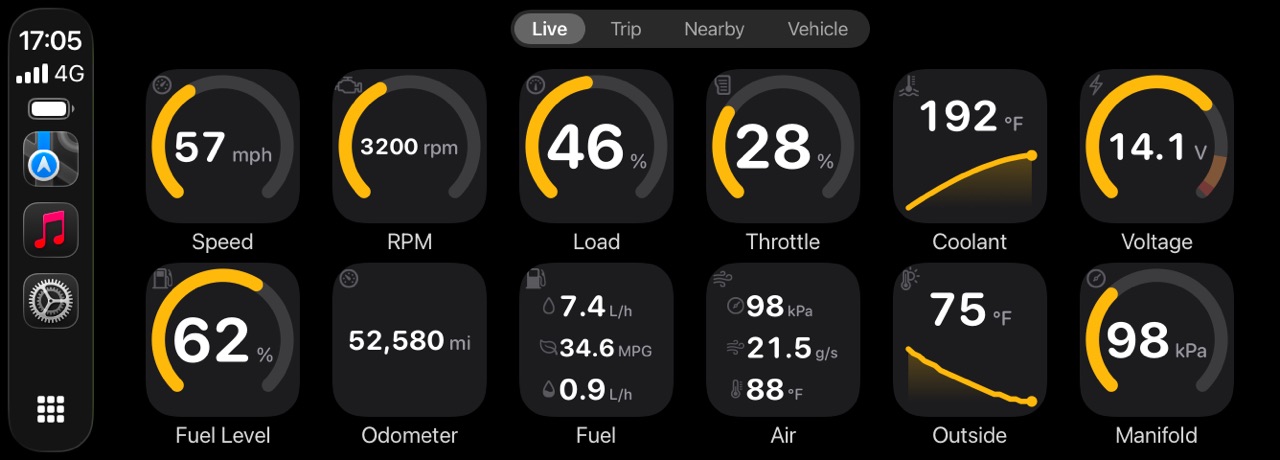
WrenchTime puts the engine on CarPlay as a grid of gauges you lay out per vehicle, with WrenchTime Pro and any supported adapter: a tachometer and a speedometer fed by the car's computer, boost, coolant temperature, voltage, fuel level or any standard reading the car reports, or a custom PID. Each tile is a ring with caution and critical bands, a short graph or a plain number; a row holds three to eight tiles; a reading that turns critical raises one alert on the car's screen; and tapping a tile shows its minimum, maximum and average for the drive. Three more tabs record and tag trips, find fuel stations or chargers nearby, and show what is due on the car. The OBD2 app for CarPlay guide covers it, and the CarPlay gauges article compares what other apps draw.
Does OBDeleven work with an ELM327 adapter?
Yes, for basic diagnostics. OBDeleven's App Store listing says the app works with OBDeleven 3 devices for full functionality and with ELM327 devices for basic diagnostics only, and its help center says an ELM327 connects for engine fault scanning and clearing, while OBDeleven's own device adds coding, customizations and manufacturer-level functionality for select brands. OBDeleven's CarPlay article names OBDeleven 3 as the device to use.
That is the practical difference between OBDeleven and a generic OBD2 adapter. A generic ELM327 adapter speaks standard OBD-II, the emissions-related set every car's diagnostic port answers: trouble codes, readiness monitors and the standard live readings. OBDeleven 3, on the brands OBDeleven is licensed for, also scans all of the car's control units, and on those brands it can change their settings.
WrenchTime takes the generic route. It works with Bluetooth Low Energy ELM327 adapters and with the Apple-certified OBDLink MX+; the Vgate iCar Pro, the iCar Pro 2S and the MX+ are confirmed working on a real car, and Wi-Fi adapters, or classic Bluetooth adapters other than the MX+, do not work with WrenchTime. With WrenchTime Pro it reads trouble codes from every module that answers the standard OBD-II request; it reads no manufacturer-specific diagnostics and writes nothing to the car. The OBD-II adapters for iPhone page lists which adapters work.
Does OBDeleven track trips, fuel and maintenance?
Yes. The trip tracker and car alerts arrived in April 2026, and maintenance reminders were already on CarPlay in 2025. OBDeleven's Trip tracker, free in the app, records drives automatically and shows each route on a map with traffic conditions, distance, duration, average and maximum speed and altitude, plus a Driving Score built from braking, acceleration and speed consistency, and an estimate of each trip's fuel cost from a short questionnaire and the refuels you log. It works without the device once the car has been connected. The October 2026 update listed on the App Store assigns trips to the car an OBDeleven 3 is plugged into and adds actual fuel usage and automatic fuel level and mileage updates, depending on the vehicle.
OBDeleven's maintenance reminders work by date, mileage or both, send notifications ahead of a service, up to a month before it is due, and keep a History & costs list of completed services. Car alerts notify you when a fault code appears or disappears while an OBDeleven 3 stays plugged in, and, according to its App Store version history, the app's expenses tracker now covers more than fuel.
WrenchTime is built around that log. The Care tab holds 56 maintenance procedures and 12 kits with reminders by date, odometer or both, and recurring series for anything that repeats; the fuel log computes economy tank to tank and handles a missed fill-up; electric and plug-in hybrid vehicles get a charging log; and trips start and stop on their own from the car's Bluetooth or motion, with G-force events and, with an adapter, the engine data recorded along the drive. 31 charts turn it into running costs, and CSV and PDF export are free. See how to keep car maintenance records.
OBDeleven vs WrenchTime at a glance
The table compares the two on what each maker states, checked October 16, 2026. "Not listed" means OBDeleven's own pages do not mention the feature, not that it is confirmed to be missing. OBDeleven is shown with its main app and the OBDeleven 3 device, WrenchTime with its free tier and WrenchTime Pro.
| Feature | OBDeleven | WrenchTime |
|---|---|---|
| Hardware | OBDeleven 3 for full functionality; ELM327 for basic diagnostics | Any Bluetooth LE ELM327 adapter, or the OBDLink MX+ |
| Platforms | iPhone, iPad, Android | iPhone, iPad, Apple Watch |
| Account | Created during setup | None |
| Read and clear engine fault codes | FREE plan | WrenchTime Pro |
| Every control unit | Advanced diagnostics on licensed brands, by country | Codes from modules answering the standard OBD-II request; no manufacturer-specific diagnostics |
| Coding and hidden features | One-Click Apps (Credits or ULTIMATE); manual coding (PRO, Volkswagen Group) | None |
| Live data | FREE plan; detailed data on licensed brands | Free; over fifty standard parameters |
| Manufacturer-specific readings | Per control unit on licensed brands | Custom PIDs on services 01, 21 and 22 (Pro) |
| Boost | Turbo boost pressure where the car reports it | Manifold minus barometric pressure, both from the car |
| Engine data kept with trips | Fuel usage and fuel level with OBDeleven 3, depending on the vehicle | Every reading, one sample per second |
| CarPlay | Live data, scan history and maintenance reminders, with OBDeleven 3 | Gauge grid laid out per vehicle, plus Trip, Nearby and Vehicle tabs (Pro) |
| Readiness and emissions | Emissions readiness check on licensed brands, with OBDeleven 3, not on EVs yet | Readiness monitors (Pro) |
| Freeze frame | PRO plan, Volkswagen Group | WrenchTime Pro |
| Trip tracking | Trip tracker with Driving Score, free | Automatic from the car's Bluetooth or motion, with G-force events |
| Maintenance | Reminders by date or mileage, with history and costs | 56 procedures and 12 kits, reminders by date or odometer, recurring series |
| Fuel and charging | Fuel cost estimates and a refuel log | Tank-to-tank fuel log and an EV charging log |
| Export | Car health report from an inspection scan, as a PDF or a link | CSV and PDF of the whole log, free |
| App Store privacy label, as declared by each developer | Data linked to you: purchases, contact info, user content, identifiers, usage data, diagnostics | Data Not Collected |
| Price model | FREE plan; yearly PRO and ULTIMATE plans; Credits | Free; WrenchTime Pro monthly, yearly or lifetime |
Checked October 16, 2026 from OBDeleven's App Store listing, help center (including the emissions readiness check, Car inspection and PRO plan articles) and CarPlay article (archived copy of May 2026); WrenchTime's feature documentation and App Store listing.
What does WrenchTime cost compared with OBDeleven?
OBDeleven: the FREE plan comes with the device and covers fault codes, live data, the trip tracker and car alerts. Coding needs a PRO or ULTIMATE plan, sold on obdeleven.com as a one-year plan that renews automatically unless you cancel it, or Credits for single One-Click Apps. Device, Pack and plan prices depend on the bundle, and OBDeleven's help center notes that in-app prices may differ from its website because of app store taxes, so check OBDeleven's products page for your country before you buy.
WrenchTime: free to download, with live OBD-II data on the free tier. Trouble codes, CarPlay, custom PIDs and the rest of WrenchTime Pro cost $2.99 a month, $14.99 a year with a free trial, or $34.99 once for a lifetime unlock, App Store prices read on 2026-10-05. The adapter is bought separately, and the adapter page lists the ones that work. A lifetime unlock has nothing to renew.
Which one should you choose?
Pick by whether you want to change the car or read it. If neither fits, the best OBD2 apps for iPhone compares more reading apps side by side, and FIXD vs WrenchTime covers a sensor sold with a subscription.
- Choose OBDeleven if you want to change how your car behaves: One-Click Apps on Volkswagen Group, BMW, Toyota, Ford (US models) and Mercedes-Benz cars, manual coding on Volkswagen Group cars, every control unit scanned on those brands, battery coding and service resets, plus free fault codes and live data, on iPhone or Android.
- Choose WrenchTime if you use an iPhone, want to pick your own adapter, and want live data as gauges on CarPlay laid out per vehicle and recorded with every trip, boost computed from the car's own barometric reading, and a full maintenance, fuel, charging and trip log with no account.
- Look at other coding tools if coding is the point and OBDeleven does not cover your car or your country: VCDS, Carista and Carly are other coding tools owners compare it with. WrenchTime is not one of them.
Key takeaways
What to remember about OBDeleven and WrenchTime, checked on October 16, 2026.
- OBDeleven's FREE plan reads and clears fault codes and shows live data with its own device on most CAN-bus cars from about 2008; PRO adds manual coding on Volkswagen Group cars, and ULTIMATE or Credits unlock One-Click Apps on the brands it is licensed for.
- Since September 15, 2026, PRO and ULTIMATE plans from obdeleven.com are one-year plans activated with a payment card for automatic renewal; purchases inside the app are unchanged.
- OBDeleven on CarPlay shows live data, scan history and maintenance reminders with the OBDeleven 3 device; an ELM327 adapter gives basic diagnostics only.
- Boost is manifold pressure minus barometric pressure: subtracting a fixed 1 bar instead under-reads boost by about 2.3 psi at 5,000 feet, by NASA's standard atmosphere.
- WrenchTime codes nothing, but reads live data free from any Bluetooth LE ELM327 adapter or the OBDLink MX+, draws it on CarPlay with WrenchTime Pro, records it with every trip and keeps the car's whole log, with no account.
See your engine's live data on iPhone and CarPlay with the adapter you choose
If you want live data, boost and gauges rather than coding, WrenchTime reads over fifty standard parameters for free over a Bluetooth LE ELM327 adapter or an OBDLink MX+, shows 3 instruments on the WrenchTime Live dashboard on the free tier, and puts the full gauge grid on CarPlay with WrenchTime Pro, which you can buy once for $34.99. The free tier also keeps 1 vehicle with 3 fuel entries and 2 maintenance entries a month and 10 recorded trips a week. Start with the OBD-II app for iPhone guide. If you need coding or diagnostics on every control unit, OBDeleven covers what WrenchTime does not.
Frequently asked questions
Is there an OBDeleven alternative for iPhone?
For coding, owners compare OBDeleven with tools such as VCDS, Carista and Carly. For live data, gauges and a car log without coding, WrenchTime runs on iPhone with any Bluetooth LE ELM327 adapter or an OBDLink MX+: live data is free, and trouble codes and CarPlay gauges come with WrenchTime Pro, also sold as a lifetime purchase.
Does OBDeleven work with an ELM327 adapter?
Yes, for basic diagnostics only. OBDeleven's App Store listing, checked October 16, 2026, says the app works with ELM327 devices for basic OBD2 diagnostics and with its own OBDeleven 3 for full functionality, including advanced diagnostics, coding and customization. Its CarPlay article names OBDeleven 3 as the device to use.
Do you need an OBDeleven subscription?
Not to read codes or live data: OBDeleven's FREE plan covers fault reading and clearing, live data and basic diagnostics with its device. PRO adds manual coding and adaptations on Volkswagen Group cars, ULTIMATE adds unlimited One-Click Apps, and since September 15, 2026 the plans sold on obdeleven.com are yearly, with automatic renewal unless canceled.
Does OBDeleven work with Apple CarPlay?
Yes. OBDeleven's own article from September 2025 says its app shows live OBD2 data such as RPM, coolant temperature and battery voltage on CarPlay, plus scan history and maintenance reminders, with the OBDeleven 3 device. WrenchTime draws CarPlay gauges from any supported ELM327 adapter or an OBDLink MX+, with WrenchTime Pro.
How do I get a boost gauge from OBD-II?
Subtract barometric pressure (PID 33) from intake manifold absolute pressure (PID 0B): above zero is boost, below zero is vacuum. Use the car's own barometric reading rather than a fixed 1 bar, which under-reads boost by about 2.3 psi at 5,000 feet. WrenchTime computes boost this way and shows it as a gauge.
Can WrenchTime code my car like OBDeleven?
No. WrenchTime reads data and writes nothing to the car: it has no coding, adaptations or One-Click Apps, and it reads no manufacturer-specific diagnostics. Its custom PIDs can only send read requests, on services 01, 21 and 22. For coding, use OBDeleven or another coding tool.
