CarPlay · OBD-II · iOS 26+
An OBD-II app for CarPlay that draws real gauges, not a list
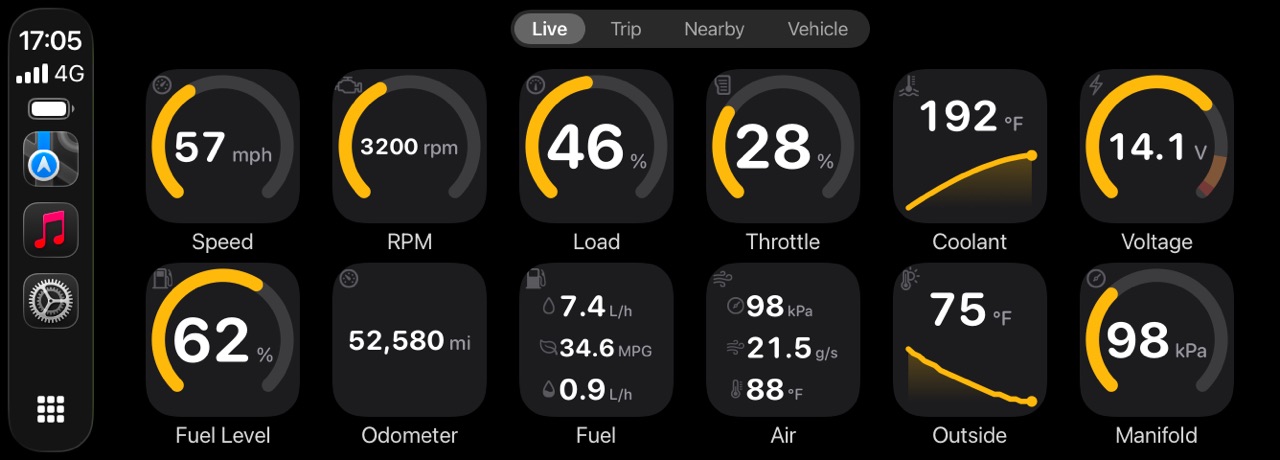
WrenchTime is an iPhone app that puts live OBD-II data on Apple CarPlay as a grid of gauges you lay out yourself: a tachometer and a speedometer fed by the car's own computer, plus boost, coolant temperature, throttle, engine load, voltage, fuel level, fuel rate and any of over fifty standard readings the car reports, or a custom PID you defined. Each tile is drawn as a ring with its caution and critical bands, a short graph of recent values, or a plain number, and related readings can share one tile. The grid is redrawn four times a second by default and up to nearly seven, a reading that turns critical raises an alert on the car's screen, and tapping a tile shows its minimum, maximum and average for the drive. It needs a Bluetooth OBD-II adapter, either an ELM327-compatible one on Bluetooth Low Energy or the Apple-certified OBDLink MX+, and WrenchTime Pro. Other apps that put OBD-II data on CarPlay include OBD Fusion and OBDeleven; the CarPlay gauges article compares what each one shows.
What OBD app works with Apple CarPlay?
Only an iPhone app that reads an OBD-II adapter: CarPlay itself has no access to the car's diagnostic port, and the car's screen shows only what an app on the phone draws for it. Apps that do it include OBD Fusion, OBDeleven and WrenchTime, and the difference you see in the car is the form: some send a list of values, others draw gauges. WrenchTime draws gauges, and it is a log for the car's whole life rather than a scanner alone, so the same drive that filled the CarPlay screen is saved as a trip with its engine data, next to the fill-ups and the servicing.
Can CarPlay show a tachometer?
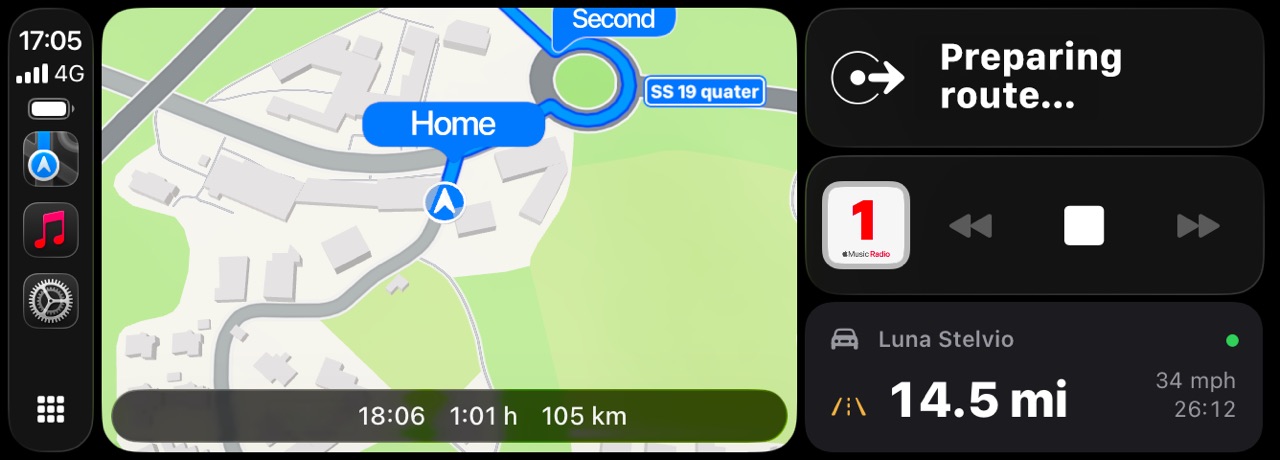
Yes, with an adapter. The RPM tile is a tachometer drawn as a ring, with its scale and its red zone taken from the vehicle: set a red line once in that signal's gauge scale and the CarPlay tile, the phone's Live dashboard and the trip charts all draw the same one. A motorcycle gets a bike's scale by default, and so does every other gauge.
Can CarPlay show a speedometer?
With an adapter, yes: the speed tile reads the vehicle speed the car's own computer reports over OBD-II, not an estimate from the phone's GPS. Without an adapter the CarPlay gauges have nothing to read. Google Maps and Waze show a GPS speed on CarPlay, and on the iPhone itself WrenchTime Live has a GPS speedometer that needs no adapter at all: see the car dashboard app.
Which readings can be gauges?
Any reading the car answers. The standard set covers speed, revs, engine load, throttle, coolant, intake and outside temperature, fuel level, module voltage, manifold pressure, air flow and fuel rate and, wherever the car reports them, dozens more such as boost, torque and power, oil and exhaust temperatures, fuel trims, lambda, and the particulate filter and the AdBlue level on a diesel. A custom PID you defined, a transmission temperature for instance, becomes a tile like any other. Two tiles group related readings: fuel, with consumption and economy together, and air, with manifold pressure, air flow and intake temperature.
How do I choose the gauges and their layout?
In Settings > CarPlay, per vehicle. The list shows every tile as it will look in the car, with a switch that puts it on the grid and a handle to order it, and each signal can be drawn as a gauge, a graph or plain text, or left on Automatic. You also choose how many tiles a row holds, from three to eight, whether tiles carry their name and unit, a gauge style, and an accent colour for that vehicle, so two cars in the same garage are told apart at a glance. The layout travels with the vehicle through your own iCloud.
How fast do the gauges update?
The grid is redrawn four times a second by default. Settings > CarPlay > Performance offers five paces, from once a second to nearly seven times a second, and Low Power Mode holds it to twice a second unless you tell it not to. While the grid is on screen, the readings it shows are also asked of the adapter more often than the rest, so the numbers on the car's screen are the newest the link can deliver.
What happens when a reading turns critical?
The car's screen shows an alert, once per transition: coolant crossing into its critical band, for instance, or a custom signal you marked to alert when it turns active. The check runs on every reading whether its tile is on the grid or not, and each signal then stays quiet for ten minutes, so an alert never turns into a nag. Tapping any tile shows its current value with the minimum, maximum and average for the drive.
Does it follow the car's night mode?
By default it follows the head unit, dark at night and light by day, and it can be held dark or light instead. The car's own interface stays under the car's control; what changes is every gauge WrenchTime draws.
What else is on CarPlay?
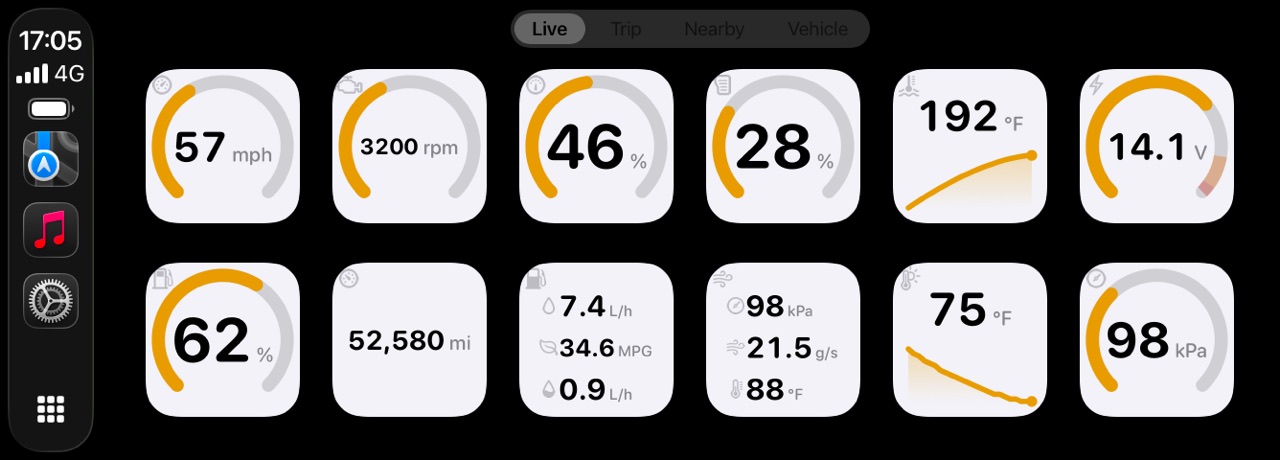
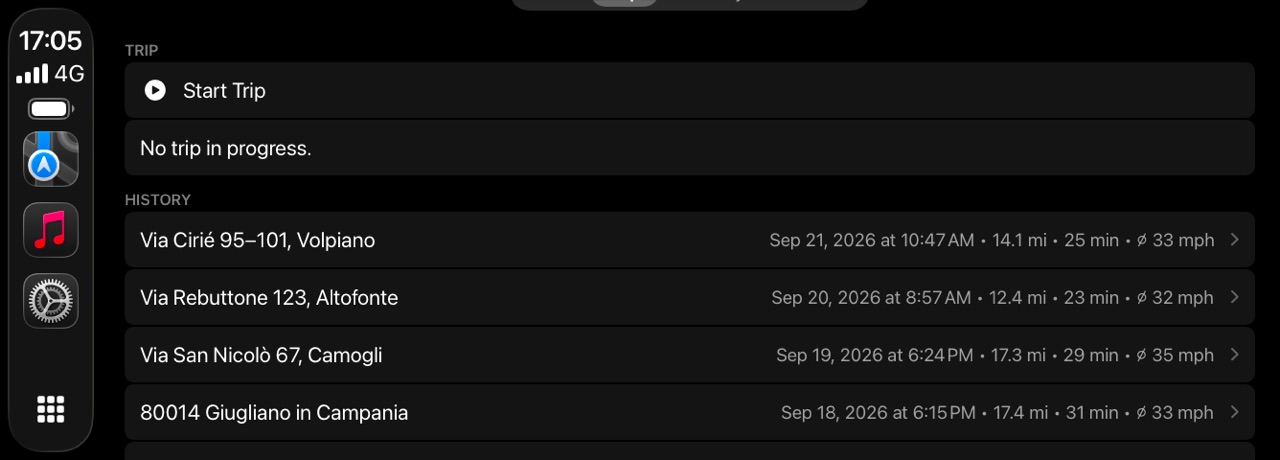
Three more tabs. Trip starts and stops a recording, tags it, and lists your last ten drives with a route map. Nearby shows up to twelve fuel stations around you, or chargers for an electric vehicle. Vehicle shows the odometer and what is due next, a service or a payment. You can reorder the tabs, which matters on a head unit that shows fewer than four.
What do I need?
An iPhone on iOS 26 or later, a car with CarPlay, wired or wireless, a Bluetooth OBD-II adapter linked to the vehicle in WrenchTime, and WrenchTime Pro, since every CarPlay tab is part of it. The adapters confirmed on a real car, and the ones that need a setup step first, are on the OBD-II adapters for iPhone page.
Frequently asked questions
What OBD app works with Apple CarPlay?
An iPhone app that reads an OBD-II adapter. WrenchTime, OBD Fusion and OBDeleven all put OBD-II data on CarPlay; WrenchTime draws it as a grid of gauges with caution and critical bands rather than a list.
Can I see RPM on CarPlay?
Yes, with an OBD-II adapter and WrenchTime Pro: the RPM tile is a tachometer ring with the red line you set for the vehicle.
Does the CarPlay speedometer use GPS?
No. With an adapter, WrenchTime's speed tile reads the vehicle speed the car's own computer reports. Without one, the CarPlay gauges have nothing to show.
How often do the CarPlay gauges refresh?
Four times a second by default, and anywhere from once a second to nearly seven times a second in Settings > CarPlay > Performance.
Is CarPlay free in WrenchTime?
No, CarPlay is part of WrenchTime Pro. Live OBD-II data on the iPhone, and the phone's Live dashboard with up to 3 instruments, are free.

Made for people who would rather know than guess.
Free to download. One vehicle, real features, no ads. Your garage will thank you.
Download WrenchTime on the App Store