Vehicle sharing · iPhone · iCloud · iOS 26+
One log for a car more than one person drives
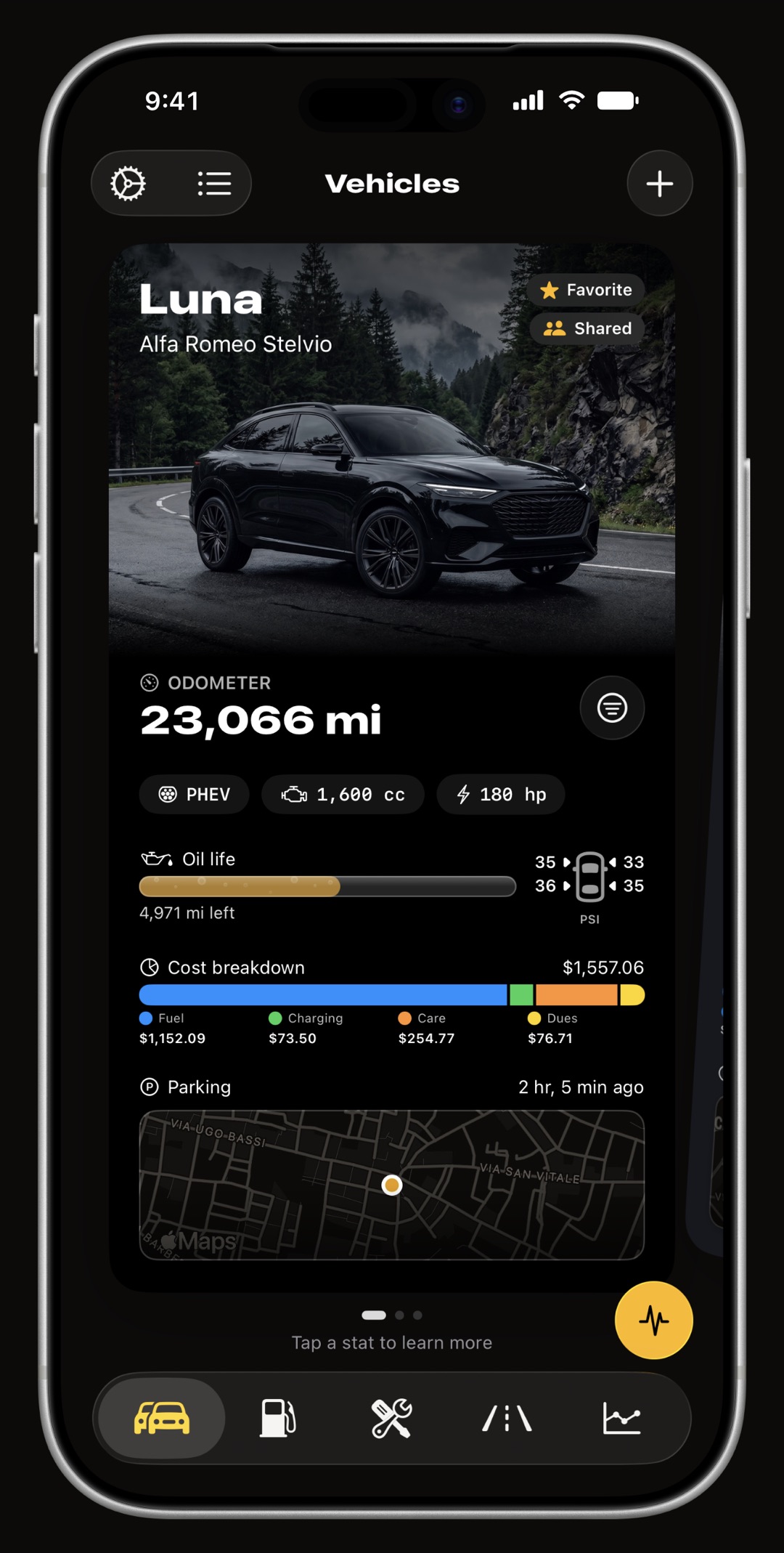
WrenchTime lets the owner of a car or a bike share that one vehicle with family, a partner or a co-driver over iCloud, so everyone who drives it keeps one shared log, and one record of what the car costs, instead of several half logs. Fill-ups, charging sessions, servicing and recurring dues, odometer history, attached receipts, the parking spot, recorded trips and the vehicle's OBD-II setup and scans all travel. The owner invites each person privately through Apple's own sharing sheet and chooses, per person, whether they can only view the history or can log entries too, and every entry shows who logged it. It is not Apple Family Sharing and needs no Family Sharing group: anyone with an iCloud account and WrenchTime on an iPhone or iPad can be invited, family or not. Sharing is a WrenchTime Pro feature for the owner; accepting an invitation needs no Pro. There is no WrenchTime account and no WrenchTime server: the shared vehicle lives in the owner's iCloud and syncs to each participant's own.
Who is vehicle sharing for?
Anyone whose car has more than one driver. A couple sharing the family car, where one person fills up and the other books the service. A parent who wants to see what the teenager's car is doing without holding the phone that logs it. Two riders taking turns on one bike. A household where the car belongs to one person's Apple account but is refuelled, washed and driven by everyone. Without sharing, each of them keeps a partial record, and the fuel economy, the service due date and the running cost are all computed from half the entries. With it, there is one history, and every figure in the app is computed from all of it. A household that kept its log in another app or in a shared spreadsheet can import that history into the car first, then share it.
How do I share a vehicle?
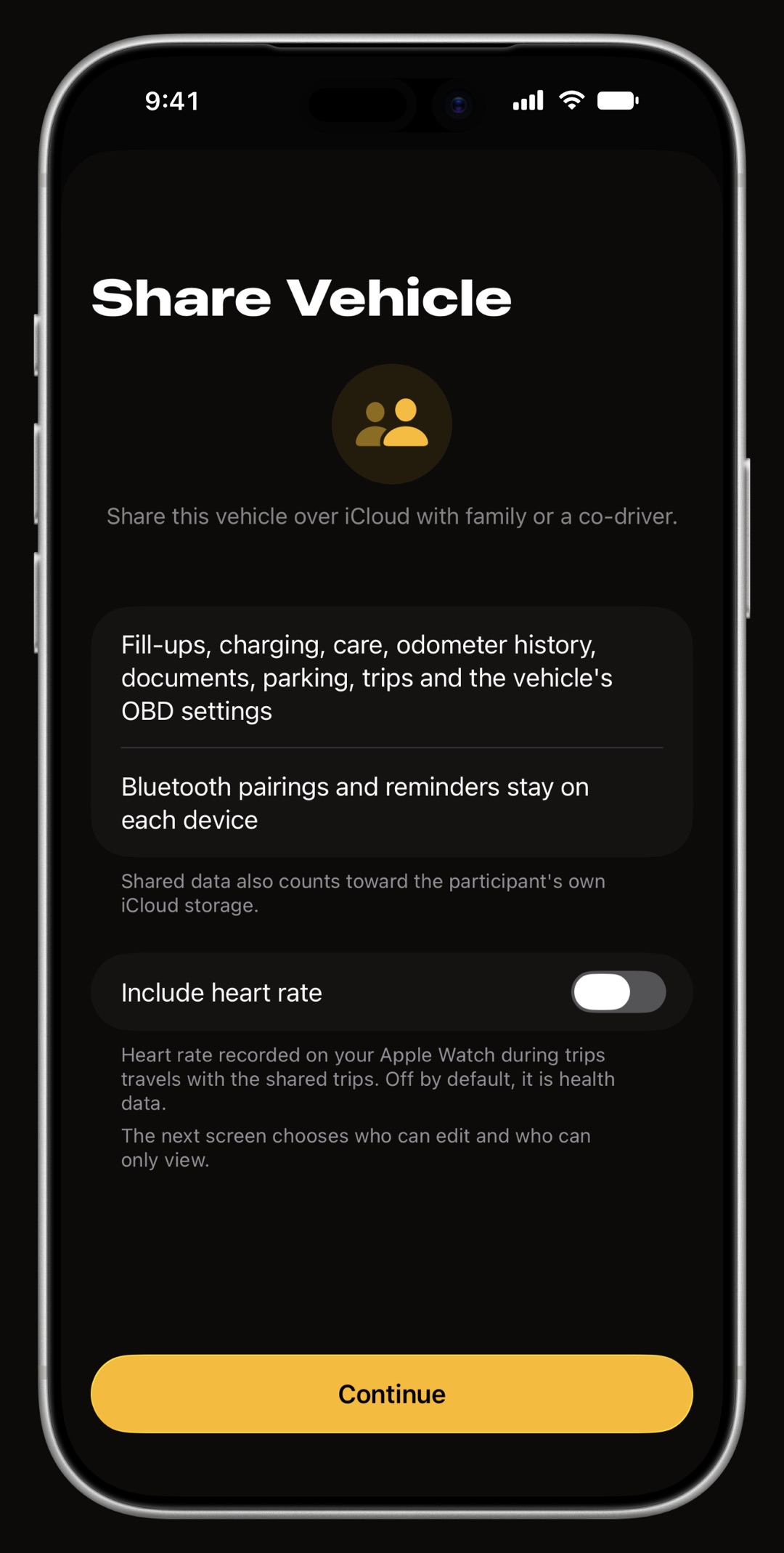
Open the vehicle, go to its Sharing section and tap Share Vehicle. A short setup screen says exactly what travels and what stays on each device, and offers the heart-rate switch described below. Continue opens Apple's standard iCloud sharing sheet, the same one Notes and Reminders use: pick people from your contacts or send the invitation through Messages or Mail, and set each person to view only or can edit. Invitations are always private; there is no public link that anyone holding it could open. The recipient taps the invitation, WrenchTime opens, and the vehicle appears in their garage with a Shared mark.
- One vehicle per invitation each shared vehicle gets its own iCloud zone, so an invitation covers that car and nothing else in your garage or your account.
- An iCloud account is all it needs sharing runs on iCloud independently of the app's own iCloud Sync switch, so it works even if you keep your personal data on this device only.
- Manage it later the Sharing section shows how many people the vehicle is shared with, when it last synced and how many changes are waiting, and Manage Sharing reopens Apple's sheet to add people, change someone's access or stop.
What travels with a shared vehicle, and what stays on each phone?
Everything that is the vehicle's history travels. What stays behind is what belongs to one particular phone rather than to the car, and the setup screen says so before you invite anyone.
- Travels fill-ups, charging sessions, care records including recurring series such as insurance and road tax, odometer history, attached documents and receipts, the parking spot, and trips with their routes, stops and tyre pressure readings.
- Travels too, for an OBD-II car the vehicle's custom PIDs, gauge scale overrides, trouble-code scans and acceleration runs, so a co-driver's phone reads the car the way the owner set it up.
- Stays on each phone Bluetooth pairings, because the car stereo that starts automatic trip detection is paired to a phone, not to the car's history.
- Rebuilt, not sent service reminders are scheduled on each device from the care record's own reminder settings, so everyone gets the reminder without anyone's notifications being copied across.
- Merged by name tags travel by name and colour and join the recipient's own tags, so a shared Work tag joins their own Work tag instead of creating a duplicate.
Can I see who logged a fill-up, a service or a trip?
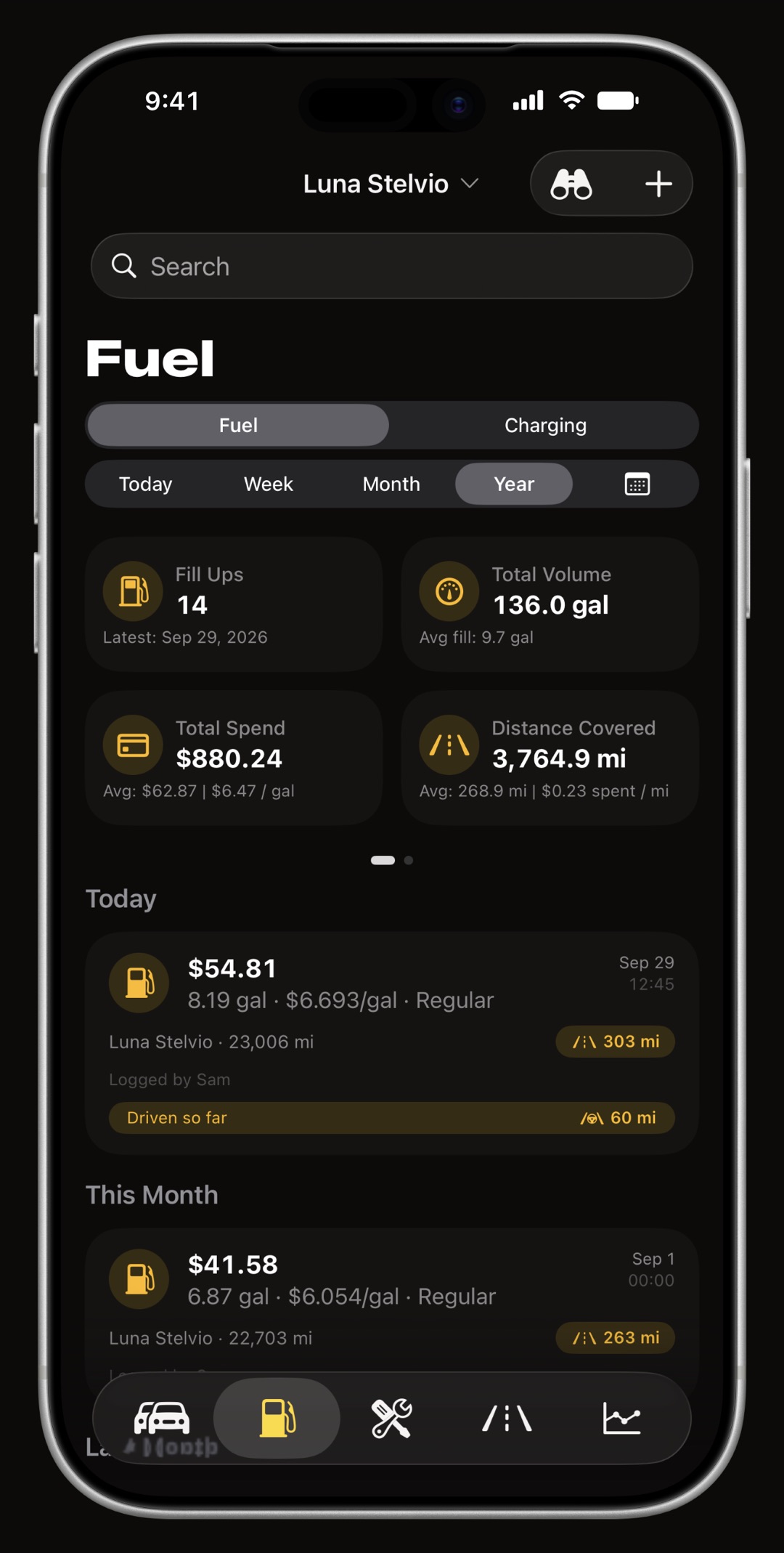
Yes. On a shared vehicle each entry carries a Logged by caption with the name of the person who added it, in the Fuel and Charging lists, on care records and on trips, so a fill-up nobody remembers or a service booked by the other driver is never a mystery. The names come from iCloud each time they are shown and are never stored by the app, which is what Apple's sharing terms ask for.
What is the difference between view only and can edit?
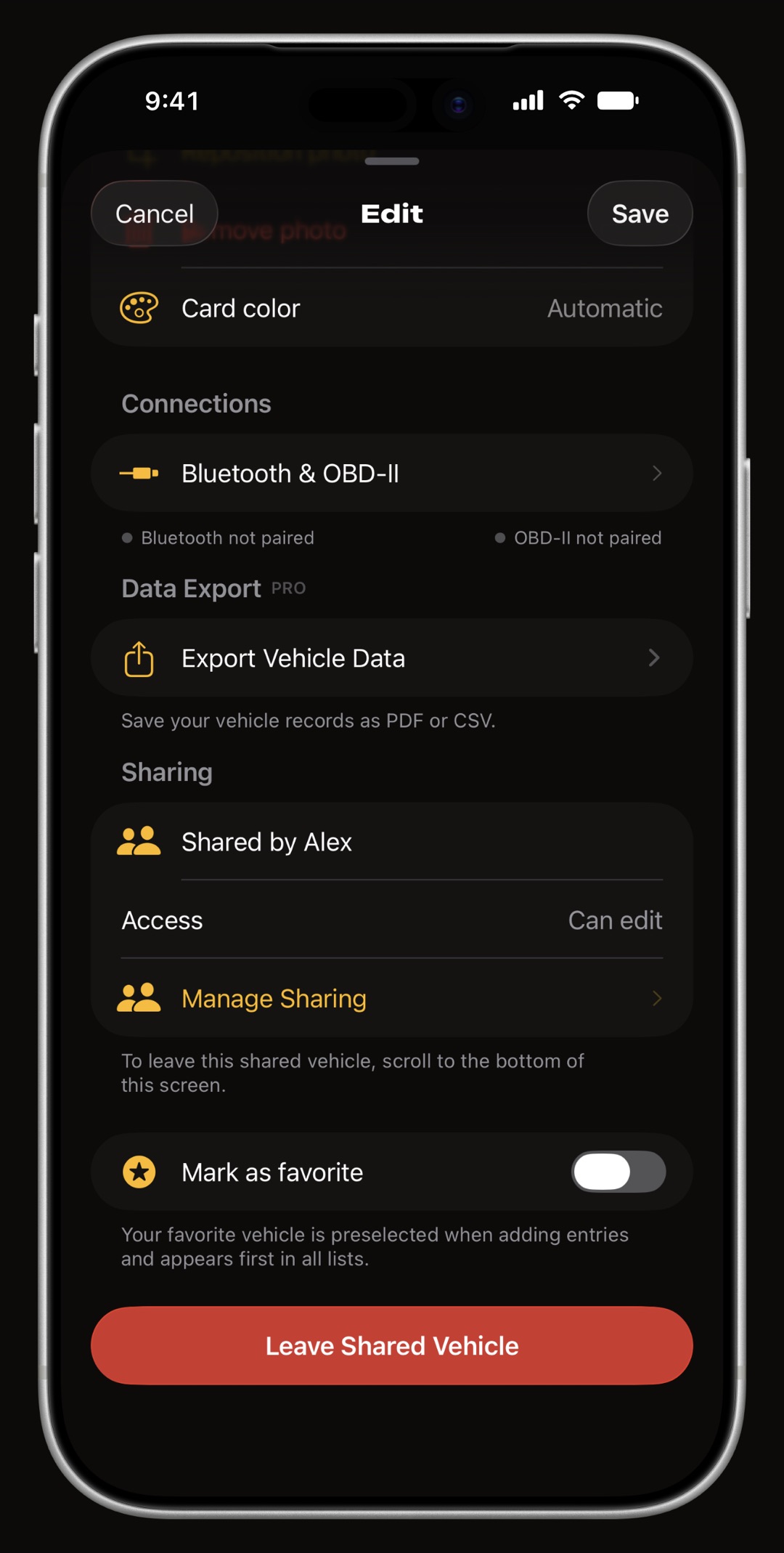
The owner sets it per person in Apple's sharing sheet and can change it at any time. A participant sees their own level in the vehicle's Sharing section, next to who shared it with them.
- Can edit logs fill-ups, charges, services and trips exactly as the owner does, and edits or deletes entries the same way. Their trips can move the shared odometer and their phone can update the parking spot.
- View only sees the whole history and every chart but cannot add, edit or delete anything, and their phone never moves the shared car's odometer or its parking spot. They can still star the vehicle as a favourite, which stays on their own phone.
- Downgraded mid-week if the owner switches someone from can edit to view only, that person's changes that had not synced yet are dropped rather than forced through.
What happens when two people edit the same entry?
The change is merged field by field rather than one whole entry overwriting the other. If one person corrected the cost of a fill-up and the other added a note to it, both changes survive. Only when two people changed the same field does the newer change win. The odometer follows its own rule: the higher reading wins, because a car's mileage only goes forward and a stale lower value from an offline phone should never roll it back.
Does trip detection work on a shared car?
Yes, for every driver. A participant's phone learns the shared car's parking spot like the owner's does, so walking to it and driving off can arm automatic trip detection the same way it does for a car of their own. A driver with can edit access sees their trips land in the one shared history with their name on them, which is what makes the mileage log complete when two people drive the same car to work on alternate days.
Is my Apple Watch heart rate shared?
Not unless you say so. WrenchTime can record heart rate from an Apple Watch during a drive, and that is health data, so on a shared vehicle it is off by default. The owner can switch Include heart rate on in the setup screen or later in the vehicle's Sharing section; turning it on also sends the heart-rate data of trips already recorded. Everything else about the trip travels either way.
How do I stop sharing, or leave a shared vehicle?
Either side can end it, and neither loses anything that is theirs.
- The owner stops sharing from Manage Sharing. The owner keeps every entry, including the ones the participants logged. Each participant's copy is removed from their phone and they are told the vehicle is no longer shared with them.
- A participant leaves with Leave Shared Vehicle at the bottom of the vehicle screen. Their copy is removed and the owner's data is untouched.
- Nothing recorded is thrown away a trip or acceleration run a participant recorded that had not synced yet stays on their phone as an unassigned trip instead of being deleted with the shared copy.
- Deleting the vehicle ends the sharing first, so participants are told rather than left with a car that silently stops updating.
Where does the shared data live, and what does it cost?
In iCloud, and nowhere else. The shared vehicle is stored in the owner's iCloud and synced to each participant's through Apple's own sharing, so there is no WrenchTime account to create and no WrenchTime server holding anyone's fuel log. The shared data also counts toward each participant's own iCloud storage, which the setup screen says before anyone is invited. Sharing a vehicle is part of WrenchTime Pro for the owner, as a subscription or a one-time lifetime purchase; a participant accepts and uses the shared vehicle without Pro, and it does not count toward their own free-tier limits. Demo vehicles are never shared.
Frequently asked questions
Does the other person need WrenchTime Pro?
No. Only the owner needs WrenchTime Pro to share a vehicle. Accepting an invitation and using the shared vehicle, including logging entries with can edit access, needs no Pro.
Does a car shared with me count toward my free limits?
No. A vehicle someone else shares with you never counts toward your own free-tier limits on vehicles, entries or trips, because the owner is the one with WrenchTime Pro. That holds even once your own limits are used up: a trip recorded on a shared car is kept after your weekly trips run out, and a trip that ends without a vehicle waits for you to assign it to the shared car instead of being lost. You can keep your own car on the free tier and still log into a car shared with you.
Is vehicle sharing the same as Apple Family Sharing?
No. It does not use Apple Family Sharing and needs no Family Sharing group. The owner invites anyone with an iCloud account, family or not, through Apple's standard iCloud sharing sheet, the same one Notes and Reminders use.
Can someone with an Android phone join a shared car?
No. The person invited needs an iPhone or iPad with WrenchTime installed, which is a free download, and accepting the invitation needs no Pro. WrenchTime is made for Apple devices only, so an Android phone cannot join.
Can my partner and I keep track of the car's expenses together?
Yes. Every fill-up, charge, service and recurring cost either of you logs lands in the one shared history, so the running costs, fuel economy and service dates on both phones are computed from all of it, and each entry shows who logged it. WrenchTime shows what the car costs; it does not split the bill between people or work out who owes whom.
Can the people I share with see my other cars?
No. Each shared vehicle lives in its own iCloud zone, so an invitation covers exactly that vehicle and nothing else in your garage or your iCloud account.
Can I share a car with more than one person?
Yes. Invite as many people as you like through Apple's sharing sheet and give each one view only or can edit access separately. Invitations are always private; there is no public link.
What happens to the data when I stop sharing?
You keep all of it, including the entries the others logged. Each participant's copy is removed from their phone and they are told the vehicle is no longer shared with them.
Is my Apple Watch heart rate shared with the other drivers?
Only if you turn on Include heart rate for that vehicle. It is off by default because it is health data, and it can be switched on in the setup screen or later in the vehicle's Sharing section.
Does sharing work if I have the app's iCloud Sync switched off?
Yes. Sharing needs an iCloud account on each phone but runs independently of the app's own iCloud Sync switch.
Can a view-only person change the odometer?
No. A view-only participant cannot add, edit or delete entries, and their phone never moves the shared car's odometer or its parking spot.
Do I need a WrenchTime account to share a car?
No. There is no WrenchTime account and no WrenchTime server. Sharing runs entirely on Apple's iCloud, between your iCloud and the iCloud of the people you invite.

Made for people who would rather know than guess.
Free to download. One vehicle, real features, no ads. Your garage will thank you.
Download WrenchTime on the App Store