Fuel economy tracker · iPhone · iOS 26+
A fuel economy tracker that refuses to invent a number
WrenchTime is a fuel log and fuel economy tracker for iPhone that computes consumption tank to tank: an economy figure only exists between two full fill-ups, a missed fill-up is flagged and excluded rather than averaged over, and the US gallon and the imperial gallon are two different units with MPG computed correctly for each. It reads pump displays and receipts on device with a seven-segment decoder and a plausibility check, alerts you when economy drops against your own history, estimates what each recorded trip consumed from the fill-ups around it, plots the cheapest stations around you where a public price registry exists, and draws the fuel price trend, the efficiency trend and the cost per distance as charts. No account, no server, no ads.
How is fuel economy calculated?
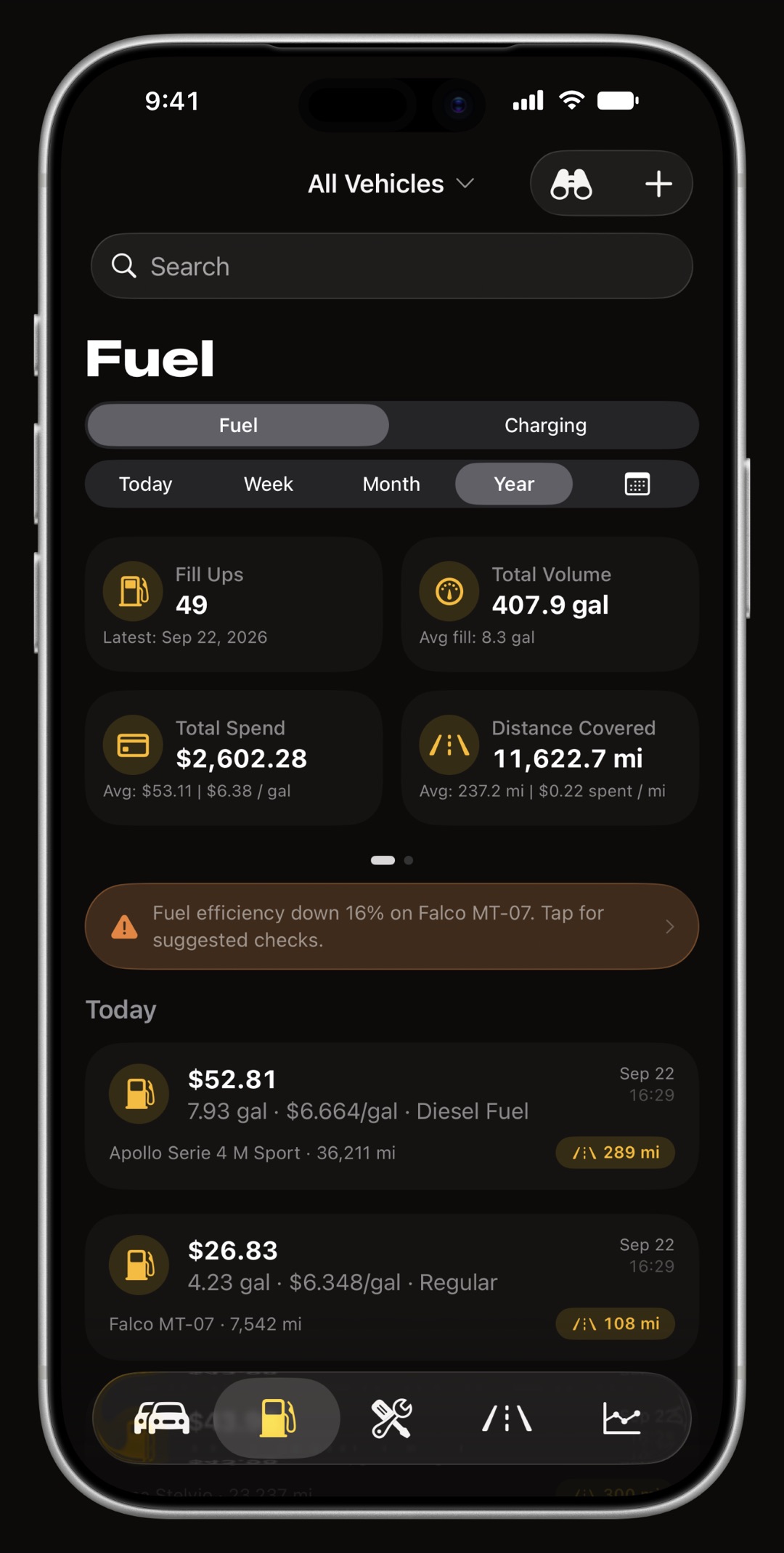
From full tank to full tank. A fill-up marked as a full tank closes an interval, and the fuel logged inside that interval divided by the distance the odometer covered is the only economy figure WrenchTime will state. A partial fill-up is recorded and costed but does not produce a figure of its own. A fill-up you forgot to log is marked on the next entry with the missed-fill-up flag, and that interval is excluded instead of quietly producing an impossible number. Fuel grade is tracked per fill-up, so you can see whether the expensive pump returns anything.
- Full tank flag with a configurable default, so a driver who always brims the tank never has to tap it.
- Missed fill-up flag the honest alternative to averaging over a gap you know is there.
- Efficiency drop alerts when economy falls meaningfully against your own history, a sheet explains what changed rather than a bare badge.
Which units does it use, and are the two gallons kept apart?
Fuel economy reads in km/L, L/100 km, MPG (US) or MPG (imperial). Volume is litres, US gallons or imperial gallons as separate units, not one approximate gallon: a US gallon is 3.785 litres and an imperial gallon is 4.546, and an app that conflates them reports British consumption roughly a sixth too low. British defaults are miles, litres and imperial MPG, which is how the UK actually measures. Everything is stored in litres and kilometres and converted for display, so switching units never rewrites your history, and currency follows your region or any one you force, with the symbol where your locale puts it.
How does pump and receipt scanning work?
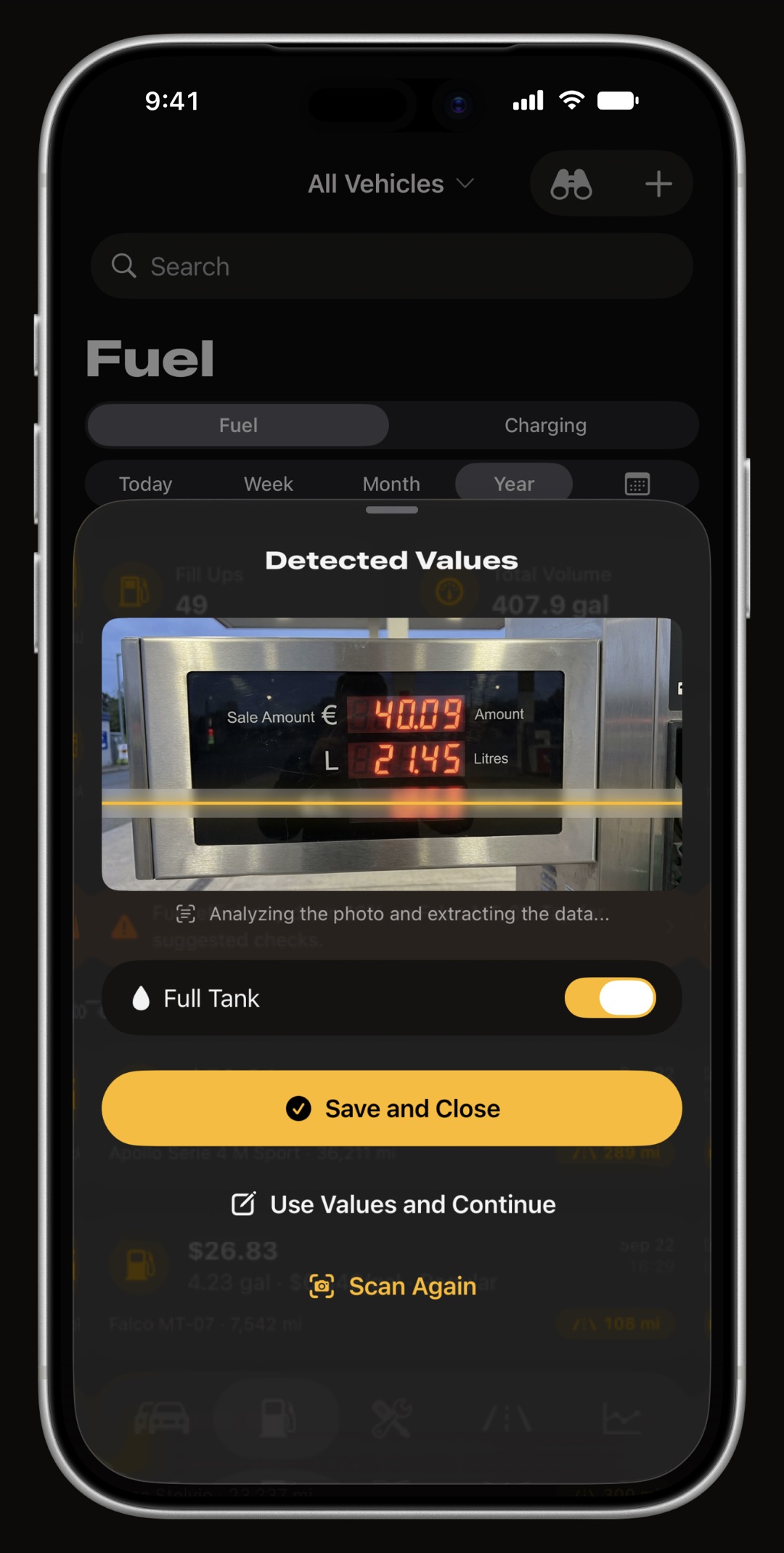
Point the camera at the pump display, the charger screen or the paper receipt. On-device text recognition reads the volume, the unit price and the total, with a dedicated seven-segment decoder for the LED displays that ordinary text recognition fails on. A plausibility solver then cross-checks the three values against each other: any two of volume, price per unit and total must agree, so a misread digit is caught rather than saved. A confirmation sheet always shows what was read before anything is stored, and no photo, receipt or number ever leaves your iPhone. Reading the numbers and keeping the paper are separate steps: you can also scan the receipt or the invoice with the document scanner, or add a photo or a PDF, and it stays attached to the fill-up, ready to open from the entry later.
- Seven-segment decoder built for the LED pump display, where general text recognition reads an 8 as a 3.
- Plausibility check volume times unit price must equal the total; if it does not, the entry is questioned, not saved.
- Fails safe an unreadable photo is kept in your library so you still have the numbers.
Can it find the cheapest fuel near me?
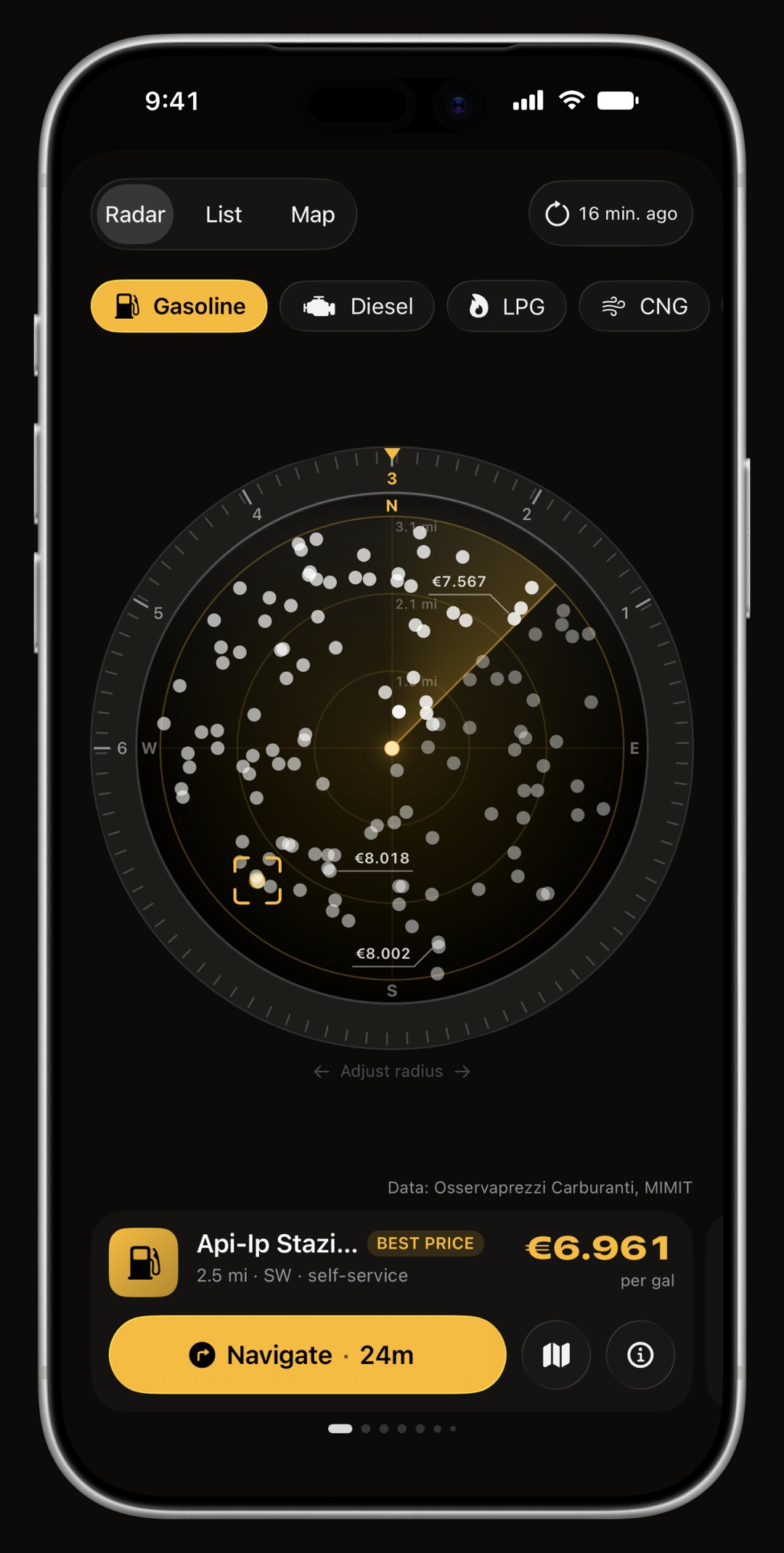
Where a country publishes pump prices, yes. The Price Radar plots the stations around you by real direction and distance with the cheapest highlighted, and one tap navigates to it. Italy, France and Spain work straight away from their official public registries; Germany works once you enter your own free Tankerkönig key in Settings. Everywhere else the radar still lists the stations around you, from Apple Maps, without prices, and the screen drops every price element rather than showing empty ones. Charging points are the exception and are found worldwide, though never with a price.
What does it tell you about cost?
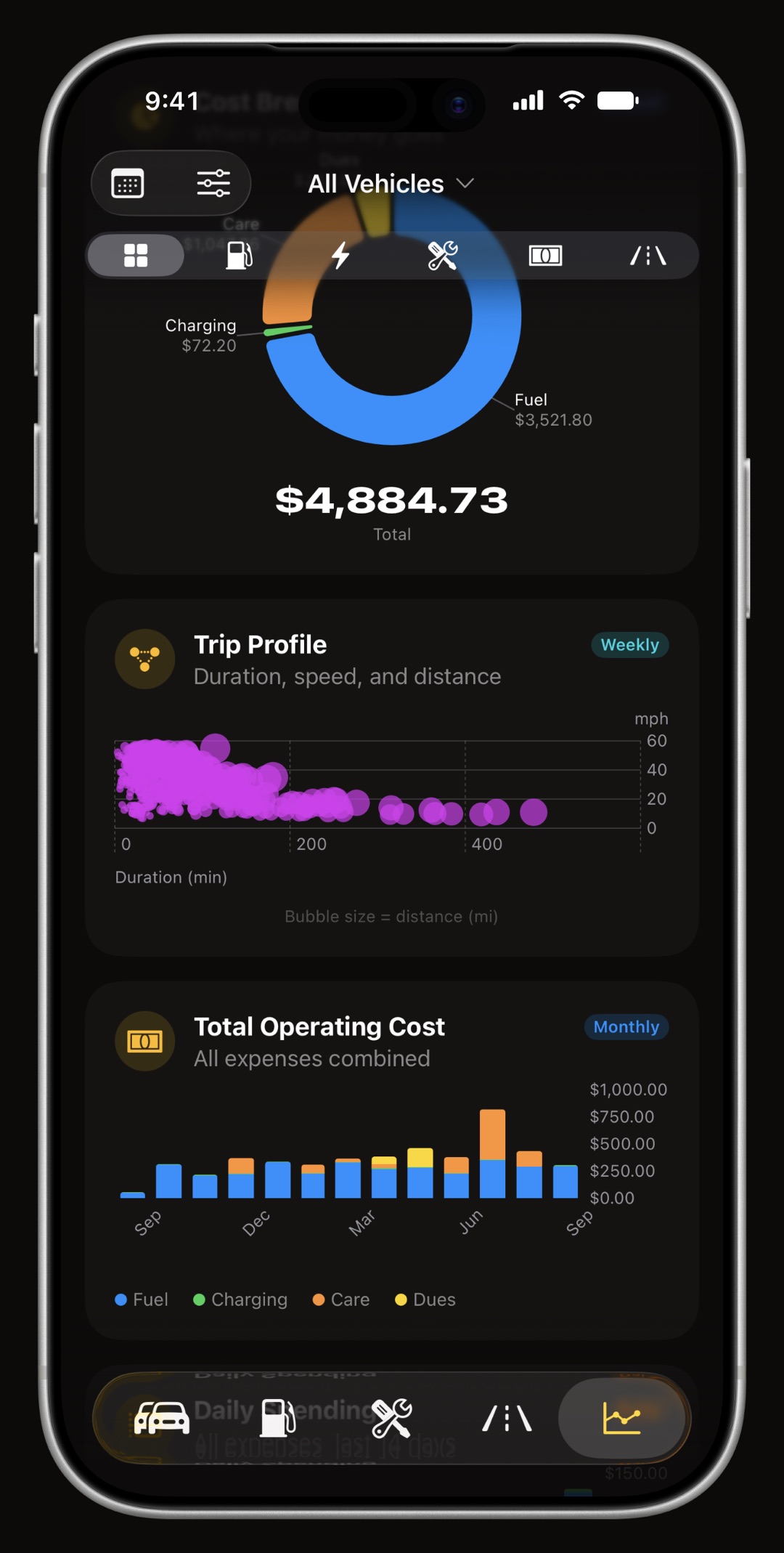
Fuel cost over time, the fuel price trend, the efficiency trend, cost per distance, distance covered, distance per fill-up, the distribution of fill-up volumes, a fuel grade breakdown and a map of where you fill up, each chart with a caption stating how the figure is computed and each hiding itself when there is not enough data to be honest. Enter your tank size once and the app estimates what is left and how far it will take you, and warns when a fill-up is larger than the tank could physically hold. Fuel is one part of what a vehicle costs; insurance, road tax, tolls and parking are tracked as dues in the car expense tracker.
How does mileage get into the fuel log?
Mostly on its own. Trips record themselves when your car stereo connects over Bluetooth and add their distance to the odometer, so the odometer on a fill-up form is usually already right; if not, pick it from the last fuel stop or type it. Because the trips are there, each drive also gets its own consumption figure, estimated from the fill-ups on either side of it, which is how you learn that the short cold commute costs more per kilometre than the motorway run. If a recorded trip ends at a filling station, the app can remind you to log the fill-up before you forget.
How does WrenchTime compare with Fuelly, Drivvo and Magica as a fuel log?
Fuelly is a fine fuel log with a large community, but it needs an account, keeps your data on its server, shows ads on the free tier and does not record trips. Drivvo is an expense ledger with fuel logging, also account-based. Magica records trips and fuel but scans nothing. WrenchTime is the one that combines true tank-to-tank economy, two gallons kept apart, on-device pump scanning, automatic mileage, per-trip consumption and a price radar, with everything on your device and in your own iCloud. Coming from Fuelly or Drivvo, the CSV import brings your fill-ups across with the full-tank and missed fill-up flags the old app recorded, so the tank-to-tank figures carry on from your existing history.
Frequently asked questions
Does it work in miles and gallons?
Yes, including the distinction between US and imperial gallons, and MPG computed correctly for each. British defaults are miles, litres and imperial MPG, which is how the UK actually measures.
What happens when I forget to log a fill-up?
Mark the next entry with the missed-fill-up flag. That interval is excluded from the economy figures instead of being averaged into an impossible number.
Does scanning upload my receipts?
No. Text recognition runs entirely on the iPhone. No photo, receipt or number leaves the device.
Does it show fuel prices near me?
In the countries whose governments publish them: Italy, France and Spain with nothing to set up, and Germany with your own free Tankerkönig key. Elsewhere the radar lists nearby stations from Apple Maps without prices.
Does it work for diesel, LPG or CNG?
Yes. WrenchTime knows 11 engine types, including diesel, LPG, CNG and the petrol and diesel hybrids, and hides the maintenance procedures that do not apply to each. CNG is priced by the kilogram where the registry quotes it that way, never converted into a volume.
Does it need an account?
No. There is no WrenchTime account and no WrenchTime server. Your fuel log lives on your iPhone and syncs through your own private iCloud.

Made for people who would rather know than guess.
Free to download. One vehicle, real features, no ads. Your garage will thank you.
Download WrenchTime on the App Store